Forum Discussion

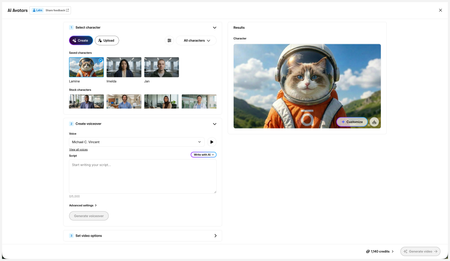
New in Labs: AI Avatars
- 2 months ago
Hi everyone,
We’ve just released a few exciting enhancements to AI Avatars, and we’d love for you to check them out! Here’s what’s new:- AI Avatars in Custom Blocks
- AI Avatars in Storyline 360
- References
- Use References to guide character generation with your own visual assets. This is now available in the Create and Customize Character workflows.
- Quick Prompts
- Choose from prebuilt prompts for style, framing, presentation, pose, environment, clothing, and expression. Available in the Create and Customize Character workflows.
- Tips
- A new Tips icon is now available in the Create and Customize Character workflows to help you get even better results.
- Delete and Rename Saved Characters
- Keep your library organized by renaming or deleting saved characters.
- Upload Character
- Upload your own character to your Saved Character library.
- Download your Avatar Video
- To download your avatar video, click play, then select the Download icon in the lower-right corner.
As always, we welcome any feedback! You can share that here in this discussion, or use this feedback survey link!


You can also get to the video by publishing your course to a web file; open the zip, find the folder called 'assets' and that'll have all files in there. sort by MP4 and you can get all your vids that way super easy. The file names are obnoxious alphabet soups, so you have to open the vids to see what's what and rename them, but it's an easy way to grab all the vids from an entire course.

Great info. I just confirmed SCORM does this as well;
...\[Zipped folder location]\[Course_Name.zip\scormcontent\assets
Related Content
- 3 months ago
- 5 months ago
- 5 months ago