Forum Discussion

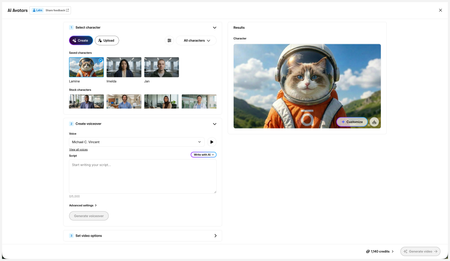
New in Labs: AI Avatars
- 2 months ago
Hi everyone,
We’ve just released a few exciting enhancements to AI Avatars, and we’d love for you to check them out! Here’s what’s new:- AI Avatars in Custom Blocks
- AI Avatars in Storyline 360
- References
- Use References to guide character generation with your own visual assets. This is now available in the Create and Customize Character workflows.
- Quick Prompts
- Choose from prebuilt prompts for style, framing, presentation, pose, environment, clothing, and expression. Available in the Create and Customize Character workflows.
- Tips
- A new Tips icon is now available in the Create and Customize Character workflows to help you get even better results.
- Delete and Rename Saved Characters
- Keep your library organized by renaming or deleting saved characters.
- Upload Character
- Upload your own character to your Saved Character library.
- Download your Avatar Video
- To download your avatar video, click play, then select the Download icon in the lower-right corner.
As always, we welcome any feedback! You can share that here in this discussion, or use this feedback survey link!

Hi HVfb0f498d-053b,
Great question!
Please refer to the Usage and Credit FAQs above for the most current information. I've logged this request internally, so we'll be sure to update you with any news!

How can we know/see how many credits do we have?
- KellyAuner3 months agoStaff
Hi DK-ZG,
Thanks for reaching out!
If you open the AI Avatar window, you'll see the number of available credits in the bottom right corner. Select the arrow to view your AI credits balance!
- DK-ZG3 months agoCommunity Member
Thx Kelly, already tried.
Works good (for now), shared some feedback to make it even better. Hope you don't mind. 🙂
- KellyAuner3 months agoStaff
Amazing, DK-ZG! We'll take all feedback!
Related Content
- 3 months ago
- 5 months ago
- 5 months ago