Forum Discussion

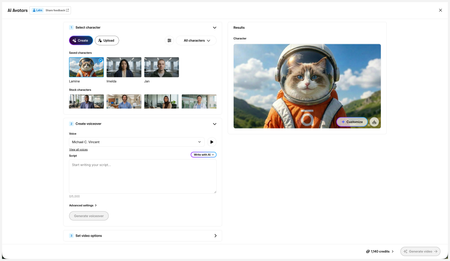
New in Labs: AI Avatars
- 2 months ago
Hi everyone,
We’ve just released a few exciting enhancements to AI Avatars, and we’d love for you to check them out! Here’s what’s new:- AI Avatars in Custom Blocks
- AI Avatars in Storyline 360
- References
- Use References to guide character generation with your own visual assets. This is now available in the Create and Customize Character workflows.
- Quick Prompts
- Choose from prebuilt prompts for style, framing, presentation, pose, environment, clothing, and expression. Available in the Create and Customize Character workflows.
- Tips
- A new Tips icon is now available in the Create and Customize Character workflows to help you get even better results.
- Delete and Rename Saved Characters
- Keep your library organized by renaming or deleting saved characters.
- Upload Character
- Upload your own character to your Saved Character library.
- Download your Avatar Video
- To download your avatar video, click play, then select the Download icon in the lower-right corner.
As always, we welcome any feedback! You can share that here in this discussion, or use this feedback survey link!


I always put this command at the end of my script:
[2 second pause as she looks at the camera and smiles gently]
Then if there is still something after her smile I cut the last second off the video and it removes that awkward piece. This is what I do for now until they have editing ability in these. I have to say though I am really impressed with the AI Avatars and being able to take a character and change their background or clothes so that it is always the same. I use the same voice for each of the videos in a particular course for consistency. I hope this may help you.
Carmen

Carmen adding this at the end of a script means that its a command as opposed to part of the script? [2 second pause as she looks at the camera and smiles gently]I wasnt aware there were or do you mean at the end of the design section?
- JenniferSweeney3 months agoCommunity Member
JasadaSmith I tested this today, and if you put the command in brackets [ ] at the end of your voiceovers script, it'll create a pause at the end of the video where the character is sitting with a small smile not saying anything for several seconds. It's not perfect, and it doesn't to work at all at the start of a video, but it at least gives me a little bit of a pause at the end. I'm having to import these into Canva to add branding and text overlays and the pause at the end helps with transitions to other videos and slides.

Related Content
- 3 months ago
- 5 months ago
- 5 months ago