Forum Discussion

New in Labs: AI Avatars
- 3 months ago
Hi everyone,
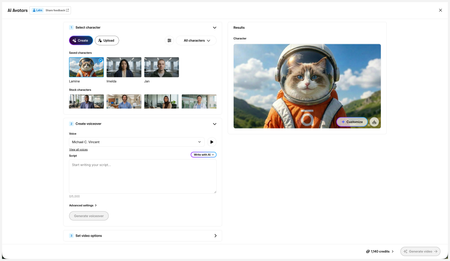
We’ve just released a few exciting enhancements to AI Avatars, and we’d love for you to check them out! Here’s what’s new:- AI Avatars in Custom Blocks
- AI Avatars in Storyline 360
- References
- Use References to guide character generation with your own visual assets. This is now available in the Create and Customize Character workflows.
- Quick Prompts
- Choose from prebuilt prompts for style, framing, presentation, pose, environment, clothing, and expression. Available in the Create and Customize Character workflows.
- Tips
- A new Tips icon is now available in the Create and Customize Character workflows to help you get even better results.
- Delete and Rename Saved Characters
- Keep your library organized by renaming or deleting saved characters.
- Upload Character
- Upload your own character to your Saved Character library.
- Download your Avatar Video
- To download your avatar video, click play, then select the Download icon in the lower-right corner.
As always, we welcome any feedback! You can share that here in this discussion, or use this feedback survey link!

Hi everyone,
We’ve just released a few exciting enhancements to AI Avatars, and we’d love for you to check them out! Here’s what’s new:
- AI Avatars in Custom Blocks
- AI Avatars in Storyline 360
- References
- Use References to guide character generation with your own visual assets. This is now available in the Create and Customize Character workflows.
- Quick Prompts
- Choose from prebuilt prompts for style, framing, presentation, pose, environment, clothing, and expression. Available in the Create and Customize Character workflows.
- Tips
- A new Tips icon is now available in the Create and Customize Character workflows to help you get even better results.
- Delete and Rename Saved Characters
- Keep your library organized by renaming or deleting saved characters.
- Upload Character
- Upload your own character to your Saved Character library.
- Download your Avatar Video
- To download your avatar video, click play, then select the Download icon in the lower-right corner.
As always, we welcome any feedback! You can share that here in this discussion, or use this feedback survey link!
- JenniferSweeney3 months agoCommunity Member
KellyAuner This is FANTASTIC! The sheer joy of being able to delete unwanted avatars!! and a HUGE thank you for being able to drop in the LOGO!! I played around with the quick prompts today and boy does that streamline basic prompting. Mostly I'm impressed with how quickly Articulate made these changes after hearing customer feedback!
- JenniferSweeney3 months agoCommunity Member
KellyAuner I may have to rollback my earlier enthusiasm...I uploaded our company logo (Encoura)...and the avatar is randomly including the logo in the video about halfway through but completely modifying the image file that was used to upload the logo. This is insane; how is it even doing that? In another frame, it rolls in half of the logo, but doesn't finish it. This feature is unfortunately unusable as-is until this can be fixed.
- KellyAuner3 months agoStaff
Hi JenniferSweeney,
I love the enthusiasm!
All feedback is welcome. That will help us improve the user experience and make necessary changes. The behavior you describe certainly sounds odd, and I've shared this with the team. Are you able to upload a screen recording?
- ShandaH3 months agoCommunity Member
If you customize too much, does it null the syncing feature? It's not syncing in the preview, and I don't want to waste credits to find out if it will in the video it creates.
- CarmenWaterman3 months agoCommunity Member
My experience has been that it syncs better in the video it creates. KellyAuner if we have a problem and the video is not syncing with the audio can we ask for a credit refund?
- KellyAuner3 months agoStaff
Hi, CarmenWaterman!
Currently in Labs, we're not offering credit refunds if the results don't meet expectations. Credits will be automatically refunded only if the generation fails.
- KellyAuner3 months agoStaff
Hi ShandaH,
Using complex scenes with multiple characters or busy environments can lead to unnatural lip-syncing and background movement. To achieve the best results, I recommend using these tips!
- CarmenWaterman3 months agoCommunity Member
Thanks, I haven't used any scenes with multiple characters, and appreciate all the tips.



Related Content
- 6 months ago
- 3 days ago