Forum Discussion

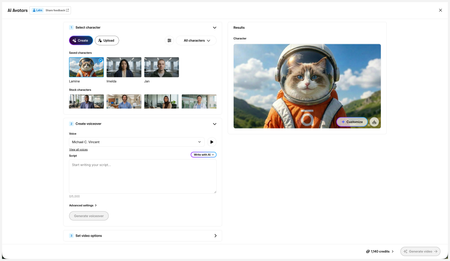
New in Labs: AI Avatars
- 2 months ago
Hi everyone,
We’ve just released a few exciting enhancements to AI Avatars, and we’d love for you to check them out! Here’s what’s new:- AI Avatars in Custom Blocks
- AI Avatars in Storyline 360
- References
- Use References to guide character generation with your own visual assets. This is now available in the Create and Customize Character workflows.
- Quick Prompts
- Choose from prebuilt prompts for style, framing, presentation, pose, environment, clothing, and expression. Available in the Create and Customize Character workflows.
- Tips
- A new Tips icon is now available in the Create and Customize Character workflows to help you get even better results.
- Delete and Rename Saved Characters
- Keep your library organized by renaming or deleting saved characters.
- Upload Character
- Upload your own character to your Saved Character library.
- Download your Avatar Video
- To download your avatar video, click play, then select the Download icon in the lower-right corner.
As always, we welcome any feedback! You can share that here in this discussion, or use this feedback survey link!

Hi, everyone!
Have you created something great with AI Avatars? We’d love to see it!
We’re looking for examples from our AI Avatar users to share with the broader Articulate community, showcasing creative ideas and best practices for using Avatars. We'll use your examples in upcoming demos, training workshops, and E-Learning Heroes community posts.
If you have something you’re proud of, send it our way. You can share:
- A video you created with AI Avatars
- A quick share link to a course featuring Avatars
- An example of how you’ve incorporated Avatars into a Custom Block or Storyline
We’re especially interested in creative or unexpected ways you’re using AI Avatars, as well as examples that might inspire other course creators.
Please let me know if you have any questions!
- tjniko2 days agoCommunity Member
I just pulled out the lesson in one of my courses (ILT) I used several avatar videos for.
https://share.articulate.com/D5NaC235x-GfI7-RuFNgP
The Premise
This is a lesson from an instructor-led, in-person Dock Master certification course. Formatting is adapted for ILT (large font, less text, clean visuals). This lesson focuses on reviewing four incidents and analyzing them for lessons learned. The first two are fictional, the last two are not.
The Use Case
In each case the Avatar lays out a brief summary of the incident. The summary matches the text on screen. The instructor then facilitates a discussion guiding learners in pondering the possible investigation outcomes.The instructor then scrolls down, and the 2nd video (same avatar) reveals the results of the investigation which is NOT onscreen. Instead, key takeaways are provided beside the reveal video.
This pattern is repeated three times however for the last two real incidents, key takeaways are not provided. The learners are encouraged to determine those.
I can tell you, the first video was the very first test I did as soon as this feature was released. I just happened to have a review scheduled that day for a SME, I showed her the test, and she loved it. It ended up being used in the course.

Related Content
- 3 months ago
- 5 months ago
- 5 months ago