Forum Discussion

New in Labs: Connected Packages
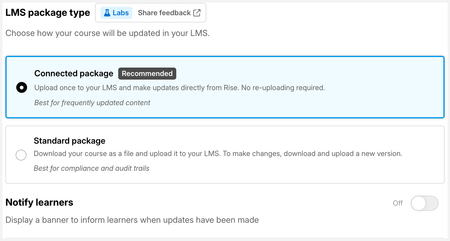

This functionality is a game changer for us. With over a thousand Rise modules linked to shared courses this reduces our admin editing significantly. There is one additional setting we would need to be able to use the connected package. We have written assessments that we link to Rise course topics and these are opened and viewed as external links to the LMS (Written assessments are open book with no time limit). So we would need the share external setting to be included in the connected package, currently this setting disappears from the options.
- catganim3 months agoStaff
MITOLearningDes Thank you for bringing this to our attention. We're taking a look into this case and are planning on bringing this capability back as soon as we can.
- catganim2 months agoStaff
MITOLearningDes This should be fixed now, give it another look and please let me know if you run into any issues.
- MITOLearningDes2 months agoCommunity Member
@catganim Hi there, I've tried it with different courses and settings and it doesn't work. The error code "not found 404" is displayed when you copy a Rise course and paste it directly into the web browser. If it helps these are the two pathways. The first one is the traditional SCORM package which works.
https://elearning.mito.org.nz/pluginfile.php/145826/mod_scorm/content/58/scormcontent/index.html#/
https://packages.articulateusercontent.com/content/V6QiQZYWYS8LMQAgkue7mQYn5TyzLEs5/content.html#/
- catganim2 months agoStaff
MITOLearningDes We're pulling back the option for the moment to make sure we get a thorough testing of your specific use case. There's also a few points that I need to clarify, which also might lend to some suggestions on tweaks you could make when we're ready to re-add. It seems like that first link is being hosted somehow to serve the index.html file that is found within a standard package. How are you hosting this file? There's an html file in the connected package which is essential to boot the course; this course will not load if the url inside that file is accessed directly. I'm curious to know more about your use case. Have you tried using the "web" exports previously? If so, how did they work for you?

Related Content
- 6 months ago