Forum Discussion

New in Labs: Connected Packages
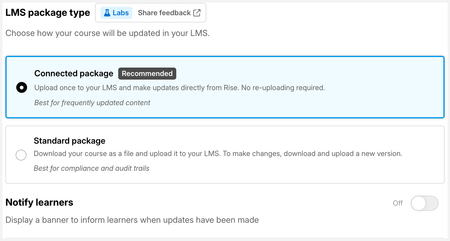
In both tests, the learner completed the course (since it is so short for testing purposes :-)

Hello OpforArticulate,
Thanks so much for testing this across multiple LMSs and for sharing what you found! I'm glad to hear it's working as expected in your LMS Rise Up.
Since Connected Packages are designed to work with any SCORM-compliant LMS, including SAP SuccessFactors, we'd love to better understand what's different in this scenario.
A few questions that would help us narrow it down:
- When you published the update, did Rise confirm that the Connected Package update completed successfully?
- In SuccessFactors and SCORM Cloud, did you completely close the course and relaunch it after publishing the update?
- What kind of changes did you make to the course (for example, text edits, adding/removing lessons, quiz changes, etc.)?
- Is the same Connected Package file being used in all three LMSs?
Looking forward to hearing from you!
- OpforArticulate2 months agoCommunity Member
hi LucianaPiazza ,
Thank you for picking this up so quickly!
I would say yes to questions 1, 2 and 4, since it all worked in my own LMS, which is in my own environment. My client started over the entire course, refreshed the page several times on her end, waited for an hour (sometimes changes in SuccessFactors are only pushed in batch) and erased all the learner's history, but she kept seeing only the original course.
As for the changes: I added a lesson and moved content from one lesson to the new one. After reading here through the comments, I also activated Reset progress and tried again on SCORM Cloud, but that did not help. On the other hand, I did see the last changes in my own LMS Rise up.
Actually, I don't think it's LMS related. It's as if there is no connection with the SCORM I sent to my client. Or uploaded in SCORM Cloud.- LucianaPiazza2 months agoStaff
Hello OpforArticulate,
Thanks for sharing this additional information. I've gone ahead and opened a support case on your behalf so we can take a closer look at your setup. We'll be in touch shortly via email. Thanks for your patience!
- OpforArticulate2 months agoCommunity Member
Hello LucianaPiazza,
As mentioned in the ticket, I'll copy my findings here so the rest of the community can benefit from it.I started all over and this time it worked. We've tested on three different LMS's:
- Upload first connected SCORM
- Go through half of the course
- Modify something small (addition in a certain lesson) in Rise 360 and publish --> we could see the modifications in all LMS's, and continue learning. The LMS's opened the course where we left off.
- Take the quiz and finish the course. Quiz passing is mandatory to complete (in order to gain a compliance point), otherwise you will never receive 100% completed.
- Modify something small without resetting progress --> we could see the modifications in all LMS's while maintaining the status Complete in the LMS.
- Modify something big (addition of a lesson) and force reset --> the Rise course started over from the beginning but the completion status in the LMS was maintained. Which is important: people should not loose the points they earned because of an update.
So, for us, this feature does what it's supposed to. We will go live with it at the publishing of our next course (end of September).
Related Content
- 7 months ago