Forum Discussion

New in Labs: Connected Packages
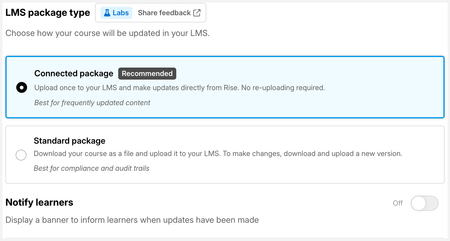

Question: once published as a conncected package, is there a possibility to recreate a (connected) SCORM? Example: I created a connected SCORM for client A, and some time later client B want the same course, which has already been updated a few times since creation. Or can I send the original SCORM and they will immediately see all the updates?

Great question, OpforArticulate ! Yes, you can absolutely create a separate Connected Package for Client B.
The best approach is to duplicate the course in your Rise 360 dashboard, then publish a brand-new Connected Package from that copy. This gives Client B their own independent connected package, completely separate from Client A's, so updates you push for one won't affect the other.
As for sending the original SCORM file to Client B: that won't work the way you might hope. The original file is tied to Client A's connected package instance, so Client B would receive Client A's updates, and you'd have no way to manage them independently. A fresh duplicate and a new export is definitely the cleaner path.
Let us know if you run into anything as you set that up!
- OpforArticulate1 month agoCommunity Member
Thank you LucianaPiazza for this explanation.
Actually, both clients *should* have the same updates :-) So I'm going to go forward with the original SCORM and keep people posted here (still have to test things with client B)- LucianaPiazza1 month agoStaff
Happy to help! Sounds great, OpforArticulate!
Yes, let folks know about your experience in case they run into similar.
Related Content
- 6 months ago