Forum Discussion

New in Labs: Connected Packages
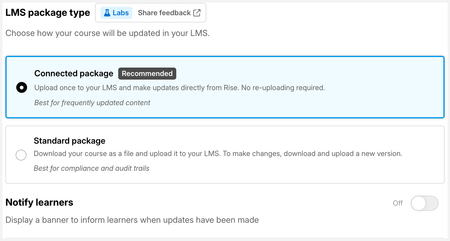

I've recently started using connected packages (beta) on a project I'm working on. We are a SaaS company with frequent changes in our software, and therefore our course content (screen shots, descriptions, not actual course structure). The ability to publish the course to the LMS via a connected package without having to replace the SCORM file is huge for us (so that in-progress learners won't lose their bookmark!) and maintenance-critical. I was having a problem with a survey block recording this week, and found a bug that if a survey block is used, it will not record results in the LMS and was told to go back to the old-fashioned way and just replace SCORM files rather than using connected packages, and connected packages are in beta and are experimental, and it is not recommended to use them in training delivered to users. Disappointing. Anyway, I will turn off connected packages, but what is the best practice if this goes live and we can turn this on eventually and use the feature? I will have a SCORM file uploaded to the LMS, turn on the connected package feature (unless it goes away) when it is ready, and hope for the best? Also, can I receive some clarification on what beta means to Articulate? In software it means pre-release, but Support warned me that the feature may just go away and should not be used live. Thanks for your help.

Hi AmyLNewhook,
Thanks for sharing this, your use case (frequent content updates, stable structure, in-progress learners keeping their bookmark) is exactly what Connected Packages is designed for, and it's great context for us.
On "beta": Connected Packages is a Labs experiment, which means it's still being tested and can change based on what we learn. That's why Support flagged it as not recommended for live learner training right now, not because the feature is broken day-to-day, but because we're still working out edge cases like the one you hit.
On best practice: your instinct is right. Keep a standard SCORM file uploaded as your working baseline, and turn on Connected Packages when you're ready to test further. If something goes wrong, you just re-upload the standard package.
On the survey block: survey data can be reported to your LMS through a Connected Package, it works similarly to quiz results. The difference is that some LMSs need to be configured to listen for this type of data. It's worth checking with your LMS admin to confirm your LMS is set up to capture survey responses, since that configuration step may be what's needed.
- AmyLNewhook22 days agoCommunity Member
It appears there is a bug with connected packages and survey blocks, that I submitted through support. Will this be fixed when this feature completes beta? It would be a huge win for us. Right now I can see the results of the survey block in skilljar but onoly with connected packages turned off and the standard scorm file.
- LucianaPiazza21 days agoStaff
Hi AmyLNewhook, thanks for reporting this through support and for sharing the details here! Good news, you don't need to wait for the beta to end. A fix for survey block results with Connected Packages was released on October 2nd.
If you aren't seeing survey results yet, we'd recommend:- Have a learner launch the course again to generate updated survey data.
- If the results still don't appear, make a small change to the course, download a new package, and re-upload it to Skilljar.
- If the issue continues, check your LMS configuration, as that may also affect how survey data is reported.
If you're still seeing the issue after trying these steps, we'd be happy to take a closer look within your support case. Thanks for helping us improve Connected Packages!
Related Content
- 7 months ago