Forum Discussion

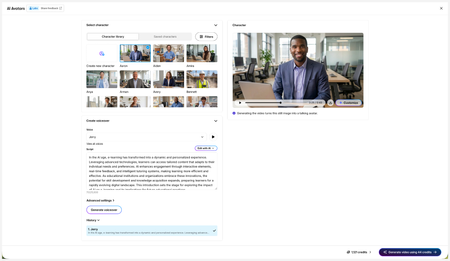
New in Labs: AI Avatars
- 7 days ago
Hi everyone,
We’ve just released a few exciting enhancements to AI Avatars, and we’d love for you to check them out! Here’s what’s new:- References
- Use References to guide character generation with your own visual assets. This is only available in the Create Character workflow.
- Quick Prompts
- Choose from prebuilt prompts for style, framing, presentation, pose, environment, clothing, and expression. Available in the Create and Customize Character workflows.
- Tips
- A new Tips icon is now available in the Create and Customize Character workflows to help you get even better results.
- Delete and Rename Saved Characters
- Keep your library organized by renaming or deleting saved characters.
- Upload Character
-
- Upload your own character to your Saved Character library.
- Download your Avatar Video
- You can now download avatar videos by hovering over the block and selecting the Download icon from the floating toolbar on the left.
As always, we welcome any feedback! You can share that here in this discussion, or use this feedback survey link!
- References


Y'all. I asked AI to help me create a Pixar-style L&D avatar and now she's funnier than me and looks better too. 😂
- GabeShulman20 days agoCommunity Member
I created a tortoise-shell Persian cat in a tiara with a posh British accent (IFYKYK), and now I need her to narrate all my courses.
- CarmenWaterman19 days agoCommunity Member
I think she is awesome!
- CarmenWaterman19 days agoCommunity Member
I think she is awesome! Great job
- DK-ZG19 days agoCommunity Member
SMcNicol, that is great!
We use mascots for learning, created for such purpose and this is what we also got from "avatarisation".
Would you please be so kind and share how you got such strong, and dynamic voice expressions? (pauses, emphasises, positive emotional oscillations in voice...)
And which voice did you use in this?
Thx in advance for this 🙏- SMcNicol19 days agoCommunity Member
When I develop a script, I try to keep just one idea per sentence. Sentences that feel fine on the page don’t always translate well to AI avatars.
I read every sentence aloud before I finalize it to make sure it sounds natural. If I stumble, run out of breath, or lose my place, my avatar will too. If it sounds natural when I say it, it should sound natural when the avatar says it.
After that, I add pauses deliberately, since pauses aren’t empty space—they’re emphasis. In my experience, the most important lines in an avatar script are often the ones followed by silence. I use brackets for stage directions (for example: [pause], [leans in slightly], [gives a knowing smile]) and punctuation (like dashes and ellipses) to shape timing.
My last step is to find a voice that matches the content, and that can take a while. I like to shortlist a few voices I think will work, then test them on the script. For this video, I used Jessa—easygoing, conversational, and real (with a “best friend” vibe). The platform describes Jessa as a natural, effortless, relatable voice with a casual, off-the-cuff style.
Disclaimer: This is just my method. I’m not claiming it’s the “right” way—but since there wasn’t much documentation, this is what’s worked for me so far. 😃
- JasadaSmith18 days agoCommunity Member
This is truly inspirational.....I want you to know you set up my day here in New Zealand perfectly...thank you and just wow!!!
- KellyAuner18 days agoStaff
Amazing!




Related Content
- 2 months ago
- 1 month ago
- 3 months ago
- 3 months ago
- 1 year ago