Forum Discussion

Audio over images
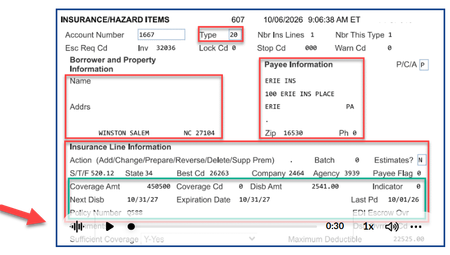

Hi, thank you for reaching out,
For example, I’m currently working on a course that includes a mix of AI-generated images and images I create myself to demonstrate systems and processes.
When developing a course, I create all content and images first. Once the content is approved, I go back and add the audio. While I can design an image with extra space at the bottom from the beginning, I usually don't know whether that image will be the final version. To avoid spending time making layout adjustments before they're needed, I often wait until the course is finalized.
A helpful enhancement in Rise would be the ability to attach audio below an image rather than placing it on top of the image. This would save significant time by eliminating the need to revisit each image, locate the original file in Snagit, add additional space for the audio player, and then re-save and replace the image throughout the course.
To answer your next question: What gets covered is the bottom portion of the image, which is often where key information is located. For many of the images I create to demonstrate a system or process, the audio player sits directly on top of the image and can block important details that learners need to see.
As a result, learners may miss critical information or steps that the image is intended to highlight. While adding audio is a great feature, having the audio overlay the image is not always practical. This issue impacts both custom-created images and AI-generated images, including the examples I provided in my original email.
Allowing the audio player to display below the image, rather than on top of it, would improve the learner experience and eliminate the need to redesign or resize images just to accommodate the audio controls. I'll add the images again so you can see
This last one I had to re do to give space at the bottom for the audio so the whole image is visible to the user. Let me know your thoughts, thank you!