Forum Discussion
Brand Kit in Rise 360

Hi MorganLavey,
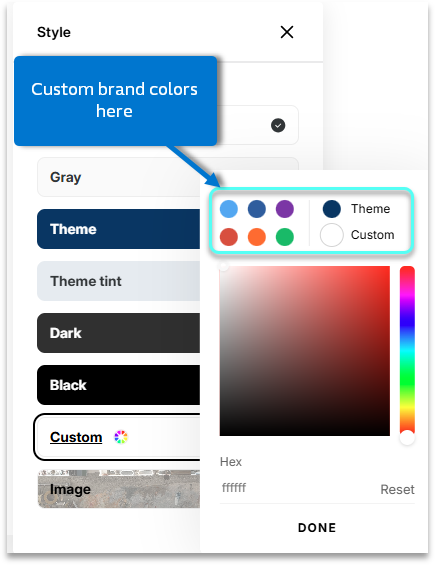
That’s a great idea! Rise 360 currently supports one theme color at a time, but it doesn’t yet include a full brand kit or palette where you can store multiple brand colors. I’ve shared your suggestion with our product team so they can see how a multi-color brand kit would help streamline course styling and speed up design consistency.
For now, the best workaround is to keep your brand color hex codes handy and apply them manually in the color picker.
Thanks for sharing this idea, it’s a thoughtful improvement that would make branding in Rise 360 much easier.
- RebeccaRoehm-ed9 months agoCommunity Member
Having to manually enter a hex code every time you want to do a color change is an astronomical waste of time. Being able to set a custom color palette should be a no brainer, bare minimum feature.
I don't understand why Articulate continually chooses to waste time on things that aren't really that impactful. It is so frustrating to see requests (that have been asked for since Rise's release) such as custom color palettes and text styles get ignored for things like "Quick Share".
- JessMannina-2433 months agoCommunity Member
EricSantos what's the status on this? Tagging you in my comment below as well. For what we pay for Articulate licenses, a proper brand kit feels like a very basic expectation. I don’t know of any organization that realistically operates with a single color system—that’s not just limiting, it’s out of step with how branding actually works. As others have pointed out, the current approach also feels unnecessarily inefficient and ultimately a waste of time. Rise is one of the only authoring tools that is set up this way. Instead of focusing on AI functions that don't work 99% of the time maybe start with something basic that every organization would benefit from.
Related Content
- 1 year ago
- 1 month ago
- 1 year ago