Forum Discussion

Move audio playback bar for Image & Text Blocks
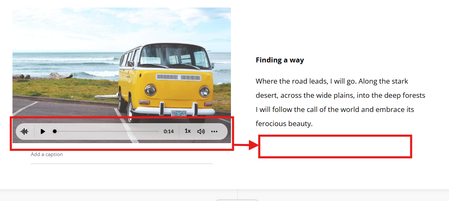

Hi mikeschalk1,
Welcome to the community, and thanks for sharing this idea along with such a clear screenshot. It makes it easy to see how the playback bar sits over the image.
It sounds like you’d like the audio controls to sit under the text in an Image & Text block, so they don’t cover important detail in the image and are easier for learners to find, especially on mobile. At the moment, the audio playback bar appears over the image in that block, and there isn’t a setting to move it. One thing that can help in the meantime is the Collapse audio player button, the first icon on the left of the controls, which shrinks the bar down to a small icon so more of the image shows.
What does the audio add for your learners in this block, such as narrating the text or describing the image?
Related Content
- 7 months ago
- 8 months ago