advice
2242 TopicsHelp Embedding Interactive Storyline Map into SharePoint Online
Hi! I'm hoping someone can help me figure out how to display an interactive map I created in Storyline directly on my company's SharePoint site. I'd love for my colleagues to be able to interact with the map right on the SharePoint page rather than having to download it/open it separately. Is this possible? I've looked at these two posts from before, but it still didn't work: https://community.articulate.com/discussions/discuss/embedding-storyline-into-company-sharepoint/1021044 https://community.articulate.com/discussions/discuss/viewing-articulate-360-content-in-sharepoint-online/774255 A few of the comments mentioned converting the story.html file to story.aspx, so once I did that and uploaded it, it wouldn't let me select it through the File and Media web part. Then when I tried to embed, it launched File Explorer instead. Has anyone successfully done this recently? Thank you!!Trouble with 360* images in Storyline
Hi everyone! Did anyone else have issues with uploading 360* images in Storyline recently? I finished my free trial a couple of days ago, and I never got it to work properly. Every time I added an image, I would get stuck in the preview screen. Did anyone else experience this and find a work around? There were a couple of other glitchy features, but this is by-far the most important for me to try before I commit. Thank you!43Views0likes1CommentMultiple match question
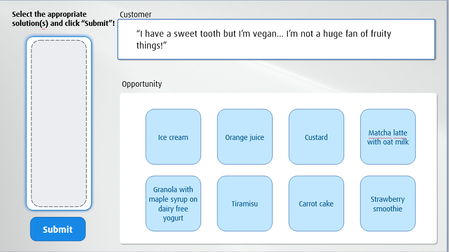
The learner has to select multiple answers (the blue boxes) and click "submit". But I want the selected boxes to appear in the grey box on the left as they stack on top of each other. I made the grey box big enough to fit 3 blue boxes because there are three answers. Is there a way to approach this without using java code? Thank you so much!74Views0likes2Comments“When Rise AI Audio Has a Mind of Its Own…” 😄
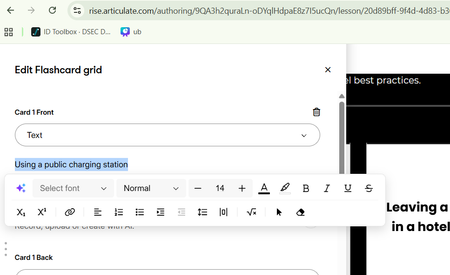
I ran into a strange issue while creating AI audio in a Rise accordion. I couldn’t get any of the voices to pronounce all the words correctly. For example, vehicle was pronounced “Vladimir” in one voice and “vaccine” in another. There was no consistency from voice to voice—and, even stranger, Rise was adding words to my script that weren’t there. 🤔 I was getting ready to submit a support case when I wondered if the problem might not be with the AI voice itself, but with the accordion block. I created a standalone Audio block using the same script. It worked—all but one word! Since I had copied and pasted the text, I deleted the “offending” word, typed it back in manually, and...it worked! 🎉 Now I had another problem: How do I get this working in the accordion? You can’t export and import the AI audio, so I tried copying and pasting the script from the standalone Audio block back into the accordion. And for whatever reason...everything worked! Who am I to question it? It worked! 😂 I don’t know if this trick will work for everyone or in every situation, but if you run into something similar, it might be worth a try. I’m ending my Friday on a high note! Happy Friday! 🎉 Penny40Views0likes1CommentRemoval of Comments After Publishing to Review In Rise?
I am currently working on a course in Rise and had just gotten feedback from my manager on my course. I decided to publish a new version to Review, but now when I go back to look at the comments that were originally there, it says the course has no comments. Has this happened to anyone else? And is there a way to get them back?(Kind of urgent) How do I make an icon animate across a map in multiple slides?
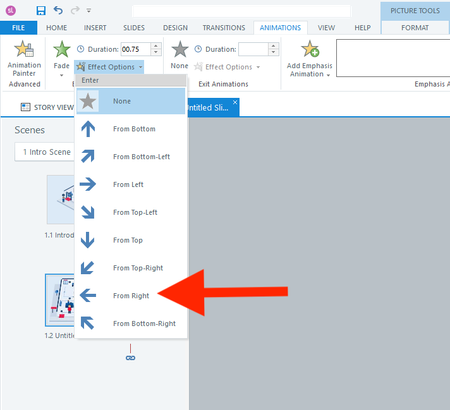
Hi everyone, I actually have two questions. I will start with the easier one first. Question 1 In a fade-in from the right animation, is there a way to adjust how far to the right the object starts? I don't want it to animate from off the right side of the slide. I only want it to start a few pixels to the right. Question 2 How do I animate the red shirt character below across 13 slides? I want it to follow each button from 1 to 13. I realize I should use the Motion Path. But what's the smartest way to use the motion path across slides? I have always found the motion path to be challenging. Thank you all for your help! :)72Views0likes3CommentsOdd AI audio issue
Hi everyone, I’m hoping someone can help with an issue I’ve encountered while developing French versions of courses. In multiple courses, the French AI-generated audio plays correctly, but the automatically generated closed captions appear in English. In each case, the workflow was: Develop the English version of the course. Create a copy for the French version. Export the Word document, translate it, and import the translated content. Regenerate the AI audio in French. The Generate Closed Captions option remained selected throughout the process (it is enabled by default). However, for some reason, the captions generated are still in English while the audio is French. I can resolve the issue by recreating the AI audio slide by slide, which also regenerates the captions correctly. However, I’ve noticed another problem: the newly generated audio is a different length than the original, even when using the same voice, speed, and all other settings. To troubleshoot, I tried several approaches, including: Generating completely new AI audio from the translated slide content. Using the Notes section to create new audio. Recreating audio through the existing AI Text-to-Speech settings while ensuring all voice and playback settings matched the original. Despite using the same settings and text, the regenerated audio lengths are different, which impacts animation timing throughout the course. My questions are: Is there a faster way to update or regenerate closed captions that are in the wrong language without recreating the audio on every slide? Has anyone experienced captions being generated in English while using French AI audio? Does anyone know why AI text-to-speech audio length would differ when regenerated using the same voice and settings? Will I need to recreate the audio and adjust animations slide by slide, or is there a more efficient solution? Any insights or recommendations would be greatly appreciated. Thanks in advance! BryceCan't Figure Out Why Trigger is Not Firing
I'm banging my head on the desk, I cannot figure out where i've gone wrong... I have a narration on/off toggle button. On the first slide there is a bit of automatic audio telling the learner about it. If they don't click the toggle button the VoiceOver variable = false. If they click the toggle button once, the VoiceOver variable = true. If they click the toggle button again, the VoiceOver variable = false again, and so forth. The variable works (in the sample file, there's a reference shape to show the value for the variable). On each slide and layer, there's this same toggle button with a trigger that either sets its state to "Narration On" or "Narration Off". On some base layers this fires ok, on the subsequent layers i cannot get it to fire. I've tried: Having the initial state as Narration Off, setting the state to Normal if VoiceOver variable = true. Didn't work. Having the initial state as Hidden, setting the state to Normal if VoiceOver variable = true, else setting the state to Narration Off. Didn't work. Creating a Narration On state instead of using Normal. Trying both initial state versions (initial state being hidden or Narration Off). Didn't work. I've been at this all morning and before i kill my whole day doing this, i thought i'd ask for help. Does anyone have any ideas? We use Storyline 360 but we didn't get authorization for the AI version.Solved87Views0likes4Comments