ai localization
4 TopicsSwitching between languages in the LMS
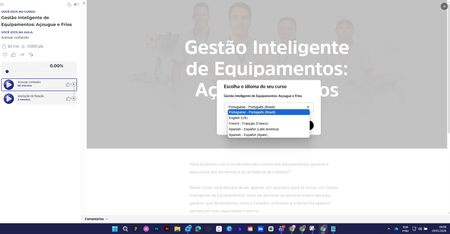
Hi everyone, how are you? I used the "Localization" feature in a course. After making the content available, when selecting a language I can't revert to the original language. What am I doing wrong? Choice of language After this, it is no longer possible to change the language. Thank you in advance.834Views0likes11CommentsQuery and Feature Request: Pop up when a localization credit will be used
In my last billing cycle I created a localized e-learning in 8 languages (elearning 1). In the new billing cycle I initially didn't have localization as an add-on and so couldn't open the file, instead I was prompted to save the languages as individual storyline files. Then a different project has been assigned 10 credits so localization is back as a feature but I only want to use those credits for a specific project that Omniplex are working on and not my original file (elearning 2). What I cannot tell is, if I make edits to one of the exported language files from my original e-learning (elearning 1), that I created when I didn't have localization enabled, will I be charged a credit when I publish that individual language file? And if I am not the admin of the account how do I know if a credit is about to be used / has been used? Could we please have a feature in Storyline that gives you a pop up when a credit is about to be spent? It would help a lot in trying to manage credits that have been allocated for certain projects, especially if you have a centralized account with one admin, as then users could see if and when they are at risk of spending credits they don't have allocated. Thank you for any support.53Views3likes0Comments[Issue] AI Localization: Text-to-Speech audio does not auto-regenerate after translation?
Hi everyone, I am currently testing the new AI Localization feature (English to Italian) and ran into a workflow issue regarding Text-to-Speech (TTS) audio generation. The Setup: Source: English Storyline file using native Text-to-Speech audio. Action: Used File > Localization > Translate Course to convert to Italian. Settings: Formality set to "Formal". The Issue: The AI successfully translated the text inside the Text-to-Speech script editor into Italian. However, the actual audio file on the timeline did not update automatically. When I previewed the slides: The text on screen was Italian. The script in the TTS window was Italian. The Audio being played was still the original English voice. The Workaround: I had to manually open the Text-to-Speech editor for every single audio clip and click the blue "Update" button. Only after doing this manual step did the audio regenerate into the Italian voice. My Question: I noticed the disclaimer that "Text-to-speech translation is currently in beta." Is this manual update process expected behavior for the Beta version? Or should the AI be auto-regenerating the audio files during the initial translation process? Checking if anyone else has experienced this or if there is a setting I missed to force auto-generation. Thanks!539Views0likes2CommentsLocalization translation of closed captions
Hi - We have just started using the translation features and received this feedback from a reviewer "In general, the translation is good. However, in the section which translates the closed captions of the videos, as it takes only one sentence at a time, it loses all sense and is very difficult to correct." Has anyone had the same experience with the translation of closed captions?422Views0likes1Comment