articulate ai
12 TopicsWe Need to Talk, Ava Tar 😬 (Annual Performance Review)
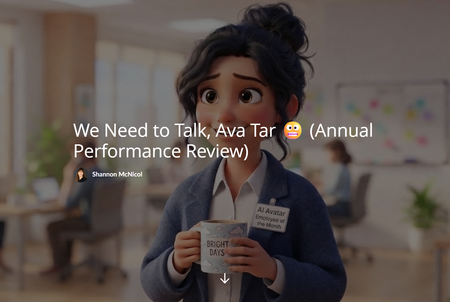
Every employee gets a performance review. So I gave one to Articulate's AI Avatar. Meet Ava Tar: AI Avatar, Virtual Presenter, and self nominated Employee of the Month. She shows up on time, never asks for PTO, and has never once complained about the lighting. She also keeps talking after she's done, talks with her hands (all of them), and her lips occasionally do their own thing. So we needed to talk. 👉 We Need to Talk, Ava Tar 😬 (Annual Performance Review) How it works The whole thing is a Rise Code Block built like an HR review form. You're the manager. ⭐ Strengths: flip cards with the real wins. Script to video in minutes, no camera or studio, it lives right inside Rise, easy script swaps, captions included, and the same face every time. 📋 Growth areas: you rate Ava on 9 competencies like "Knowing When to Stop Talking" and "Works Well With Others." Each rating slams down a stamp, then shows the evidence, Ava's response, and my suggested fix. 💸 Development plan: you get 100 Review Bucks (play money!) to fund her upgrades. The upgrades cost way more than 100, so you have to choose. Just like real life. ✍️ Sign off: sign the review, compare your picks to mine, and hear Ava's response. Then hit reset and try again with different answers. The plot twist: I ran out of credits 😅 Halfway through building a course about AI Avatar credits, I ran out of AI Avatar credits. So I leaned in. Ava's statements are now "submitted in writing due to a credit shortage." Her photo is stamped INSUFFICIENT CREDITS, and the Generate Video button responds with things like "Still 0 credits. We checked." The good news is that AI audio doesn't use credits. So Ava still got her voice. Her face is just on unpaid leave. Her words type out as she talks, which accidentally demos one of my wish list items: an interactive transcript. 🤣 And yes, there's a blooper. Count the hands. 🙌 My wish list for Ava's development plan A trim editor after the video is done, to cut that awkward ending. Two avatars in one video, so we can build real conversations and scenarios. Fix one line without regenerating the whole video and spending credits again. Voice controls for pace, pauses, emphasis and tone, plus a way to fix pronunciation. A calm to expressive slider for gestures and background motion. A lip sync resync button. Translated narration, not just translated captions. A shared team library of approved avatars and voices. An interactive transcript in the player. Why I built it this way A pros and cons list is easy to skim and easy to forget. Turning feedback into a performance review made it personal, a little ridiculous, and much more fun to click through. And it let me be honest about the gaps while giving credit where it's due. I really do like working with Ava. I just want her to grow. 💙 Built with a co-creator I built this with Claude as my development partner. Claude wrote the Code Block, and I directed the design, the jokes, and Ava Tar herself. Every image of Ava Tar was made with the AI Avatar tool. Your turn! How would you rate Ava Tar? And if you only had 100 Review Bucks, which upgrade would you fund first? Tell me in the comments 👇112Views1like3CommentsI Was Wholly Unprepared for NOVA’s Translation and Localization Power!
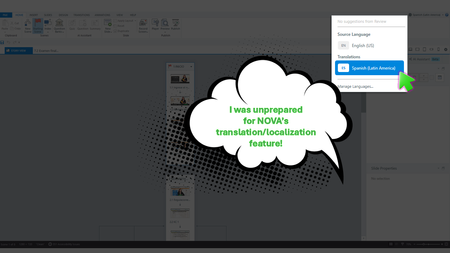
Yup, We Need This Course Updated by Next Week During the week of Articuland Orlando, my business partners dropped an “immediate need” eLearning build in my lap. At first, I didn’t think it would be a huge lift. Then I realized I had to fine-tune the English version of an existing course and create a Spanish version. Typically, translating a course from English into Latin American Spanish can take us two to four weeks. After I use Copilot to translate the course's script, an internal expert validates the translation. I then make the necessary changes, and the expert confirms that the revisions are correct. The challenge is that my internal expert has a full-time role with the company, so reviewing eLearning translations naturally falls lower on their priority list. When Articulate announced during the keynote that NOVA’s translation and localization feature had been activated for Articulate360 subscribers, I was literally in the middle of translating my course (MANUALLY). What Can It Hurt - Take NOVA for a Spin I said, “What the heck. Even if Storyline is able to only translate the base layer’s onscreen text, that’s a win.” Mind blown, when NOVA translated nearly everything!🤯🤯🤯 It translated: Onscreen text (base layer) Onscreen text (layers) Onscreen text (Master slides*) Changed the language the player was set up in AI Voiceover audio Lessons learned Written Spanish, typically, runs longer than written English. Resizing your text boxes etc. takes time, even with the tool that spotlights exactly where the issues are. *Some Master Slide (layouts) were translated, some were not. I was not working on a highly complex course, so fixing the lingering untranslated Master Slide (layouts) was not a big deal. As mentioned in Articulates Help documentation, when you have hardcoded text onto an image, that will not be translated. I can’t share a full demo, but I captured a few screenshots for your perusal (see below). My Key Takeaway Bottom line, the time NOVA saved us is remarkable. I was so excited, I nearly called my manager to rave about it (even though she was on vacation 🤣🤣).159Views8likes5CommentsWork from Home: Flexibility Meets Productivity
Hi everyone! I created this microlearning using Nova's presenter-style video feature, and I’m really excited about the possibilities it offers. This tool opens up new opportunities to create learning experiences that are engaging, meaningful, and memorable for learners. Work from Home: Flexibility Meets Productivity | Rise 36067Views2likes1CommentArticulate AI.....When?
So I have been reviewing numerous posts in relation to Articulate AI launching. No unless I missed something, I just can not seem to find any 'definite' launch date information. September seems to be the month now being talked about. Do we have any official word on this, any actual date? We have a couple of new projects we are keen to trial with the use of Articulate AI.Solved3.2KViews5likes36CommentsAI Integration Compatability
Hello! I'm reaching out regarding the forthcoming AI feature in Articulate. If my team adds this feature but works with another team who doesn't add AI, what sort of limitations, if any, will exist if we share a Storyline or RISE file? For example, if I build something in Storyline using AI and then send it to a colleague who doesn't have AI, will they be able to open the file? Edit the file? Edit whatever was added with AI? Thanks!Solved458Views1like2CommentsAI in Rise 360
Hello, I have searched for the answer to this but cannot find it. A few months ago, when I last used rise 360 I have the AI function, now I don't. I have checked the 'manage subscription' box and I am opted in to the trial. Has this function been removed? Thank you.202Views0likes1CommentTurning SL course into an app
Hello community. Has anyone found a way to convert SL course into an iPhone app or for Andorid? I found this site and wanted to hear from people who tried or have any success. Love to hear your comments. https://forum.volt.build/t/converting-an-articulate-storyline-course-into-an-app/682 Best,210Views0likes2Comments"Must Opt out AI Assist by 9/13", but I haven't seen any AI features in 360 yet.
Good morning! In August I received an email that AI Assist in 360 would start up in September, but I haven't seen any of the AI Assist features come through yet. Am I missing it? I am wondering because in the email it states, "If you want to opt out of the Articulate 360 AI trial, please do so by September 13, 2024". It's almost the 13th and I haven't had a chance to try it yet. I don't want to get charged before trying it. Thanks! BrookeSolved474Views0likes2Comments