e-learning development
1797 Topicsstoryline missing navigation buttons in modern player landscape view on iphone
I created a course using the modern player and it previews correctly in the program when viewed in both phone portrait and phone landscape. But when I view it in the browser on my iphone, the navigation buttons, cc and other controls are not there in landscape. Portrait still works. Has anyone else seen this or know of a fix? Images attached.(Kind of urgent) How do I make an icon animate across a map in multiple slides?
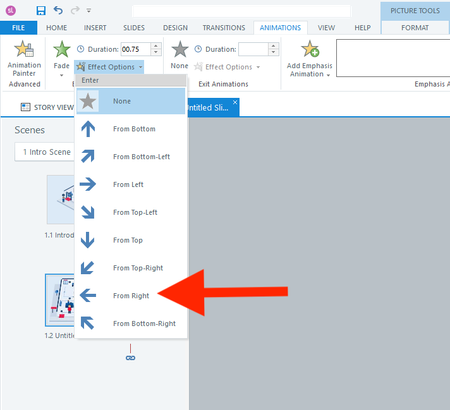
Hi everyone, I actually have two questions. I will start with the easier one first. Question 1 In a fade-in from the right animation, is there a way to adjust how far to the right the object starts? I don't want it to animate from off the right side of the slide. I only want it to start a few pixels to the right. Question 2 How do I animate the red shirt character below across 13 slides? I want it to follow each button from 1 to 13. I realize I should use the Motion Path. But what's the smartest way to use the motion path across slides? I have always found the motion path to be challenging. Thank you all for your help! :)39Views0likes3CommentsOdd AI audio issue
Hi everyone, I’m hoping someone can help with an issue I’ve encountered while developing French versions of courses. In multiple courses, the French AI-generated audio plays correctly, but the automatically generated closed captions appear in English. In each case, the workflow was: Develop the English version of the course. Create a copy for the French version. Export the Word document, translate it, and import the translated content. Regenerate the AI audio in French. The Generate Closed Captions option remained selected throughout the process (it is enabled by default). However, for some reason, the captions generated are still in English while the audio is French. I can resolve the issue by recreating the AI audio slide by slide, which also regenerates the captions correctly. However, I’ve noticed another problem: the newly generated audio is a different length than the original, even when using the same voice, speed, and all other settings. To troubleshoot, I tried several approaches, including: Generating completely new AI audio from the translated slide content. Using the Notes section to create new audio. Recreating audio through the existing AI Text-to-Speech settings while ensuring all voice and playback settings matched the original. Despite using the same settings and text, the regenerated audio lengths are different, which impacts animation timing throughout the course. My questions are: Is there a faster way to update or regenerate closed captions that are in the wrong language without recreating the audio on every slide? Has anyone experienced captions being generated in English while using French AI audio? Does anyone know why AI text-to-speech audio length would differ when regenerated using the same voice and settings? Will I need to recreate the audio and adjust animations slide by slide, or is there a more efficient solution? Any insights or recommendations would be greatly appreciated. Thanks in advance! Bryce17Views0likes0CommentsGray "Video" box when editing SL
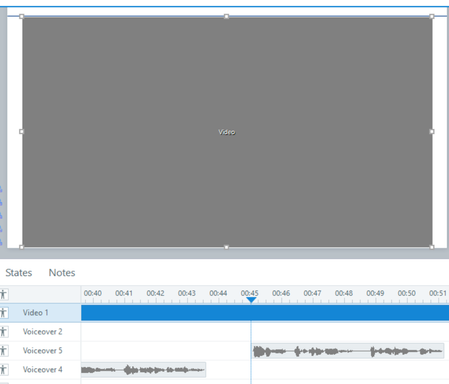
Help! Something has changed in a recent update that is making my video appear as a gray box within the editing stage in Storyline. The video plays fine, but as soon as I pause the timeline to add audio or shapes to highlight parts of the video, the gray box is back. It is impossible to overlay shapes or line up audio when I can no longer see the video on the slide. How do I fix this?!?10Views0likes0CommentsWhat's your pre-publish sanity check?
I'll admit to a ritual that probably looks obsessive from the outside. When a Storyline course is 'done,' before I publish, I open the trigger panel on every slide that has conditional logic and read the triggers top-to-bottom, out loud, like a script. 'When the user clicks Next... if MenuVisited is True...' It takes 20 minutes on a big course. It's tedious. And it catches things preview never does — a condition checking a variable that isn't set until two slides later, two triggers in an order that only breaks on revisit, a 'jump to slide' firing before the 'set variable' above it. Preview always walks the happy path. The read-through doesn't. I'm curious how other people handle this. Do you have a pre-publish ritual — a trigger review, a console check for your JS, a specific click-path you always test? Or do you trust preview and let QA catch the rest?45Views0likes4CommentsCan I reduce the noise of the mouse clicks?
Some learners have recently tests a course I have produced and lots of them found the clicking sound on the "view" mode too loud and jarring- is there any way to reduce the volume of this? If I were to not use it at all- I feel it loses the impact of tracking along the steps I'm demonstrating- so any alternative suggestions appreciated! :)25Views0likes1CommentSlide Layer Interaction Not Working
Hi I have set up a project and I want the user to be able to click on a tab at anytime to see their score. I have set up a slide master to do this. There is a base slide which I have set to jump to a button layer once the timeline starts on the slide (the slide is set to restart at the initial state). The first layer has the button on it and when you click the button it shows a second layer with the score icon on it. The score icon layer automatically hides once the timeline ends. The theory being that it goes back to the original slide and then automatically opens the button layer again, and so on. I have done this a thousand times before, but for whatever reason the base slide does not jump to the button layer once the icon layer has closed the first time. What am I missing? https://360.articulate.com/review/content/a17552ca-5968-430e-91bb-32031f9439ae/reviewSolved60Views0likes6CommentsHow do you manage external video resources in Storyline or Rise 360?
I'm working on an e-learning project where I need to manage several external video resources before adding them to a Storyline/Rise 360 course. I'm particularly interested in how other course creators handle the workflow from sourcing a video to preparing the final media file. Things I'm considering include video quality, file size, captions, accessibility, permissions, and keeping the original source documented. In my own workflow, I also tested fdown.media for saving a publicly available video for offline preparation/reference. I'm interested in how others approach this part of the workflow and whether there are better ways to organize externally sourced media. For those working with Storyline or Rise 360, do you normally keep local copies of external videos, host them separately, or use another approach? How do you balance quality, accessibility, and course size?Trigger not launching email in LMS player
I developed a course that includes a hotspot. The learner is supposed to click on the hotspot which triggers a "send email to" action. The items work in review 360 but do not in the lms player (vi LMS). Any suggestions on how to get the trigger/hotspot to work?76Views1like4Comments