e-learning development
2050 Topicsstoryline missing navigation buttons in modern player landscape view on iphone
I created a course using the modern player and it previews correctly in the program when viewed in both phone portrait and phone landscape. But when I view it in the browser on my iphone, the navigation buttons, cc and other controls are not there in landscape. Portrait still works. Has anyone else seen this or know of a fix? Images attached.Japanese AI Text-to Speech Quality
Has anyone had success using a particular voice for the AI Text-to-Speech for Japanese? I have tried several and continue to get feedback that the text-to-speech quality is very poor, and some voices randomly mix Japanese, Chinese, and Korean accents even within a single paragraph. All of the translated audio text has been thoroughly reviewed and is accurate. Here are the latest voices I have tried and the general feedback received: Alva: Good (the voice used in the course) Akira: Poor Hajime: Poor Gojo: Acceptable Ken: Good (possible alternative, but does not address the root cause) Masa: Acceptable In the Advanced settings, I have Multilingual v2 selected for each one. Note that even for the voices marked good or acceptable, the reviewer still indicates that the quality is not at a level that they feel can be used. They believe the root cause is that the program invoking text-to-speech does not consistently retain the selected voice option and that it incorrectly auto-detects the language and switches voice options even within a single sentence. I am not sure how to respond to that. I would appreciate any insights anyone else has about this topic!520Views0likes6CommentsWorksheet Style Interactivity Within a Course?
I am working on a course and want to try a slightly different approach, but I'm not quite sure how to go about it. Normally, we would have a video in a module, and after the video is complete, we would ask the learner to download a PDF "worksheet" and complete the exercise before moving to the next module. 80% of our user base accesses courses from a mobile device, so the chances of them downloading a PDF and completing it between modules are slim to none. Do any of you have ideas on how I could add boxes for learners to type in answers to reflection questions within the course itself? If so, is there a way they could do that AND have all of their responses at the end of the course emailed to them, so they have a complete notes packet after they complete all the modules? I'm happy to hear any and all ideas of how to make this happen (from personal experience or just "in theory this should work" thoughts)!38Views1like3Comments(Kind of urgent) How do I make an icon animate across a map in multiple slides?
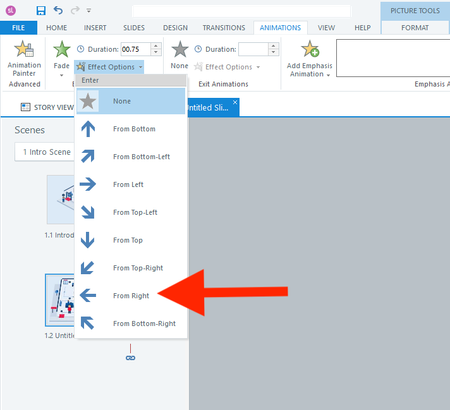
Hi everyone, I actually have two questions. I will start with the easier one first. Question 1 In a fade-in from the right animation, is there a way to adjust how far to the right the object starts? I don't want it to animate from off the right side of the slide. I only want it to start a few pixels to the right. Question 2 How do I animate the red shirt character below across 13 slides? I want it to follow each button from 1 to 13. I realize I should use the Motion Path. But what's the smartest way to use the motion path across slides? I have always found the motion path to be challenging. Thank you all for your help! :)39Views0likes3CommentsCan I reduce the noise of the mouse clicks?
Some learners have recently tests a course I have produced and lots of them found the clicking sound on the "view" mode too loud and jarring- is there any way to reduce the volume of this? If I were to not use it at all- I feel it loses the impact of tracking along the steps I'm demonstrating- so any alternative suggestions appreciated! :)Odd AI audio issue
Hi everyone, I’m hoping someone can help with an issue I’ve encountered while developing French versions of courses. In multiple courses, the French AI-generated audio plays correctly, but the automatically generated closed captions appear in English. In each case, the workflow was: Develop the English version of the course. Create a copy for the French version. Export the Word document, translate it, and import the translated content. Regenerate the AI audio in French. The Generate Closed Captions option remained selected throughout the process (it is enabled by default). However, for some reason, the captions generated are still in English while the audio is French. I can resolve the issue by recreating the AI audio slide by slide, which also regenerates the captions correctly. However, I’ve noticed another problem: the newly generated audio is a different length than the original, even when using the same voice, speed, and all other settings. To troubleshoot, I tried several approaches, including: Generating completely new AI audio from the translated slide content. Using the Notes section to create new audio. Recreating audio through the existing AI Text-to-Speech settings while ensuring all voice and playback settings matched the original. Despite using the same settings and text, the regenerated audio lengths are different, which impacts animation timing throughout the course. My questions are: Is there a faster way to update or regenerate closed captions that are in the wrong language without recreating the audio on every slide? Has anyone experienced captions being generated in English while using French AI audio? Does anyone know why AI text-to-speech audio length would differ when regenerated using the same voice and settings? Will I need to recreate the audio and adjust animations slide by slide, or is there a more efficient solution? Any insights or recommendations would be greatly appreciated. Thanks in advance! Bryce17Views0likes0CommentsGray "Video" box when editing SL
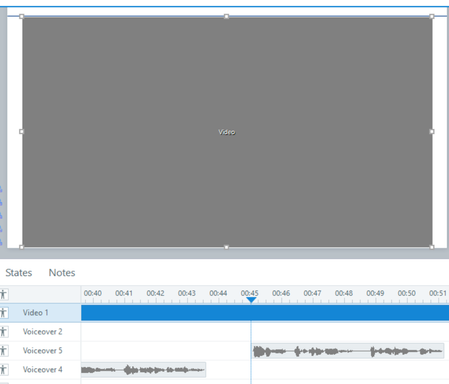
Help! Something has changed in a recent update that is making my video appear as a gray box within the editing stage in Storyline. The video plays fine, but as soon as I pause the timeline to add audio or shapes to highlight parts of the video, the gray box is back. It is impossible to overlay shapes or line up audio when I can no longer see the video on the slide. How do I fix this?!?10Views0likes0CommentsWhat's your pre-publish sanity check?
I'll admit to a ritual that probably looks obsessive from the outside. When a Storyline course is 'done,' before I publish, I open the trigger panel on every slide that has conditional logic and read the triggers top-to-bottom, out loud, like a script. 'When the user clicks Next... if MenuVisited is True...' It takes 20 minutes on a big course. It's tedious. And it catches things preview never does — a condition checking a variable that isn't set until two slides later, two triggers in an order that only breaks on revisit, a 'jump to slide' firing before the 'set variable' above it. Preview always walks the happy path. The read-through doesn't. I'm curious how other people handle this. Do you have a pre-publish ritual — a trigger review, a console check for your JS, a specific click-path you always test? Or do you trust preview and let QA catch the rest?45Views0likes4CommentsAutomatic Selection of preferred language in LMS/SCORM-Package
Hi there, I have a question about the localisation feature in Articulate Rise and would be grateful if anyone with similar experience could help me. 😄 My use case is as follows: Our course content is inside an Articulate Rise course and is exported as a SCORM 1.2 package to a Moodle platform. When the SCORM package is clicked, the user is directed to a pop-up containing the course contents. I understand that Articulate Localisation is the best way to generate and export Rise courses in multiple languages, as demonstrated in the following article and e-learning course: Articulate Localization: Publish Multi-Language Rise 360 Courses | Articulate - Community https://rise.articulate.com/share/wbbxvTJyDgfSsfVryNBVDjvmjdX8agsK#/ The best method I have found is to allow the user to select their preferred language at the beginning of the SCORM package using a dropdown menu, as demonstrated in this article: Multi-SCO SCORM Package with Language Select | Articulate - Community Is there any way to skip the dropdown menu and automatically display the correct course language based on the user's browser language or, alternatively, based on the user's Moodle profile fields? Ideally, this would not require much coding or a custom solution and would not change the current user flow when accessing course content. Any help or feedback on this issue would be much appreciated. 🙏 Best regards, Felix302Views0likes6CommentsNo feedback/answer key section showing when publishing as PDF in Rise
When I tried publishing the rise file, I found that the PDF has the assessment part neither marking the correct/incorrect answers nor showing the correct and incorrect feedback as it does while publishing in Storyline 360. Is it possible to add the feedback/answer key section for assessments in rise when publishing as PDF.270Views2likes6Comments