elearning challenge
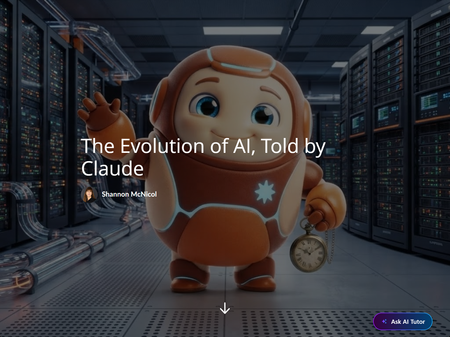
84 TopicsThe Evolution of AI, Told by Claude ⏰ (yes, I let Claude narrate its own family history)
This week's challenge was an interactive timeline, and I could not resist. What if Claude told the story of AI, from Turing's big question in 1950 to Claude itself, and poked fun at its own ancestors along the way? 🤖 I built it as a Rise 360 Microlearning using a Code Block. The video was created using Articulate's AI Avatar tool with Claude as my co creator. Learners meet Claude in a short intro video, then click through 8 eras in any order. Each one opens with Claude's narration, plus two things they can choose to dig into: "Show the receipts" for the facts and "Claude's hot take" for the commentary. Explore all 8 and Claude unlocks a closing thought. There's also a Surprise me button for the indecisive. 🎲 Why I built it this way: A timeline shouldn't feel like a row of dates. The learner decides what to open, what to skip, and when to laugh. The humor is doing real work too. If someone remembers that ELIZA only asked questions and Deep Blue couldn't write an email, the history stuck. Some fun facts: Clocks drift down the background, using a clock image I supplied, because it's a timeline and I committed to the bit ⏰ I created the Claude character using Articulate's AI Avatar which started as a prompt, then I brought it to life as an image and a video The video wrapper has custom controls, speed options, and a transcript Claude wrote a lot of the code and I steered the design, which is honestly how most of my projects go now. Have a look and tell me which era surprised you most! 👇 The Evolution of AI, Told by ClaudeMeet Your Instructor - Which One Is the Lie?
I built this quick “Meet Your Instructor” interaction for the latest eLearning Heroes challenge. The interaction is a simple truth-or-lie icebreaker where learners review three statements about the instructor and decide which one is false. I designed it with a heavy equipment/construction theme and included custom visuals, themed buttons, correct/incorrect feedback screens, and a short video introduction and conclusion featuring me as the instructor. What I like about this concept is that it could work both virtually and in person. In an eLearning course, learners can click through and make their own choice. In a live class, a facilitator could use the same interaction as a quick group icebreaker before moving into the session. It’s a small activity, but it adds some personality, gives learners a reason to engage right away, and helps make the instructor feel a little more human before the course begins.118Views3likes3CommentsFootball Manager
Hello there! 👋 I've been looking for different ways to start building out a portfolio and this weekly challenge caught my attention! I love football, despite supporting Everton... and wanted to trial some gamification in storyline! ⚽ Please have a look using the link and let me know your thoughts in the comments! 👇 Confession: I spent a bit more time on this than I planned! 😅 Enjoy! 😄 Link: Football Manager Module Website: 22Studio.ukInterrogating the Future: An AI Confession
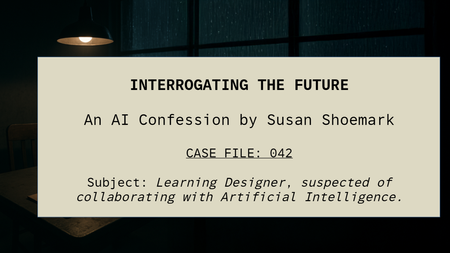
“The suspect knew too much about AI. Or maybe… she just knew how to answer the right questions.” Check out the recorded Pod Cast Here: Interrogating the future How It All Began It started as a simple reflection, ten questions about how AI is shaping my design work. But instead of writing a straight blog, I found myself drawn to something more atmospheric. Something that felt like the process itself, shadowy, uncertain, full of creative tension. So, I turned the reflection into a crime-show-style interrogation, complete with tape recorder hums, flickering lights, and a narrator whose voice demanded answers. The irony? Every part of the production was built with AI. The words, the sound, the visuals, even the interrogation room itself, were all digitally generated and then manually composed by me. Built by AI, Crafted by Hand I started by feeding the ten questions into ChatGPT, but instead of plain responses, I asked for a script. Together, we created a dialogue between a suspicious interrogator and me — a learning designer “accused” of collaborating with Artificial Intelligence. Then came the layers: Voice: generated using AI text-to-speech, giving each character a distinct tone and rhythm. Sound Effects: sourced and blended through AI-assisted sound libraries; tape clicks, fluorescent hums. Images: created with AI image generation and enhanced in Photoshop’s Generative Expand to build the noir interrogation room. Editing: every frame and cue assembled manually — timed to each pause, each flicker, each breath. It wasn’t just automation, it was orchestration. Why Noir? Noir has always been about truth hiding in plain sight. It’s smoky, suspicious, human. And that’s exactly how AI feels right now, part mystery, part revelation. The interrogation format gave me a way to ask the big questions: Is AI saving us time or stealing our craft? Can it really understand empathy, context, and culture? Or is it just pretending well enough to fool us — and our learners? The Real Interrogation Behind the theatrics, the project became a metaphor for the design process itself. Every day, learning designers interrogate ideas: “What’s the story here?” “What does the learner need?” “Is this real, or just noise?” AI doesn’t replace that questioning, it amplifies it. It’s like having an endless brainstorm partner who never sleeps, never stops suggesting, and occasionally hands you brilliance on a platter. The Craft of Collaboration What fascinated me most was the balance. AI built the assets — but I gave them shape. It’s a partnership that works best when humans stay in control of tone, meaning, and emotional truth. “AI gave me the pieces. But I had to make them make sense.” That’s the new creative muscle, knowing when to hand over, when to edit, and when to override. Lessons from the Interrogation Room By the end, I realised the project wasn’t about AI at all, it was about agency. The ability to stay curious, playful, and skeptical, even when technology feels all-knowing. If AI has a role in the future of learning design, it’s not to automate creativity, it’s to augment it. To make space for designers to ask better questions, faster. To amplify storytelling, not silence it. Final Word So yes, I built my own interrogation. I wrote the script with AI. I voiced it with AI. I scored, illustrated, and expanded it with AI. And then I did what no algorithm could: I stitched it all together with intuition, timing, and story sense. Because creativity isn’t about the tools you use. It’s about what you do with them.409Views4likes5CommentsFrom Music History to Interactive Learning
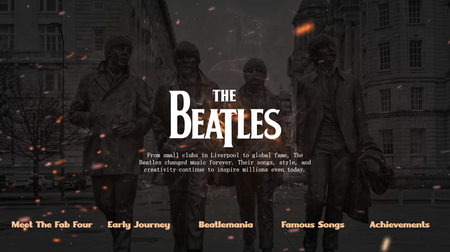
I created this interactive learning experience inspired by **The Beatles**—the band that changed music forever. From their early journey in Liverpool to the global craze of Beatlemania, this microlearning module blends storytelling with engaging interactions to bring history to life. This project reflects how microlearning can turn even classic topics into **engaging, immersive experiences**. Linkedin Article Demo Direct213Views0likes1CommentWanna Get Away?!
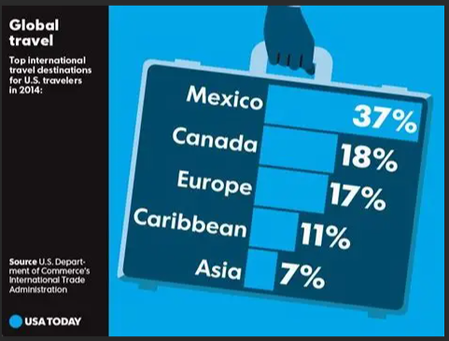
After five days of being iced in, I am more than ready for a getaway. I used the 2014 USA Today snapshot as inspiration. While the travel data is historical, the project was a perfect creative outlet—and it certainly inspired a few vacation searches of my own! Global Travel219Views1like1CommentMini-Course: Employee Health & Wellness #492
This week, your challenge is to create and share a 5-slide mini-course on a health and wellness topic you’re passionate about. Incorporate a mix of informational content and interactive elements to keep learners engaged while using different content and/or block types.4.2KViews1like32CommentsSilent Signatures
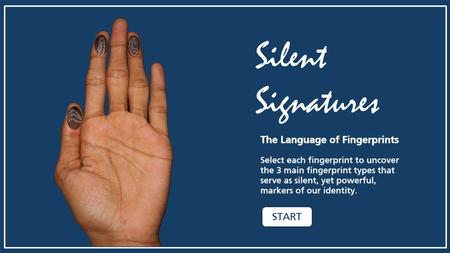
In this entry, you'll explore different fingerprint types. It was originally supposed to be created for the Magnify & Zoom ELC but time didn't allow so I adapted the idea to this challenge. I wouldn't have thought of a button set to accomplish this! Surely, I would have had layers and clutter on the back end so loving how much I'm learning from participating in these challenges. Silent Signatures Demo