graphics
78 Topics"Wait, SVGs are just code?"
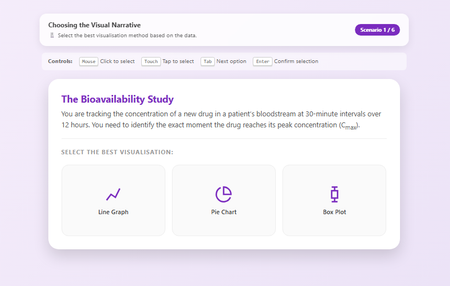
Hi everyone, I have to admit something embarrassing. I was today years old (well, 44 years old to be exact) when I properly realised that SVG files are just code. I always thought of them as "images" you have to save, host, and link to. But no, they're just text! 🤦♂️ That realisation sent me down a rabbit hole, and the result is this: a Visual Narrative Selection Tool that is completely self-contained. No external image files, no hosting headaches, just one single HTML file doing everything. 🔍 What it is: It’s a scenario-based training interaction where learners have to pick the right chart type (e.g., "Is a Pie Chart okay for time-series data?"). If they get it wrong, the feedback doesn't just say "Incorrect"—it actually shows them why using a custom SVG graph generated right there in the browser. ✨ Why I'm sharing it: This is a pure "Zero-Asset" experiment. Because the icons and graphs are all SVG code written directly into the HTML: It's impossible to break: You can't "lose" the image files because they live inside the code. It's lightweight: The whole thing is tiny. It's accessible: Fully navigable via keyboard (Tab/Enter). AI-enabled: with a strong enough visual cue, no other files are required I've shared the source code below. It’s fully commented (with my contact info hidden in a professional comment block at the top) Feel free to download, break it, and tell me what you think. And please tell me I'm not the only one who didn't realise SVGs were this powerful? RISE READY HERE562Views3likes3CommentsDial Spectrum scale for Rise and Storyline without custom slider logic
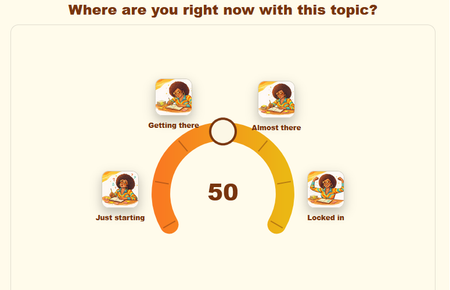
Need a real confidence scale in Rise or Storyline without building a custom slider from scratch? Use a dial that outputs as one HTML file you can drop into your course. Problem: yes-or-no questions flatten nuance. If two people both click Yes, one might be at 80 percent confidence and the other at 20 percent. If you try to fix that inside Storyline, you are into slider variables, motion paths, value mapping, and conditional feedback layers. Rise does not even give you a native scale block. Solution: Dial Spectrum is a generator that builds a continuous or stepped scale with configurable labels and feedback, then exports a single HTML file you can embed. - Set the scale range and step size. Example, 0 to 100 in 5-point steps, or 1 to 7 with whole steps. - Label anchors and optional midpoints. Example, Not at all confident, Neutral, Very confident. - Map value ranges to tailored feedback. Example, 0 to 30 triggers one message, 31 to 70 a second, 71 to 100 a third. - Match your brand colors. - Keyboard accessible. The dial can receive focus and be adjusted by keyboard. - Built to sit inside iframes and web objects without layout drift. Where it fits: - Confidence self-checks before a practice scenario. - Pre and post attitude snapshots around a module. - Opinion gauging when more than two positions are valid. - Reflection prompts tied to ranges. Example, If 0 to 40, ask them to pick one resource to revisit. How to embed: - Rise 360: Host the exported HTML on your web space, then insert it with the Embed block using the public URL. If your LMS blocks external content, wrap it in a one-slide Storyline file as a Web Object and use the Storyline block in Rise. - Storyline: Insert as a Web Object, either pointing to the hosted URL or to the local HTML file. Storyline will package it with your publish. - Captivate, Canvas, Moodle: Insert as a Web Object or iframe. Host the HTML and point the iframe to it. Most LMS pages that accept custom HTML will take it. Notes: - You are not collecting scores by default. Use it to surface thinking and route feedback. If you need to record values, capture it with your platform’s form, survey, or xAPI layer around the dial. - If you see scrollbars, increase the iframe height in your host block. The exported file is fixed-frame friendly, so once the container is tall enough the dial will hold position. Demo Dial Spectrum Dial Spectrum Generator624Views3likes5CommentsSwatch Library
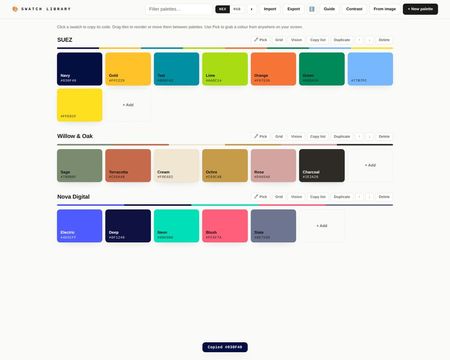
With Swatch Library you can create a palette per brand or project, and every swatch is one click to copy, in hex or RGB. Use it free right inside a Rise course or online. Type or paste a code, bulk-paste a whole list at once or, in Chrome/Edge, use the eyedropper to pick colours from anywhere on your screen, a client's website, a brand PDF, a Storyline slide. You can drop a logo or brand asset onto the tool and it will pull the dominant colours out and build a palette from them. Everything happens in the browser, nothing is uploaded anywhere. Beyond that there is a WCAG 2.2 contrast checker built in, set a foreground and background colour, get the ratio, and see pass/fail for AA and AAA body text, large text and non-text elements like icons and focus indicators. That is useful enough on its own, but the thing I am most pleased with is the contrast grid. Each palette has a Grid button that opens a matrix of every colour pair in that palette, painted with the actual pair so you can see at a glance which combinations work for text and which do not. One click on any cell opens the full checker for that pair. If you have ever wondered whether your brand colours are actually safe to use together, this answers it quickly. There is also a colour vision preview. A Vision button on each palette shows it as it appears to people with protanopia, deuteranopia and tritanopia, plus a greyscale row for print. It automatically flags any pairs that become hard to tell apart, named with their perceptual distance score. Each swatch has a tints and shades button that opens a nine-step ramp from light to dark, and you can click any step to copy it or add it to the palette. Useful for hover states and backgrounds. You can drag swatches to reorder or move them between palettes, filter palettes once your library grows, and use Export/Import to back everything up or share a brand palette file with your team so everyone's working from the same set. There's a built-in guide for the full tour. It can be used directly in the linked Rise course, or used online via the link. All free, no downloads, no signup, no nonsense! Swatch Library - Rise Swatch Library - Online253Views3likes1CommentFootball Basics: Click the Pitch to Learn the Game
DEMO LINK For this week’s challenge, I created a simple interactive football basics activity for new fans, casual viewers and beginners who want to understand the game without feeling overwhelmed. The idea is built around a top-down football pitch with numbered clickable markers. Each marker opens a short explanation of one key football concept, such as the goal, players, positions, the ball, passing, dribbling, shooting, defending, set pieces and offside. I wanted the interaction to feel like the learner is reading the game from the pitch itself rather than moving through a traditional slide deck. The pitch acts as the main navigation screen, and the markers guide learners through the basics in a clear, visual way. How I approached the design I used a clean football pitch as the central visual so that the learning stayed connected to the game environment. The numbered markers are deliberately large and easy to spot, so learners know where to click without needing long instructions. Each pop-up includes: Element Purpose Short explanation Introduces the football term in plain English Quick example Helps the learner understand how it appears in a real match Visual support Shows the concept rather than only describing it Learner takeaway Gives the learner one simple point to remember Design rationale The design is intentionally simple because the audience is new to football. I avoided too much technical detail at the start and focused on helping learners build confidence. For example, the offside section ( Marker 10) uses a visual comparison of not offside and offside, showing what the situation looks like before and after the pass. The key message is: Freeze the picture at the moment the ball is passed. That one sentence gives beginners a practical way to understand a rule that many people find confusing. Interaction idea The learner clicks each marker on the pitch to reveal a short learning point. This could easily be expanded with: Possible addition How it could improve the activity Progress tracking Shows how many basics the learner has completed Audio narration Supports learners who prefer listening Short quiz questions Checks understanding after each topic Match scenario cards Lets learners apply each rule in context Final recap jingle Helps learners remember the key basics Reflection This was a fun way to turn football rules into a small exploratory learning experience. Instead of explaining the game as a long list of rules, I tried to make the learner feel as if they are standing above the pitch, clicking into the parts of the game they want to understand. I look forward to your input and feedback. Best Nadia :-) Here is my example: DEMO LINK471Views4likes3CommentsCooking Game (Jeopardy style + Gamifiation)
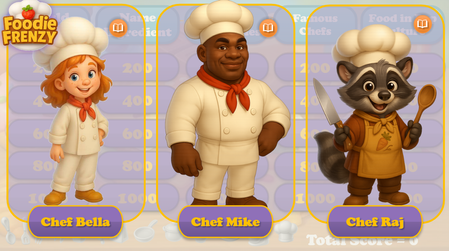
Hello Articulate Heroes! I'm excited to share my second personal project with you — a cooking-themed, Jeopardy-style game! Cooking Frienzy This project was inspired by two fantastic webinar series shared here: How to Create A Jeopardy! Style Game Gamification series I started with the "Jeopardy!" template and added the following custom features: Cooking-themed questions and answers — 5 questions across 5 categories Custom visuals — including characters, backgrounds, UI, and tokens The ability to choose one of three characters at the start of the game (and replay with a different chef assistant!) Personalized feedback and questions — with character-specific images and voiceovers A 20-second Pomodoro-style timer with a “wiped” animation Tokens awarded when the user completes a certain number of questions The characters were created using AI. Thank you for taking the time to check out the game! I’d love to hear your thoughts — feel free to share any comments or suggestions! You can check-out the game by this link: Cooking FrienzySolved2.4KViews8likes21CommentsGamified Onboarding
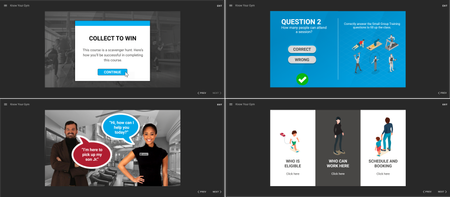
Collect the gems by exploring the office! This gamified eLearning was developed for team members to explore their workspace while getting some product knowledge. The process: Conducting a training needs analysis through discussions with leaders Building a learner persona using surveys and polls Planning the desired outcomes Create a fun course Explore the project.2.8KViews12likes8CommentsCreate an Animation for Rise Using PowerPoint
If you create something like this flowchart in PowerPoint, then add in a fade-in animation to each item, set the animation to happen "After Previous" (automatically). (time to play through 1 second). Duplicate the slide - set each item to have no animation. Go back to first slide - add a transition - NONE but set it to Advance slide after X seconds (where X is the same length of time as it takes for the animation to play [example 1 second) Go to second slide - add a transition - MORPH and have it Advance Slide after Y seconds (where Y is the length of time before the animation loops again [example 10 seconds]) Then you can add this animation directly into a Rise Image Block (or elsewhere) You can also change the slide size in PPT to reduce the white space around the animation. Example (chart 4.gif) I changed the slide size to half the height First animation (chart.gif) - no 2nd slide Second animation (chart 3.gif) - 10 second 2nd slide626Views7likes4CommentsHappy Birthday Mini Game
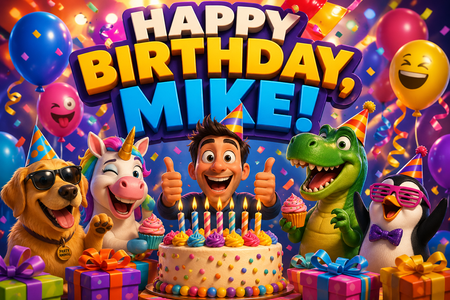
How I Built a Bright, Clicky Birthday Game for Rise 360 I wanted to make a birthday interaction in Rise 360 that felt a little more playful than a standard celebration graphic, so I built a custom HTML block for a colleague's birthday. It started as a colorful animated birthday screen with balloons, confetti, and a cake. Cute? Yes. But then I thought… what if it felt more like a mini game? So I turned it into a fast little “birthday grab” activity where goodies fall from the top of the screen and learners click them before time runs out. I added a score, timer, party meter, different fall speeds, and a win screen to make it feel more arcade-like. Cupcakes drift slowly, stars zip by faster, and the whole thing is packed with bright colors and motion. One of the biggest lessons was keeping the code simple enough to behave nicely inside a Rise 360 embed. Once we switched to a cleaner JavaScript approach for the falling items, everything clicked into place. It was a fun reminder that even a small custom block can add a lot of personality to a course. Sometimes a birthday shoutout can also be a mini interactive experience. Happy Birthday Mini Game616Views6likes3CommentsPractice: Visualizing Policy with Rise360
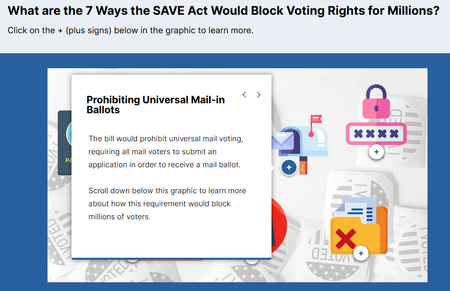
Hi there, I'm Leslie! I built this microlearning module in Rise360 because I wanted to practice creating a short, visual story with interactive elements from a text-only public policy source. 7 Ways the SAVE Act Would Block Voting Rights Government and think tank materials are text-heavy and focus on the process to create the policy or proposal, rather than who the policy impacts and what they either have the opportunity to do, or are now responsible for. I wanted to select a topic and source material that I didn't know anything about to keep my decision making to a minimum. I think visual storytelling would help people process policies and decide faster if they want to complete the call-to-action. I used Flaticons for the icon/ vectors. I created two different source attribution pages at the end of the module - one for the source material and one for the icon/ vectors used I'm unsure how to create a .story file for download. But happy to share anything I can. Thank you in advance for your feedback and comments on the design, flow, etc. While I believe in this topic and the research behind it, I realize it is political, so I hope I haven't violated and posting rules. Best, Leslie1.2KViews3likes10CommentsClaude Shannon Explainer – Interactive Overview of the Father of Information
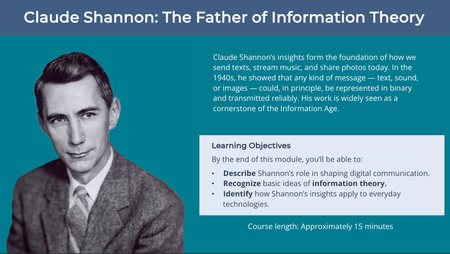
Hi everyone, This interactive module offers a short introduction to Claude Shannon’s key ideas and how they shaped modern computing and communication. The module is part of my portfolio and was designed to demonstrate accessible design, custom illustration, and learner-driven interaction in Storyline. I’d appreciate your feedback on: Navigation and overall flow Accessibility (especially for screen readers) Visual design and pacing Any suggestions for improving engagement or polish Here’s the link: Claude Shannon Explainer Thanks for taking the time to have a look. I’m new to the community and would welcome any thoughts or suggestions.624Views3likes4Comments