instructional design
147 TopicsAI Tool for creating conversations
Hi everyone, I'm exploring the possibility of using text between 2 (or more) people to create an AI-generated audio conversation, in most cases between a CSR and customer. From my web search I see there's a utility called Musely that might work but my company's internet policies block me from seeing the page. So, I figured I'd poll this wonderful group of creators to see what they may know or could recommend. Thanks!3Views0likes0CommentsWorksheet Style Interactivity Within a Course?
I am working on a course and want to try a slightly different approach, but I'm not quite sure how to go about it. Normally, we would have a video in a module, and after the video is complete, we would ask the learner to download a PDF "worksheet" and complete the exercise before moving to the next module. 80% of our user base accesses courses from a mobile device, so the chances of them downloading a PDF and completing it between modules are slim to none. Do any of you have ideas on how I could add boxes for learners to type in answers to reflection questions within the course itself? If so, is there a way they could do that AND have all of their responses at the end of the course emailed to them, so they have a complete notes packet after they complete all the modules? I'm happy to hear any and all ideas of how to make this happen (from personal experience or just "in theory this should work" thoughts)!67Views1like3CommentsHow are you designing courses for localization from the beginning?
I've been thinking a lot about localization as a design decision rather than something that happens after a course is built. One thing I've learned from working on global learning projects is that decisions made early, including how text is handled in graphics, how media is structured, how reviews are managed, and how the course is packaged, can make a huge difference once you begin scaling across languages. I'm curious how others approach this. What are you doing during the design and development stage to make localization easier later?52Views0likes3CommentsHow to Build a Rotating Video Carousel in Articulate Storyline
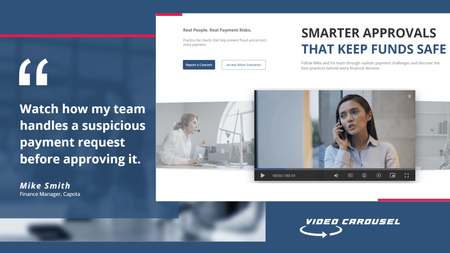
2 min read Three videos. Click a side tile and the whole set glides across, the outer tiles scaling and blurring back into depth. It loops in both directions and never dead-ends. Try the live demo first. Then here is how it goes together. The videos stay in Storyline They sit on three slide layers, Vid01, Vid02 and Vid03, as ordinary Storyline video. That matters. You keep your seekbar, your accessibility settings and your normal publish pipeline. Swapping in your own footage is just right click, Change Media. The carousel is a web object A small folder of HTML, CSS and JavaScript sits on top and draws the three tiles. The front tile lines up exactly behind the real video, so what learners click is Storyline, not a picture of Storyline. The look and motion live in one file Open config.js in Notepad. Tile size, swing distance, tilt, blur, fade, speed, play button colour and background are each one line with a plain-English comment. Change a number, save. There is no code to write. The folder rule nobody expects This is the step that may trip up almost everyone. Storyline copies the web object folder when you insert it, so pointing it back at the same folder shows you the old version no matter how many times you save. Rename the folder, repoint the web object at the new name, then publish. Why it looks blank in Preview Web objects do not render in Storyline Preview. You have to publish to see the carousel run. This is normal Storyline behaviour and nothing is broken. See it running Open the live carousel demo and click the side tiles to feel how the motion reads. Watch the full tutorial on YouTube for the complete build.78Views1like2CommentsDoes AI work for you or do you work for AI?
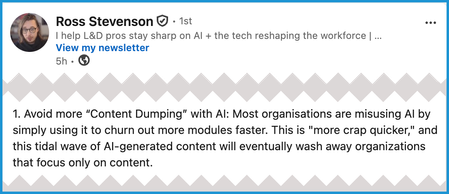
Are you a centaur or a reverse centaur? What does that mean? Here's how Cory Doctorow presents those terms in his book, "The Reverse Centaur's Guide to Life After AI": "[A] centaur is a person who is assisted by a machine... A reverse centaur is a human who is conscripted into acting as an assistant to a machine." As an example, think about Lucy & Ethel working at the chocolate factory. (Search for the video if you don't know what I'm referring to.) They're supposed to wrap each chocolate as it travels on a conveyer belt. But they can't control the speed and can't keep up. The result is hilarious in a situation comedy. It wouldn't be so funny in an actual work situation, though. Product quality would suffer, and so would the workers. Or consider this note by Ross Stevenson: (I recommend going to that LinkedIn post for his full list of takeaways from a conversation about how people learn.) So the real question is this: How can L&D pros use the new AI features in Articulate to create, review, and maintain meaningful and accurate "content" that helps improve job performance throughout their company? Of course, so many other questions have to be answered first. How big is the company? What tasks do people need to do? How often do processes/procedures change? What has to be done to ensure that materials are error free? What are the risks from errors and/or noncompliance? What's the budget? How much input does L&D have in the decision making anyway? And on and on... In other words, this discussion won't be marked as "solved." It's just here because I think there's a lot worth pondering—and this community is great at that. 😊 To paraphrase Hamlet: "No software is either good or bad, but the use case makes it so." P.S. For those who might be interested in Doctorow's book, here are more excerpts:169Views1like3CommentsNew to Instructional Design - Advice Appreciated!
Hello! I am brand-new to the world of instructional design and so excited to have discovered this amazing career path! I would really appreciate some specific advice on how to get started on building the necessary skills, theories, methodologies, etc. that are needed to be successful in this industry. I am looking to educate myself and would love to hear from those that have built their careers from the ground up. What did you do, or what would you do if you were in my position? I look forward to connecting! :)185Views1like8CommentsCreating a Prompt Library
We have about 20 or so folks across the organization using Articulate 360. I want to start a prompt library that we can all contribute to for code block prompts, AI images, etc. For those of you who have done something similar, what has worked best for you?141Views1like4CommentsHow to Chunk a Loooong Rise Course
Hi Everyone, Question...we do an Annual Education push for all our staff; and as it contains the yearly compliance courses, etc., it is a very long course. We have already broken it into chunks using Rise, but it still runs as one long course. The issue we are having is in our LMS - which has never been known to do bookmarks right when users need to stop and start. And users are finding when they need to leave the course and then return, they need to go thru the entire course again, as the LMS didn't bookmark. In addition, the course has just one place where it has users branch off based on their job titles. Our LMS will let us know larger courses (we use Oracle, so they're called Specializations) where several courses make up the Specialization, but again, with that branching scenario, it makes it touch to create separate courses to fit neatly into a Specialization. Anyone else do courses that branch and would otherwise be very long if you didn't use the approach you've learned to use? If so, can you share? Thanks so much!102Views1like4CommentsScaling feedback?
Do you have any way of providing feedback to your learners? If so, how do you think about scaling it? Hey all! I recently had a coffee chat with JulieDirksen and she said something that got me thinking (well, she said a lot of things that got me thinking but this was one I wanted to share!). She was talking about how for a long time, feedback was one of the last things in learning that you couldn't scale. But, she noted that with AI that is now changing—it's now more possible to scale the experience of receiving feedback on your work. As a community professional, scaling feedback is something I've long thought about doing via nominating experts from the community to help spread the expertise of an "instructor" beyond one single person—I'm actually going to be giving a session at Articuland next week in Orlando that touches on this! But, all of this got me thinking about different forms of providing feedback and how they have the potential to scale, and I wanted to pitch this question to the community and get your thoughts.214Views1like9Comments