instructional design
5 TopicsThink About It!! Quiz, with Quiz Builder
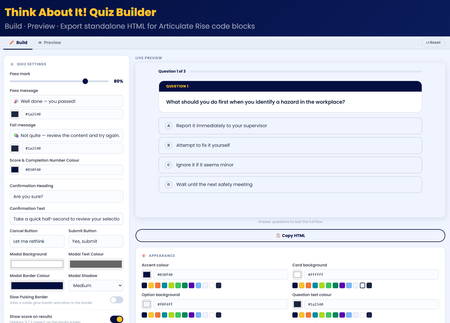
💡My take on the challenge: I looked at this from a slightly different perspective. Building a quiz is easy! so I wanted to create something useful for the entire community. I didn't just create a quiz, I built an app right inside Rise that allows users to craft, preview, and export their own high-impact, standalone quiz right inside Rise for use in their own courses. Everything in the quiz is customisable! Use it along with the native rise style and format block controls to create something amazing! 🖥️ The tech bit! The tool is a dynamic, client-side web application built using HTML, CSS, and Vanilla JavaScript. It allows you to build, configure, and export self-contained, interactive quiz blocks engineered specifically for code block iframe integration within Rise. 🔎LMS/Rise Compatibility & Performance The exported codebase is mathematically pure Vanilla JavaScript (ES5 standard for runtime compatibility). I hope you enjoy it 😊 Think About It!! Quiz With Quiz BuilderPatient Safety Reflection Pop Out
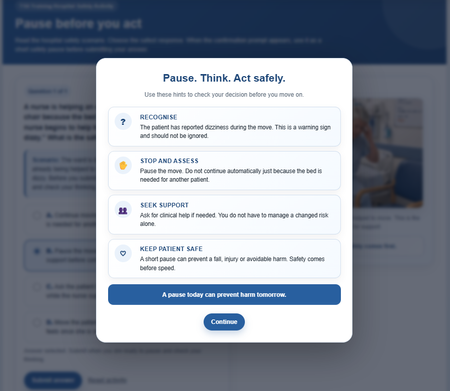
Hello Fellow eLearning Developing Friends. 🙂 Below I've designed a hospital safety interaction in Rise ( Code Block) and Storyline using an “Are you sure?” prompt. Instead of moving straight to feedback, learners pause, review risk cues and reflect before submitting. I may also add subtle correct and incorrect sound effects, plus two or three linked questions within the case study to deepen reflection. I hope you like it, and I’d welcome any ideas to improve it further. I will update the link later with the remaining work also. Best N DEMO LINKPause, Confirm, Continue: A Confirmation Prompt Demo
For my demo, I explored how confirmation prompts can do more than just validate an action. Throughout the course, learners encounter simple prompts that encourage them to pause and confirm before moving forward—whether it's understanding the course navigation, acknowledging key concepts, or preparing for a quiz. I often use these types of prompts in my eLearning projects, especially for navigation. They help learners feel more in control of their experience while ensuring they don't miss important information. Sometimes, a simple "Are you sure?" can improve engagement and create a smoother learning journey. Demo: https://sarkgcreation.com/ELC555C/“Are You Sure?” in E-Learning #555
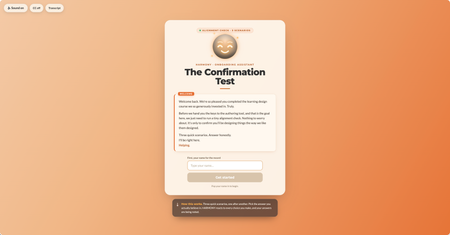
This week I wanted to lean into the spirit of the confirmation prompt, that moment of pause, of reconsideration, and ask: what if that pause wasn't entirely on your side? The scenario: you're an internal team member who's just come back from a learning design course. You have the master learning design authoring tool. Before you're allowed near the authoring tool, the org's AI guide HARMONY needs to run a quick "Confirmation Test." Three scenarios. Shouldn't take long. HARMONY is very helpful. The "Are you sure?" mechanic does something a little different here. I'll leave it at that. 🙂 A few craft notes for anyone interested in the build: The confirmation prompt UX is deliberately asymmetric; the buttons don't behave the same way depending on which answer you're leaning toward HARMONY has two states that shift based on your choices throughout Three different endings based on your answer tally The fake "analysis" stage has a silent jury. You'll see. I have a lot of fun with Claude Design, Code and all things Claude Would love to know which ending you hit, and whether any of the scenarios felt a little too close to home. 👀 Are you a conformist or a rebel? Find out here Confirmation Test Thanks to DavidAnderson and the Articulate 360 Account Management team for the prompt; this one was a lot of fun. #ElearningChallengeA Cozy Minute
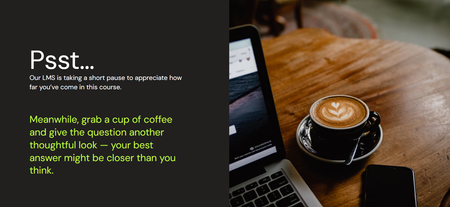
In this example, my goal is to create a gentle, learner-centered pause that feels supportive and caring 🤗 Techniques Used Friendly microcopy and positive reinforcement. A cozy coffee-break metaphor. Personification of the LMS as a supportive presence. Impact on the Learner The approach acknowledges potential cognitive overload and normalizes short pauses during learning. By making the LMS feel attentive and caring, it reinforces that the learner’s effort and answers matter. As a result, a waiting moment becomes an opportunity for reflection and greater confidence in the final answer.