instructional design
235 TopicsFrom Prompt to Parking: A Small Learning Experience
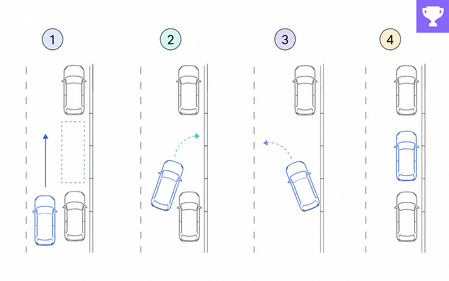
For this challenge, I experimented with using prompts to create a small learning experience in ChatGPT Sites. The result is a short parallel-parking example that moves from a title image to a brief story and then into an animated step-by-step interaction. It is not intended as a full demonstration of FLaM. It is a small test of how consistently a visual language and a functional learning flow can be translated into a working prototype through prompting. I refined the prompts iteratively—especially the story image, the layout, and the movement of the car—until the interaction behaved as intended. View project here: www.linkedin.com/in/hillaschlegel64Views1like0CommentsThink About It!! Quiz, with Quiz Builder
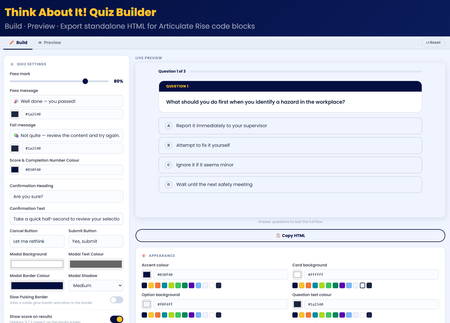
💡My take on the challenge: I looked at this from a slightly different perspective. Building a quiz is easy! so I wanted to create something useful for the entire community. I didn't just create a quiz, I built an app right inside Rise that allows users to craft, preview, and export their own high-impact, standalone quiz right inside Rise for use in their own courses. Everything in the quiz is customisable! Use it along with the native rise style and format block controls to create something amazing! 🖥️ The tech bit! The tool is a dynamic, client-side web application built using HTML, CSS, and Vanilla JavaScript. It allows you to build, configure, and export self-contained, interactive quiz blocks engineered specifically for code block iframe integration within Rise. 🔎LMS/Rise Compatibility & Performance The exported codebase is mathematically pure Vanilla JavaScript (ES5 standard for runtime compatibility). I hope you enjoy it 😊 Think About It!! Quiz With Quiz BuilderPatient Safety Reflection Pop Out
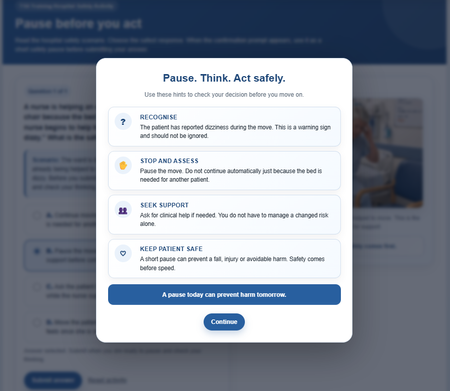
Hello Fellow eLearning Developing Friends. 🙂 Below I've designed a hospital safety interaction in Rise ( Code Block) and Storyline using an “Are you sure?” prompt. Instead of moving straight to feedback, learners pause, review risk cues and reflect before submitting. I may also add subtle correct and incorrect sound effects, plus two or three linked questions within the case study to deepen reflection. I hope you like it, and I’d welcome any ideas to improve it further. I will update the link later with the remaining work also. Best N DEMO LINKPlanning Your Localized E-Learning Projects
In this age of globalization and multinational organizations, companies want to deliver online training that will reach worldwide audiences. The result is e-learning content that needs to be tailored specifically for each cultural group. If you’ve ever had to design or develop a multilingual e-learning course, you know firsthand that developing content for multiple languages can be a heavy lift. This is especially true if you haven’t put in place early the proper planning measures to make the process smooth and effective. This article will identify what you need to know up front (long before any development begins!) to effectively localize or tailor e-learning content for a variety of cultural audiences. Understand the concept of localization When it comes to getting a course out in multiple languages, it’s a common misconception that all you need to do is translate the written content. There’s often confusion about the differences between translation and localization. Translation is the process of translating text and words from one language to another without making any adaptations. Localization is the process of translating and adapting content for a specific culture. It often involves making changes not only to the text but also to imagery, tone, colors, currencies, and more, to account for cultural and regional differences. In many situations, simply translating the text in a course is not enough; you need to adapt the content in order for it to make sense for learners across cultural barriers. For example, let’s say you’re developing an e-learning course for a multinational delivery service. The course is for delivery staff based in the US and India on how to safely deliver packages on time. In addition to translating the text from English to Hindi, you need to adapt the content itself to take into account local driving and workplace safety laws. You should also consider updating the imagery to more accurately reflect the learner's home environment. For example, the American version of the course might show background images of busy streets in New York City. For the Indian version of the course, those could be swapped out with images of the streets of Mumbai. The two cities look very different and each have distinct architectural styles, roadways, and vehicles. Additionally, an image of a delivery vehicle in the American course might show a cube van or bicycle; the Indian version might be a tuk-tuk or a rickshaw. These changes in imagery make the course more meaningful and relevant to the learner. Plan for localization up front The key to a successful localized project is to plan every step of the localization process from the get-go. You want to keep your multicultural audience in mind from the beginning to avoid quality issues, save time, and ensure a smooth localization process. Things to consider when you’re in the project planning phase include: Identify the target markets and languages you want to localize for You need to determine early on which languages you’ll be localizing for. Keep in mind that even though your learners may speak the same language, you may need to create multiple courses to take into account regional differences. For example, a course developed in Spanish might not work for both Mexico and Spain. Why not? In addition to the many linguistic differences between Mexican and Iberic Spanish, there are regional differences that need to be considered, for example: different products, procedures, laws, technical standards, and currencies. Plan to build in one language first It’s a good idea to plan to design, develop, and deliver the course in one language BEFORE localizing the course into other languages. If you develop all of your courses in tandem, you’ll find yourself doing a lot of re-work. To illustrate: imagine a Subject Matter Expert asks you to change two paragraphs in your course. It’s a lot easier (and more cost effective!) to do it in one language than in five different languages. Once the first course is complete, you can save time by localizing your course into the other languages at the same time. Plan extra time for development and testing It might seem obvious, but you’re going to need more development time when you’re building a course in multiple languages. In addition to developing the course in the first language, you’ll need time to adapt it to every other language, which will include development, testing, and review steps. It’s a good idea to plan for the localization process by adding in extra development and testing time to your project plans and timelines. Find the right localization resources Having the right resources in place can make the translation and localization process run more efficiently and smoothly. Resources include the tools and the people you’ll bring on board for your localization process. Authoring tool When you’re going to be translating an e-learning course into multiple languages, it’s a good idea to investigate ahead of time what translation features and multilingual options are available within the authoring tool you’re using. For example, Articulate Storyline 360 offers the ability to export text for translation and then re-import it, saving lots of development time. This is good to know up front, so you can plan your project and allocate time and resources accordingly. Translators The quality and experience of your translation team will have a huge impact on the caliber of the final localized output. When it comes to working with translators, it helps to find translation professionals who have experience with your industry or subject matter. When the translation team has even a basic understanding of the content they are working with, it makes a huge difference in helping them ensure it all makes sense and works. In terms of hiring translators, your options are generally a professional agency or a single contractor or freelancer. They each come with their own set of pros and cons. Professional Agency Pros Cons They will handle all the project management for all the languages. They often offer voice-over professionals for all languages. They sometimes offer to do the translation directly in your tool of choice. The quality is often not as high. Because at a large agency the translators do not know you personally and are not that invested in your project. Also, you work with a variety of translators who may each have a slightly different style, which could be reflected in the final output. Freelancer/Contractor Pros Cons The quality tends to be higher, as usually freelancers need to provide a good service in order to maintain a good reputation, stay in business, and ensure repeated business and future contracts. It’s often cheaper to work directly with a translator because they don’t have high overhead costs to cover. Takes more time to find, hire, and manage freelancers than it does to work with an agency. They may not offer project management, voice-over services, and more. Voice-Over or Narration Professionals If your project includes narration, you’re going to need resources to narrate in a variety of languages. If you’re working with a localization agency, as noted above, they may offer narration or voice-over services. If not, you’ll need to recruit voice actors for each language. Keep in mind when you’re on the hunt for a voice actor that differences in local dialects and accents can make a huge difference to your learners. For example, Australian and New Zealand accents may sound similar to an outsider, but to the locals they are completely different! Finding the right voice for your project can take time, so account for this in your project plans, as well as the time required to record in multiple languages. QA Testers Testing and quality assurance review is an important part of creating an effective and high-quality multilingual course. During the project planning phase, identify resources for the testing and quality assurance phase of your course development. What should you look for in your testers? They should be proficient in both the original course language as well as the language they are testing, so they can compare both versions and ensure the message is consistent. The tester also needs to be a good writer, with strong spelling, punctuation, and grammar skills, so they can spot mistakes in the written content. These are just some of the things to consider when planning a localized e-learning project. Remember that up-front planning will eliminate a lot of headaches and help ensure a smoother process and better end result. What tips of your own do you have about planning for localized projects? Let me know in the comments! Follow us on Twitter and come back to E-Learning Heroes regularly for more helpful advice on everything related to e-learning. If you have any questions, please share them in the comments.1.6KViews2likes14CommentsDo’s and Don’ts of Writing Effective Multiple Choice Questions
Multiple choice questions (MCQ) are a commonly used and super-versatile question type. They can be used to assess various types of learning, from testing knowledge of basic facts and concepts to crafting thoughtful scenario-based questions. There are many possibilities with multiple choice questions, but it’s important to remember that with multiple choice questions, learners are choosing from a set of potential answers. This means the correct answer is given away in the choices. If you need a learner to recall information without any prompting or guidance, then MCQs might not be the right choice for you. Let’s take a closer look at the two parts of an MCQ: Stem: This states the problem or the question. Alternatives: This is a list of suggested choices. There are two kinds of alternatives: key: the correct or best alternative; the right answer. distractors: incorrect or inferior alternatives; incorrect choices. Whether it’s your first time writing quiz questions or you’ve been doing it for years, following are tips and guidelines you can follow to craft effective multiple choice questions: Do use plausible distractors Plausible distractors are one of the keys to writing effective MCQs. You want your incorrect choices to pose a challenge to your learners, causing them to pause and think about which answer is correct. Obviously incorrect or outrageous distractors defeat the entire purpose of your quiz, because they don’t make learners think. In fact, using them means you’re just giving away the correct answer. Coming up with plausible distractors can be quite challenging, so it might be helpful to talk with a Subject Matter Expert (SME), employee, or stakeholder who can provide crucial insights into the content. It can be helpful to identify common errors or mistakes and then incorporate that information into the distractors. It’s also a best practice to avoid “none of the above” and “all of the above” as distractors. They tend to be easy fallbacks that people use instead of crafting more meaningful, authentic distractors. The same goes for “true or false” questions; these are best avoided if you want to truly test knowledge and challenge your learner. Don’t give clues In order to make an MCQ fair and challenging, it’s best to refrain from including clues about which alternative is the correct one. Sophisticated learners may be on guard for inadvertent clues to the correct answer, such as differences in length or formatting of the alternatives. It’s therefore important that your alternatives are similar in both length and language. It’s also smart to avoid unintentionally giving away an answer to a question in another part of the quiz. Another clue learners may be on the lookout for is the use of extremes. Try to avoid using the words “never,” “always,” and “only” in your distractors. It’s also wise to steer clear of outlandish or unreasonable statements; that’s a dead giveaway of a distractor. Do balance placement of correct alternatives Correct answers (also known as “the key”) tend to be placed as the second and third option in a list of choices. Keep this in mind when you randomize your question choices. Have a mix of key placement, as first, second, and third choice. If you’re using an authoring tool that lets you randomize the order of choices (such as Articulate Storyline 360), you should go ahead and enable that feature. Don’t use negative questions The negative question asks learners to choose the answer that is incorrect; it’s one way that test designers try to challenge or “trip up” the learners. I personally think it’s best to avoid questions that are intentionally (or unintentionally!) misleading. Here’s an example of a negative question: Which of the following is not a company policy? Eating in your workspace Using the computer for personal use Taking a monthlong sabbatical Isn’t that confusing? Negative questions often lead to situations where learners have to work hard simply to decipher complicated choices and understand the question before they can even begin looking for the right answer. Do use other question types! Let’s face it: multiple choice questions tend to be overused. They are a crutch that instructional designers fall back on time and time again. Next time you’re considering using an MCQ, ask yourself: Is there a different or more original way of presenting this question? Would a matching drag-and-drop activity be more appropriate? Would a hot-spot interaction work instead? Try to think outside the box and be creative with the types of quiz questions you use. Mixing it up will also make your content more varied and interesting for your learners. Here’s a great article about Matching Question Types with the Skills You’re Testing. By following this list of do’s and don’ts, you’ll be well on your way to crafting engaging multiple choice questions with thoughtful choices that challenge your learners. Follow us on Twitter and come back to E-Learning Heroes regularly for more helpful advice on everything related to e-learning. If you have any questions, please share them in the comments.2.5KViews0likes8CommentsPause, Confirm, Continue: A Confirmation Prompt Demo
For my demo, I explored how confirmation prompts can do more than just validate an action. Throughout the course, learners encounter simple prompts that encourage them to pause and confirm before moving forward—whether it's understanding the course navigation, acknowledging key concepts, or preparing for a quiz. I often use these types of prompts in my eLearning projects, especially for navigation. They help learners feel more in control of their experience while ensuring they don't miss important information. Sometimes, a simple "Are you sure?" can improve engagement and create a smoother learning journey. Demo: https://sarkgcreation.com/ELC555C/