instructional design
28 TopicsMy New “Missed Questions Only” Quiz Format for Rise 360.
One quiz. Many chances. Zero wasted time Ever wished you could skip the boring parts of a quiz and just focus on what you got wrong? Well, now you can. I’ve created a “Missed Questions Only” quiz — a smarter, faster way to learn. Instead of starting from scratch, you get a second chance only at the questions you missed. No wasted time, no repeating what you already know — just targeted practice that helps you master the tricky stuff and hit that perfect score. It’s like a quiz with a built-in comeback round — your mistakes become your roadmap to success. Ready to turn wrong answers into wins? Give it a try and see how well you know your fun facts. 🔗 Rise Link: https://360.articulate.com/review/content/7126ec89-ff0c-4595-bac3-a0fe5e2c6a26/review 🖥️ Code Block: Copy the code below. 📄 Template: See an example of my template for organizing images, questions, answers, and each JS snippet. <div id="quiz-app"> <div class="quiz-card"> <div class="quiz-header"> <div> <div class="quiz-label">Fun Facts Quiz</div> <h2 id="quiz-title">Quiz</h2> </div> <div class="quiz-status"> <span id="round-badge">Round 1</span> <span id="progress-text">Question 1 of 1</span> </div> </div> <div id="scorebar" class="scorebar"> <div>Correct: <strong id="correct-count">0</strong></div> <div>Incorrect: <strong id="incorrect-count">0</strong></div> <div>Remaining in Round: <strong id="remaining-count">0</strong></div> </div> <div id="question-container"> <img id="question-image" src="" alt="Question Image" style="max-width:100%; border-radius:12px; margin-bottom:16px; display:none;" /> <div id="question-text" class="question-text"></div> <div id="answers" class="answers"></div> <div id="feedback" class="feedback"></div> </div> <div class="quiz-actions"> <button id="next-btn" disabled>Next</button> <button id="retry-btn" style="display:none;">Retry Missed Questions</button> <button id="restart-btn" style="display:none;">Restart Full Quiz</button> </div> </div> </div> <style> /* Same styling as before */ * { box-sizing: border-box; } body { margin: 0; font-family: Arial, Helvetica, sans-serif; background: #f4f7fb; color: #1f2937; } #quiz-app { max-width: 900px; margin: 0 auto; padding: 20px; } .quiz-card { background: #ffffff; border: 1px solid #dbe4f0; border-radius: 16px; padding: 24px; box-shadow: 0 8px 24px rgba(0,0,0,0.06); } .quiz-header { display: flex; justify-content: space-between; align-items: start; gap: 16px; margin-bottom: 18px; } .quiz-label { font-size: 12px; font-weight: 700; letter-spacing: .08em; text-transform: uppercase; color: #2563eb; margin-bottom: 6px; } .quiz-header h2 { margin: 0; font-size: 28px; } .quiz-status { display: flex; flex-direction: column; gap: 8px; align-items: flex-end; font-size: 14px; } .quiz-status span { background: #eef4ff; color: #1d4ed8; padding: 8px 12px; border-radius: 999px; font-weight: 600; } .scorebar { display: flex; flex-wrap: wrap; gap: 12px; margin-bottom: 22px; padding: 12px; background: #f8fafc; border: 1px solid #e5e7eb; border-radius: 12px; font-size: 14px; } #question-image { display: block; /* ensure image is shown */ max-width: 920px; /* maximum width */ max-height: 300px; /* maximum height */ width: 100%; /* scale to container width if smaller */ height: auto; /* maintain aspect ratio */ margin: 0 auto 16px auto; /* center horizontally with bottom margin */ object-fit: contain; /* scale image without cropping */ border-radius: 12px; /* consistent border radius */ background-color: #f3f4f6; /* subtle background color for empty space */ } .question-text { font-size: 22px; font-weight: 700; line-height: 1.35; margin-bottom: 20px; } .answers { display: grid; gap: 12px; } .answer-btn { width: 100%; text-align: left; border: 2px solid #d1d5db; background: #fff; color: #111827; border-radius: 12px; padding: 14px 16px; font-size: 16px; cursor: pointer; transition: .2s ease; } .answer-btn:hover:not(:disabled) { border-color: #93c5fd; background: #f8fbff; } .answer-btn:disabled { cursor: default; opacity: 1; } .answer-btn.correct { border-color: #16a34a; background: #ecfdf3; color: #166534; font-weight: 700; } .answer-btn.incorrect { border-color: #dc2626; background: #fef2f2; color: #991b1b; font-weight: 700; } .feedback { margin-top: 18px; min-height: 28px; font-size: 16px; font-weight: 600; } .feedback.correct { color: #15803d; } .feedback.incorrect { color: #b91c1c; } .quiz-actions { display: flex; gap: 12px; margin-top: 22px; flex-wrap: wrap; } .quiz-actions button { border: none; border-radius: 10px; padding: 12px 18px; font-size: 15px; font-weight: 700; cursor: pointer; } #next-btn { background: #2563eb; color: #fff; } #next-btn:disabled { background: #9ca3af; cursor: not-allowed; } #retry-btn { background: #f59e0b; color: #fff; } #restart-btn { background: #111827; color: #fff; } .final-message { padding: 18px; border-radius: 14px; background: #effaf3; border: 1px solid #86efac; color: #166534; font-size: 18px; line-height: 1.5; } .small-note { margin-top: 10px; font-size: 14px; color: #4b5563; } MeDia (max-width: 640px) { .quiz-header { flex-direction: column; align-items: flex-start; } .quiz-status { align-items: flex-start; } .question-text { font-size: 20px; } } </style> <script> // Questions with imageUrl placeholder (replace URLs with your uploaded Rise 360 images) const fullQuiz = [ { question: "Which animal can sleep standing up?", imageUrl: "https://images.articulate.com/f:jpg,a:retain,b:fff,w:1680,q:90/rise/courses/YLUYT4CI3ckYMonl07a4CHihYXT3CnUJ/z45b6W_xMLJUUJld.jpg", options: ["Horse", "Dog", "Penguin", "Kangaroo"], answer: "Horse" }, { question: "What is the only food that essentially never spoils?", imageUrl: "https://articulateusercontent.com/rise/courses/Kg8aAYIS9RJvSNl0YFM3mOw3o8OQbz5c/MddUJBQTsySlOvqv.jpg", options: ["Rice", "Honey", "Peanut butter", "Chocolate"], answer: "Honey" }, { question: "True or False: Bananas are berries, but strawberries technically aren’t.", imageUrl: "https://articulateusercontent.com/rise/courses/Kg8aAYIS9RJvSNl0YFM3mOw3o8OQbz5c/GSei0ep7BuNe7mfL.png", options: ["True", "False"], answer: "True" }, { question: "What is a group of flamingos called?", imageUrl: "https://articulateusercontent.com/rise/courses/Kg8aAYIS9RJvSNl0YFM3mOw3o8OQbz5c/9bCYyNGee1QQRUWC.jpg", options: ["A flock", "A flamboyance", "A parade", "A bouquet"], answer: "A flamboyance" }, { question: "Which country has more pyramids than any other country in the world?", imageUrl: "https://articulateusercontent.com/rise/courses/Kg8aAYIS9RJvSNl0YFM3mOw3o8OQbz5c/srrP1z5U7J1QaYow.jpeg", options: ["Egypt", "Mexico", "Sudan", "Peru"], answer: "Sudan" }, { question: "Which animal has fingerprints so similar to humans that they can be difficult to tell apart?", imageUrl: "https://articulateusercontent.com/rise/courses/Kg8aAYIS9RJvSNl0YFM3mOw3o8OQbz5c/z32I4pCG_PvYZDUD.jpg", options: ["Chimpanzee", "Koala", "Raccoon", "Sloth"], answer: "Koala" }, { question: "How many hearts does an octopus have?", imageUrl: "https://articulateusercontent.com/rise/courses/YLUYT4CI3ckYMonl07a4CHihYXT3CnUJ/1EOT8Ml6xu2_Lmvd.png", options: ["1", "2", "3", "8"], answer: "3" }, { question: "Which fruit floats in water because about 25% of its volume is air?", imageUrl: "https://articulateusercontent.com/rise/courses/Kg8aAYIS9RJvSNl0YFM3mOw3o8OQbz5c/kRIyy568MhLPiEFd.jpg", options: ["Apple", "Orange", "Grape", "Strawberry"], answer: "Apple" }, { question: "What is the national animal of Scotland?", imageUrl: "https://images.articulate.com/f:jpg,a:retain,b:fff,w:1680,q:90/rise/courses/YLUYT4CI3ckYMonl07a4CHihYXT3CnUJ/Tl89HrMYH0AyvzF2.jpg", options: ["Highland cow", "Golden eagle", "Unicorn", "Red deer"], answer: "Unicorn" }, { question: "True or False: A day on Venus is longer than a year on Venus.", imageUrl: "https://articulateusercontent.com/rise/courses/Kg8aAYIS9RJvSNl0YFM3mOw3o8OQbz5c/WBnprMTKTGmJCPre.jpg", options: ["True", "False"], answer: "True" }, { question: "What is a group of crows called?", imageUrl: "https://articulateusercontent.com/rise/courses/Kg8aAYIS9RJvSNl0YFM3mOw3o8OQbz5c/QhTq5yGSSxZC45ZF.jpg", options: ["A mystery", "A murder", "A mob", "A shadow"], answer: "A murder" }, { question: "What is a group of owls called?", imageUrl: "https://articulateusercontent.com/rise/courses/Kg8aAYIS9RJvSNl0YFM3mOw3o8OQbz5c/d_g79Dx03aWnVP2S.jpg", options: ["A parliament", "A council", "A jury", "A congress"], answer: "A parliament" }, { question: "What is a group of giraffes called?", imageUrl: "https://articulateusercontent.com/rise/courses/YLUYT4CI3ckYMonl07a4CHihYXT3CnUJ/-jRiKJcZZX1mWlfh.jpg", options: ["A tower", "A skyscraper", "A stretch", "A column"], answer: "A tower" }, { question: "What is a group of rhinos called?", imageUrl: "https://articulateusercontent.com/rise/courses/Kg8aAYIS9RJvSNl0YFM3mOw3o8OQbz5c/jilS2EvEMWFQCHLN.jpg", options: ["A crash", "A charge", "A stampede", "A rumble"], answer: "A crash" }, { question: "What is a group of porcupines called?", imageUrl: "https://articulateusercontent.com/rise/courses/Kg8aAYIS9RJvSNl0YFM3mOw3o8OQbz5c/WwtKh0xFKUgG07x1.jpg", options: ["A pricker", "A prickle", "A pincushion", "A spike"], answer: "A prickle" }, { question: "What is a group of zebras called?", imageUrl: "https://articulateusercontent.com/rise/courses/YLUYT4CI3ckYMonl07a4CHihYXT3CnUJ/G-vljexS-nyS4lg3.jpg", options: ["A dazzle", "A stripe", "A blur", "A flash"], answer: "A dazzle" }, { question: "What is a group of hippos called?", imageUrl: "https://articulateusercontent.com/rise/courses/Kg8aAYIS9RJvSNl0YFM3mOw3o8OQbz5c/M-1LbZ5VHqL28Ez4.jpg", options: ["A splash", "A bloat", "A barrel", "A wallow"], answer: "A bloat" }, { question: "What is a group of ferrets called?", imageUrl: "https://articulateusercontent.com/rise/courses/Kg8aAYIS9RJvSNl0YFM3mOw3o8OQbz5c/ob7XOK2dtuA2btB-.jpg", options: ["A mischief", "A trouble", "A business", "A chaos"], answer: "A business" }, { question: "What is a group of ravens called?", imageUrl: "https://articulateusercontent.com/rise/courses/YLUYT4CI3ckYMonl07a4CHihYXT3CnUJ/L6_Yxla0T9t97Qx8.jpg", options: ["An unkindness", "A darkness", "A conspiracy", "A haunting"], answer: "An unkindness" }, { question: "What is a group of bears called?", imageUrl: "https://articulateusercontent.com/rise/courses/Kg8aAYIS9RJvSNl0YFM3mOw3o8OQbz5c/5fA5geB-XbftAeB6.jpg", options: ["A grumble", "A sleuth", "A lumber", "A maul"], answer: "A sleuth" } ]; let currentQuiz = []; let currentIndex = 0; let selectedAnswer = null; let totalCorrect = 0; let totalIncorrect = 0; let roundNumber = 1; let missedQuestions = []; const questionContainer = document.getElementById("question-container"); const questionImage = document.getElementById("question-image"); const questionText = document.getElementById("question-text"); const answersEl = document.getElementById("answers"); const feedbackEl = document.getElementById("feedback"); const nextBtn = document.getElementById("next-btn"); const retryBtn = document.getElementById("retry-btn"); const restartBtn = document.getElementById("restart-btn"); const correctCountEl = document.getElementById("correct-count"); const incorrectCountEl = document.getElementById("incorrect-count"); const remainingCountEl = document.getElementById("remaining-count"); const progressTextEl = document.getElementById("progress-text"); const roundBadgeEl = document.getElementById("round-badge"); function shuffle(array) { const arr = [...array]; for (let i = arr.length - 1; i > 0; i--) { const j = Math.floor(Math.random() * (i + 1)); [arr[i], arr[j]] = [arr[j], arr[i]]; } return arr; } function prepareQuiz(questions) { return shuffle(questions).map(q => ({ ...q, options: shuffle(q.options) })); } function initQuiz() { currentQuiz = prepareQuiz(fullQuiz); currentIndex = 0; selectedAnswer = null; totalCorrect = 0; totalIncorrect = 0; roundNumber = 1; missedQuestions = []; retryBtn.style.display = "none"; restartBtn.style.display = "none"; nextBtn.style.display = "inline-block"; questionContainer.style.display = "block"; renderQuestion(); updateScore(); } function startRetryRound() { currentQuiz = prepareQuiz(missedQuestions); currentIndex = 0; selectedAnswer = null; missedQuestions = []; roundNumber++; retryBtn.style.display = "none"; restartBtn.style.display = "none"; nextBtn.style.display = "inline-block"; questionContainer.style.display = "block"; renderQuestion(); updateScore(); } function renderQuestion() { const q = currentQuiz[currentIndex]; // Show or hide image depending on if imageUrl is set if (q.imageUrl) { questionImage.src = q.imageUrl; questionImage.style.display = "block"; } else { questionImage.style.display = "none"; } feedbackEl.textContent = ""; feedbackEl.className = "feedback"; nextBtn.disabled = true; selectedAnswer = null; roundBadgeEl.textContent = `Round ${roundNumber}`; progressTextEl.textContent = `Question ${currentIndex + 1} of ${currentQuiz.length}`; remainingCountEl.textContent = currentQuiz.length - currentIndex; questionText.textContent = q.question; answersEl.innerHTML = ""; q.options.forEach(option => { const btn = document.createElement("button"); btn.className = "answer-btn"; btn.type = "button"; btn.textContent = option; btn.addEventListener("click", () => handleAnswer(btn, option, q.answer)); answersEl.appendChild(btn); }); } function handleAnswer(button, chosen, correct) { if (selectedAnswer !== null) return; selectedAnswer = chosen; const buttons = document.querySelectorAll(".answer-btn"); buttons.forEach(btn => btn.disabled = true); if (chosen === correct) { button.classList.add("correct"); feedbackEl.textContent = "Correct!"; feedbackEl.className = "feedback correct"; totalCorrect++; } else { button.classList.add("incorrect"); feedbackEl.textContent = "Incorrect."; feedbackEl.className = "feedback incorrect"; totalIncorrect++; missedQuestions.push(currentQuiz[currentIndex]); } updateScore(); nextBtn.disabled = false; } function updateScore() { correctCountEl.textContent = totalCorrect; incorrectCountEl.textContent = totalIncorrect; remainingCountEl.textContent = currentQuiz.length > 0 ? Math.max(currentQuiz.length - currentIndex - (selectedAnswer ? 1 : 0), 0) : 0; } function goNext() { currentIndex++; if (currentIndex < currentQuiz.length) { renderQuestion(); updateScore(); } else { showRoundResults(); } } function showRoundResults() { questionText.textContent = ""; answersEl.innerHTML = ""; feedbackEl.textContent = ""; questionImage.style.display = "none"; nextBtn.style.display = "none"; if (missedQuestions.length > 0) { questionText.innerHTML = ` <div class="final-message" style="background:#fff7ed;border-color:#fdba74;color:#9a3412;"> <strong>Round ${roundNumber} complete.</strong><br> You have <strong>${missedQuestions.length}</strong> question(s) to retry. <div class="small-note">Click the button below to retake only the questions you missed.</div> </div> `; retryBtn.style.display = "inline-block"; restartBtn.style.display = "inline-block"; remainingCountEl.textContent = missedQuestions.length; } else { questionText.innerHTML = ` <div class="final-message"> <strong>Congratulations!</strong><br> You have answered all questions correctly. <div class="small-note"> Final score: ${totalCorrect} correct, ${totalIncorrect} incorrect attempts. </div> </div> `; retryBtn.style.display = "none"; restartBtn.style.display = "inline-block"; remainingCountEl.textContent = 0; } } nextBtn.addEventListener("click", goNext); retryBtn.addEventListener("click", startRetryRound); restartBtn.addEventListener("click", initQuiz); initQuiz(); </script>143Views1like3CommentsHiring Manager Interview Simulation: A Scenario-Based Final Knowledge Check
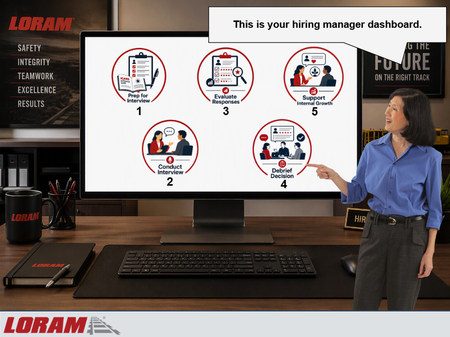
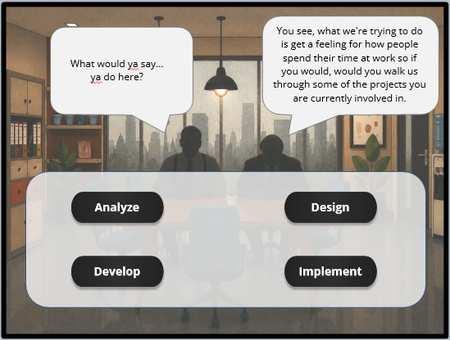
I recently built this scenario-based final knowledge check for the 2nd module in Loram's Talent Acquisition Hiring Manager Training program. Instead of ending the course with a traditional multiple-choice quiz, I wanted learners to apply their knowledge by working through a realistic hiring process from start to finish. In this simulation, the learner takes on the role of a hiring manager at Loram and navigates each stage of the interview lifecycle: - Preparing for the interview using the ICARE Interview Guide - Conducting a behavioral-based interview - Evaluating candidate responses using the STAR method and competency ratings - Participating in an interview debrief discussion - Providing development-focused feedback to an internal candidate The experience is framed as a hiring manager dashboard displayed on a computer screen. Learners interact with different workflow tabs, make decisions throughout the process, and receive coaching from a Talent Acquisition Manager character named Vicki. Incorrect choices trigger consequence-based feedback that demonstrates what can go wrong when interview best practices aren't followed. View this knowledge check here on Review 360: https://360.articulate.com/review/content/831cda88-b5f5-49e3-9567-ce4f38bfb303/review Design Goal My goal was to move beyond knowledge recall and create a practical simulation that mirrors the real hiring decisions Loram managers make throughout the interview process using gamification. I wanted learners to experience the entire interview lifecycle while reinforcing key concepts such as: Structured interviewing Behavioral-based interviewing STAR methodology Objective candidate evaluation Interview debriefs Internal candidate development conversations Consistent and compliant hiring practices Development Notes A few design choices I incorporated: Scenario-based decision making using gamification instead of a traditional quiz Character-driven coaching and feedback Consequence-based remediation for incorrect decisions Progressive workflow that mirrors Loram's actual hiring process Visual dashboard interface to increase immersion Focus on realistic workplace situations rather than obvious right-or-wrong answers Internal and external candidate scenarios to reflect real hiring manager responsibilities Tools Used Articulate Storyline 360 States, layers, variables, and triggers Scenario-based branching Microsoft Copilot AI-generated visual assets Custom dashboard-style interface design What I Learned One of the biggest challenges was balancing realism with brevity. Hiring conversations can be complex, so I focused on creating concise scenarios that still felt authentic in partnership with my subject matter experts and reflected the decisions Loram hiring managers make before, during, and after interviews. I also wanted learners to understand not only what the correct decision was, but why it mattered. The consequence-based feedback allowed me to reinforce concepts like preparation, objective evaluation, documentation, compliance, and employee development in a way that felt more realistic than traditional quiz feedback. I'd love to hear how others approach scenario-based assessments or realistic workplace simulations in their eLearning projects!268Views1like2CommentsSelf Assessment Builder
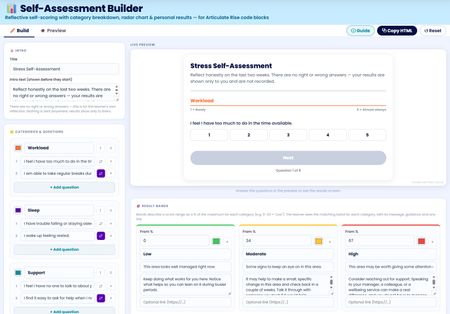
I've built a free self assessment builder tool you can use right inside Rise. You can use this to build your custom self assessments to use in your Rise courses. After completing the assessment users can view, save or print their results. I'll be adding this to my Rise Canvas tool in the next update. Any feedback to add features or improve is welcomed. Self Assessment Builder Tools used: Canva, Gemini and Rise Canvas532Views4likes2Comments3 Copy-Paste Storyline JS Interactions (Confetti, Progress Bar, Timer)
Hey everyone — long-time Storyline builder here. I kept running into the same wall: I wanted confetti on quiz wins, a real progress bar, and timed questions, but every solution I found was either a forum snippet with no instructions or an expensive subscription product. So I built my own set of 10 JavaScript interactions, tested each one by hand in a real Storyline project, and wrote beginner-proof setup guides for all of them (exact variable names, literal click paths, wiring recipes, test checklists — no "figure it out yourself" steps). I'm giving away 3 of them free — confetti burst, course progress bar, and countdown timer: https://ronaldhicks.gumroad.com/l/storyline-js-sampler Each one is a single paste-ready snippet plus plain Storyline variables. No JavaScript experience needed. Works in Storyline 360 and Storyline 3, including LMS/SCORM wrappers. If you find them useful, the full pack of 10 is $19 — but the sampler is free forever, no strings attached. Hope these save somebody an afternoon.153Views1like0CommentsI Built a Japanese Course So I Can Find a Bathroom in Osaka
My son moved to Japan. We visit in March, and I did not want to be the woman standing in a train station pointing at things and hoping. So I did what we all do with a personal problem. I turned it into a course. 🙃 It is five Code Blocks and forty-five phrases, and I want to be honest about the scope: this is not a Japanese course. You will not be fluent. You will not be having conversations. You will still be pointing at things sometimes. What you get is enough to find a bathroom, get on the right train, order food, and be polite while you do it. Survival Guide to Japanese354Views5likes4CommentsScenario-Based Quiz: Recognizing, Preventing, & Reporting Harassment
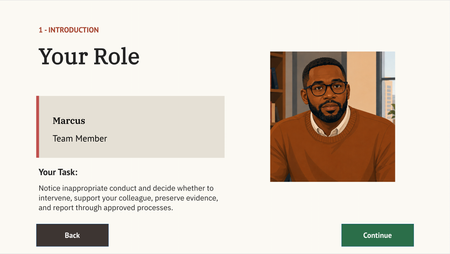
About For an instructional design & eLearning developer portfolio project, I created a fictional scenario quiz about reporting harassment using Articulate Storyline and generative AI characters. Links To learn more about this project visit my portfolio. You can also view the published Storyline project here. To see the full course that the scenario quiz was embedded into, view the course. Screens View select screens from the Articulate Storyline file below: You are welcome to let me know if you have questions or suggestions!544Views1like3CommentsADDIE Adventure
I was once again checking out the different projects that people have shown off and DavidTaits Escape Room | E-Learning Heroes caught my attention. I appreciated his explanation on ho he had the transitions work. During my recent 1on1s with my leader, she challenged me to look into the ADDIE model. At The same time I had been experimenting with some new technical "programming" in storyline while also trying to recreate some of Davids design and I mistakenly mixed some of my ADDIE learning into the SL learning and accidently made a little ADDIE adventure learning module. I was trying to find a way to take information from a drag and drop or multiple choice question and use it in a later slide in order to give more in depth feedback. My solution was to have multiple states for the drop area that translated into a numeric variable that could be recalled later on for more in depth feedback. In my version you find info on each stage of the ADDIE model and then have to use that to determine how to Analyze some issues a team is having and break it up into categories; if the issues are training related, environment related or a knowledge/skill issue. Then look at options for how to design a course and which elements you want to include, from simulations to if a cat video is necessary. Decide which Development tools are best for the task at hand. Is Storyline, Canva, Photoshop, Rise or PowerPoint the way to go. Finally order the best steps for implementation. Once those are completed you will go to a meeting and see if your answers are what management was looking for and get 1 of 5 endings based on those results. ADDIE Adventure | Review 360454Views2likes3CommentsImproving Our Responses
A Communication Skills Module for Support Teams Support specialists send hundreds of merchant responses daily. Technically correct but poorly written replies drive repeat contacts, escalations, and low satisfaction scores. To fix this, I designed a 20-minute Rise 360 module using real email exchanges from live cases. Learners spot what broke down in actual responses, rewrite them, and get immediate targeted feedback tied to specific communication principles. Learners walk away with a practised framework for written communication — and a measurable reduction in repeat contacts caused by unclear or incomplete responses. Format: Self-paced eLearning · Duration: 20 minutes · Authoring tool: Articulate Rise 360120Views0likes1CommentHow About a Progress Bar?
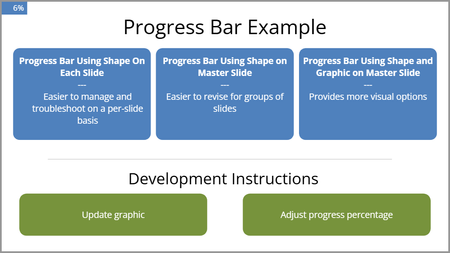
We needed a progress bar for several projects, so I created one that would be no too intrusive, easy to modify, and easy to implement. There are three versions in this file. The progress bar is thin until you hover over it. It uses Java to do the math, round up to whole numbers, and move the progress bar. It uses a true false variable toggle to keep the bar visible. You will have to add the toggle to each layer where you want the progress bar. This example is very bare bones but includes instructions. Please let me know if you might find it useful or how it might be improved. Here is the review link: https://360.articulate.com/review/content/18499632-155c-4461-b75f-fd0450ca01f5/review204Views1like2CommentsGamified Learning | What is 5S
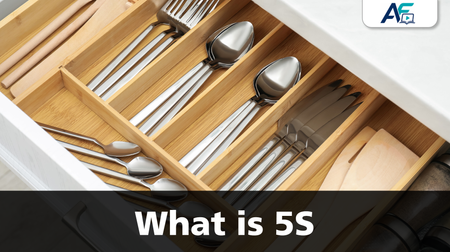
Hi Heroes. I'd like to share a recent project developed for our Supply Chain teams. The course has now been rolled out to over 900 learners and has received very positive feedback. I designed a 15-minute Articulate Storyline course introducing the fundamentals of 5S. The goal was to transform a traditional Lean Manufacturing topic into a more engaging digital learning experience. One of the highlights is a gamified 5S activity. This activity was originally delivered in the classroom using cardboard number cards. Recreating it in Storyline with all sorts of number variables and calculations was a challenge🙃. Some of the features include: Custom-built 5S game using Storyline variables and calculations. Advanced reporting using JavaScript to capture learner responses and game results in an online Excel spreadsheet. Selection of male or female narration. Anyone working in Manufacturing or Continuous Improvement? What topics or activities do you think could be transformed into a gamified learning experience? Link to the course “What is 5S”: https://storage.googleapis.com/fischer_e_learning/SHARE/What%20is%205S/story.html756Views10likes14Comments