navigation
50 TopicsAutomatically Uncheck Restrict Next/Back When Selecting Free
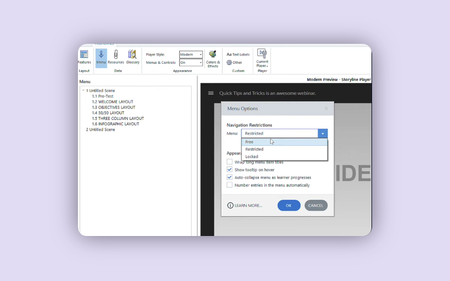
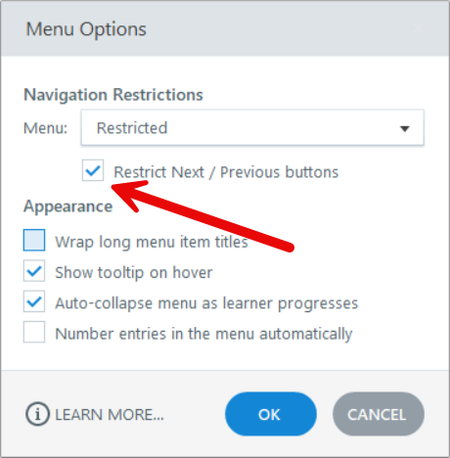
I just discovered this little UX/UI issue! If you have content Restricted with ☑️Restrict Next / Previous selected, as such: And then select Free from the dropdown: It doesn't show that checkbox for Restrict Next / Previous, but it still behaves as if the buttons are restricted when published. To change, you have to go back in, select Restricted from the dropdown, uncheck⬜ Restrict Next / Previous, then re-select Free from the dropdown. My expectation was that, because the checkbox disappeared, selecting Free would automatically disable the restriction of the next and back buttons. It also is not intuitive to fix - I was very puzzled why I couldn't find the setting until I retraced my steps - why would someone change settings to disable a checkbox specific to that setting? An alternative would be just having Restrict Next / Previous not tied to any Menu Navigations Restrictions state.209Views1like2Comments16 Navigation Examples That Skip the Next Button #462
Beyond the Next Button RECAP #462: Challenge | Recap This week's challenge asked course designers to show alternatives to using the next button. Jonathan Hill Example | Jonathan Hill | Website | @DevByPowerPoint Thaddaeus Smith Example | Thaddaeus Smith | Website Jeffrey Riley Example | Jeffrey Riley | Website Jodi M. Sansone Example | Download | Jodi M. Sansone | Website | @jodimsansone Thierry EMMANUEL Example | Thierry EMMANUEL | Website Lee Rhyne Example | Lee Rhyne Ron Katz Example | Download | Learn more | Ron Katz | Website Samuel Apata Example | Samuel Apata | Website | @afrostem Chris Hodgson Example | Learn more | Chris Hodgson | Website | @skriss Laura Hansen Example | Laura Hansen Anna Piasecka Example | Anna Piasecka eLearn Dev Example | Learn more | eLearn Dev Andreas Paul Example | Andreas Paul Sean Wright Example | Sean Wright Rebecca Horne Example | Rebecca Horne Jayashree Ravi Example | Jayashree Ravi | LinkedIn New to the E-Learning Challenges? The weekly challenges are ongoing opportunities to learn, share, and build your e-learning portfolios. You can jump into any or all of the previous challenges anytime you want. I'll update the recap posts to include your demos. If you have a blog, please write about your challenge example. I'll add links to your blog post so your examples get even more exposure. And for those who share your demos on Twitter or LinkedIn, please include #ELHChallenge so your network (and Articulate!) can track your e-learning coolness. Share Your Next Button Alternatives Examples! The next button challenge is still open! If you have one or more ideas you'd like to share, please jump over to the original challenge and post your links in the comments section. I'll update this recap page to include your examples.788Views0likes0CommentsMoving Beyond E-Learning's Next Button #462
Beyond the E-Learning Next Button #462: Challenge | Recap The “Next” button often gets a bad rap in e-learning. It’s commonly associated with linear, information-heavy courses that promote passive learning, leading learners to click through screens without truly engaging with the content. To be fair, the blame doesn’t lie with the Next button itself. Blaming the Next button for boring e-learning is like blaming the Play button for a boring video. For course designers, a good design exercise is to reimagine course navigation without relying on the ubiquitous next button. How would your learners navigate forward and backward? Can you integrate the course content into the navigation? Can interactive objects like sliders, dials, or text-entry fields be used in place of next and back buttons? 🏆 Challenge of the Week This week, your challenge is to show alternatives to using the next button. You can create something new or rework an existing project. Please include the original with your entry if you modify an existing project. Seeing both examples will help users connect the dots between where you started and where you finished. And if you have time, create multiple variations to show how clicks, slides, hovers, drags, and typing can advance learners through the course. 🧰 Resources Check out e-learning challenge #144’s examples to get an idea of what designers came up with in a related challenge. Slide, Drag, and Hover Past the Next Button #144: Challenge | Recap Using Circle Menus in E-Learning #406: Challenge | Recap Interactive Documents with Sliders #300: Challenge | Recap ✨ Share Your E-Learning Work Comments: Use the comments section below to link your published example and blog post. Forums: Start a new thread and share a link to your published example. Personal blog: If you have a blog, please consider writing about your challenges. We'll link to your posts so your great work gets even more exposure. Social media: If you share your demos on Twitter or LinkedIn, try using #ELHChallenge so your tweeps can follow your e-learning coolness. 🙌 Last Week’s Challenge: Before you slide into this week’s challenge, check out the audio interviews your fellow challengers recorded in last week’s challenge: Interviews with E-Learning Challengers RECAP #461: Challenge | Recap 👋 New to the E-Learning Challenges? The weekly e-learning challenges are ongoing opportunities to learn, share, and build your e-learning portfolios. You can jump into any or all of the previous challenges anytime you want. I’ll update the recap posts to include your demos. Learn more about the weekly e-learning challenges in this Q&A post. 📆 Upcoming Challenges Challenge #463 (05.24): Using progressive disclosure in e-learning. Challenge #464 (05.31): Labeled graphics and interactive markers 🚨 2024 Articulate User Conference Call for Proposals We’re now accepting proposals for this year’s in-person user day conference co-hosted at DevLearn in Las Vegas. Learn more about the proposal process.4.9KViews0likes111Comments20+ Ways to Show Learner Progress in E-Learning #409
Showing Progress in E-Learning RECAP #409: Challenge | Recap Discover more than 20 ways course designers show learners' progress to help them feel motivated and empowered. Examples include progress bars, gauges, badges, and much more. Jonathan Hill Example | Download | Learn more | Jonathan Hill | Website | @DevByPowerPoint Jessica Susila Example | Jessica Susila Jodi M. Sansone Example | Download | Jodi M. Sansone | Website | @jodimsansone Karlis Sprogis Example | Download | Karlis Sprogis | Website | @fastercourse Ron Katz Example | Learn more & download | Ron Katz | Website Mark Livelsberger Example | Mark Livelsberger Rachel Moore Example | Rachel Moore Robert Roberts Example | Robert Roberts Mallory Kudrna Example | Mallory Kudrna Norka O-Alcocer Example | norka o-alcocer Sarah Haage Example | Sarah Haage Ange CM Example | Ange CM Maren West Example | Maren West Daniel Canaveral Example | Daniel Canaveral Stephen Taylor Example | Learn more | Stephen Taylor | Website Rema Merrick Example | Rema Merrick | Website Kate Golomshtok Example | Learn more | Kate Golomshtok | Website Jackie Matuza (Upstream) Example | Jackie Matuza | Website Hilla Schlegel Example | Hilla Schlegel Kagan Love Example | Kagan Love | Website Emily Robinson Example | Emily Robinson Ilvija Culkstena Example | Ilvija Culkstena New to the E-Learning Challenges? The weekly challenges are ongoing opportunities to learn, share, and build your e-learning portfolios. You can jump into any or all of the previous challenges anytime you want. I’ll update the recap posts to include your demos. If you have a blog, please consider writing about your challenges. We’ll link back to your posts so the great work you’re sharing gets even more exposure. And if you share your demos on Twitter, please include #ELHChallenge so your tweeps can follow your e-learning coolness. Share Your Progress Bar Examples! The 2023 progress meters challenge is still open! If you have one or more ideas you'd like to share, please jump over to the original challenge and post your links in the comments section. I'll update this recap page to include your examples.301Views0likes0CommentsHow Do E-Learning Designers Show Learner Progress? #409
Showing Progress in E-Learning #409: Challenge | Recap Progress bars are a great way to help learners stay on course by highlighting what they've completed and how far they have left to go. As course designers, you have many ways to display learner progress. There are bars, gauges, badges, page numbers, and more. Progress designs can be playful, functional, or visually aligned with the course content. No matter which design approach you use, keeping learners on track is what this week's challenge is all about! Challenge of the Week This week, your challenge is to show how progress indicators can be used in e-learning. Related Challenges Using Progress Indicators in E-Learning #368: Challenge | Recap\ Badges and Awards in E-Learning Courses #280: Challenge | Recap Using Progress Bars in E-Learning #224: Challenge | Recap Share Your E-Learning Work Comments: Use the comments section below to link your published example and blog post. Forums: Start a new thread and share a link to your published example. Personal blog: If you have a blog, please consider writing about your challenges. We'll link to your posts so your great work gets even more exposure. Social media: If you share your demos on Twitter or LinkedIn, try using #ELHChallenge so your tweeps can follow your e-learning coolness. Last Week’s Challenge: Before you progress through this week's challenge, check out the interactive timelines your fellow community members shared over the past week: Interactive Timeline Examples RECAP #408: Challenge | Recap New to the E-Learning Challenges? The weekly e-learning challenges are ongoing opportunities to learn, share, and build your e-learning portfolios. You can jump into any or all of the previous challenges anytime you want. I’ll update the recap posts to include your demos. Learn more about the challenges in this Q&A post and why and how to participate in this helpful article. Next Week’s Challenge Next week's challenge #410 (Mar 24, 2023): Webcam Video Presentations. That's only a working title. We're looking for webcam video presentations to highlight a project or technique you used in a course. See this example from Kate to get an idea of what the challenge will be about. Got an idea for a challenge? Are you interested in doing a webinar showcasing how you made one or more challenge demos? Or do you have some comments for your humble challenge host? Use this anonymous form to share your feedback: https://bit.ly/ElearningChallengeForm.3.4KViews0likes87Comments30+ Interactive Timeline Examples in E-Learning #408
Interactive Timeline Examples RECAP #408: Challenge | Recap Discover more than 30 ways course designers use interactive timelines to provide learners with a visual way to present a sequence of content chronologically. Alistair McWiggan Example | Alistair McWiggan Jonathan Hill Example | Download | Jonathan Hill | Website | @DevByPowerPoint Mark Livelsberger Example | Download | Mark Livelsberger Karlis Sprogis Example | Download | Karlis Sprogis | Website | @fastercourse Jodi M. Sansone Example | Download | Jodi M. Sansone | Website | @jodimsansone Ron Katz Example | Download | Ron Katz | Website Jessica Susila Example | Jessica Susila Ciara Lynch Example | Ciara Lynch Sarah Eckert Example | Sarah Eckert Robert Roberts Example | Robert Roberts Thierry EMMANUEL Example | Thierry EMMANUEL Hannah Radant Example | Hannah Radant | Website Daniel Canaveral Example | Daniel Canaveral Elizabeth Pawlicki Example | Elizabeth Pawlicki Hilla Schlegel Example | Hilla Schlegel Norka O-Alcocer Example | norka o-alcocer Rachel Moore Example | Rachel Moore Samuel Apata Example | Download | Samuel Apata | Website | @afrostem Stephen Taylor Example | Stephen Taylor | Website Rema Merrick Example | Download | Rema Merrick | Website Zynthia Martinez Example | Zynthia Martinez Megan Clark Example | Megan Clark Ciara Lynch Example | Ciara Lynch Sarah Haage Example | Sarah Haage Kate Golomshtok Example | Kate Golomshtok | Website Amanda Voydetich Example | Amanda Voydetich Novitus Solutions Example | Novitus Solutions Ange CM Example | Ange CM Yewande Daniel-Ayoade Example | Yewande Daniel-Ayoade Kathleen Callahan Example | Kathleen Callahan Merve Satmaz Example | Merve Satmaz New to the E-Learning Challenges? The weekly challenges are ongoing opportunities to learn, share, and build your e-learning portfolios. You can jump into any or all of the previous challenges anytime you want. I’ll update the recap posts to include your demos. If you have a blog, please consider writing about your challenges. We’ll link back to your posts so the great work you’re sharing gets even more exposure. And if you share your demos on Twitter, please include #ELHChallenge so your tweeps can follow your e-learning coolness. Share Your Interactive Timeline Examples! The 2023 timeline challenge is still open! If you have one or more ideas you'd like to share, please jump over to the original challenge and post your links in the comments section. I'll update this recap page to include your examples.394Views0likes0Comments