reach 360
166 TopicsArticulate 360 User Guides are Moving!
Hey, everyone! As we get ready to say goodbye to 2025 and hello to 2026, we're setting you up for even greater success in the new year. In the next few weeks, we’re moving the user guides you know and love in ELH over to our other documentation database in Product Support! That means you’ll soon have a “one-stop shop" for all of your Articulate 360 documentation needs. This change will also improve the accuracy and responsiveness of Artie, our AI support agent. (Did you know you can ask Artie to find documentation for you instead of searching?) Unifying our databases enables us to analyze usage more deeply so we can better tailor our documentation to meet your needs. Plus, it gives us more options for translating user guides into other languages to serve our global community. Once everything has been transferred, the directories for the individual user guides you depend on (and may have bookmarked), like those for Storyline 360 and Rise 360, will remain available in ELH for your convenience. When you follow the links to the individual articles, they’ll take you to the Product Support knowledge base. We'll have landing pages for each Articulate 360 product there as well. We have a few more things to put in place before flipping the switch, but the transition should be seamless for you when it happens in the next few weeks. Let us know if you have any concerns or questions in the meantime.Solved312Views5likes3CommentsNew Reach 360 Feature on our Product Updates Page
Hello everyone! If you haven't discovered it yet, we now have a whole section of our community dedicated to announcing our product updates. You can subscribe to that page by clicking on the Bell icon so you don't miss out on exciting new feature articles like this one about Reach 360's learner interface now available in multiple languages. Check out the article and let us know your thoughts about this new feature and what additional languages you want to see added.199Views4likes0CommentsCustomize or Change the Contact Person for Questions on Reach 360 Invitation
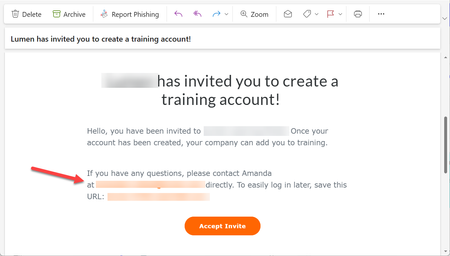
Hi Everyone! I am working to set up Reach 360. I need to customize the contact person and email address in the Reach 360 invitation email that is send to users who are imported. Currently it is showing my own work email address, but I would prefer it show my team's email address. Has anyone found a way to update this information? Here's a screenshot showing what I am hoping to update:163Views3likes1CommentBypassing Navigation Restrictions
I'm building courses in Rise 360 and publishing them to Reach 360. Knowledge checks and continue buttons restrict navigation for learners the first time they complete the course. My issue is that I need supervisors to be able to freely explore courses without navigation restriction. I thought that Quick Share links might work, but lessons are locked if the previous lesson knowledge checks aren't completed. Does anyone have a solution for this?538Views2likes5CommentsReach 360 Managing Users Passwords
Hi, I only have the free account for Reach 360 that comes with the Articulate License. I have a learner who has an issue with their password, but I cannot see anything on how to manage learners and their account settings? The learner has clicked on forgot password link but is not receiving a link to reset their password. Can anyone help with this issues with regards to what I need to do?566Views2likes2CommentsFeedback Overview on Completed Quiz
Hi! I recently got feedback from agents from my team that it would be really beneficial to have the option to check all of the quiz results, with questions answers etc at the end of the quiz, like a report of correct and incorrect answers to questions for verification. I think it would be beneficial to ad such option for learners. Thank you in advance for taking look on it.53Views1like4CommentsShort form content: what does it mean for us, and is anyone actually using Rise microlearning?
Been mulling this over for a while and wanted to see what others think. Most people now consume information in short bursts. Shorts, Reels, TikTok. I don’t buy the idea that attention spans have collapsed, the same people happily sit through three hour podcasts and binge a whole Netflix series in a weekend. What’s collapsed is tolerance for padding. And our industry has churned out an awful lot of padded 40 minute modules with a locked Next button over the years, so maybe we’ve brought it on ourselves. My hunch is that short form becomes the reinforcement and performance support layer. Sixty second how-tos at the point of need, spaced refreshers after the main course, that sort of thing. Deep skill building stays long form but has to justify every minute. The bit that gets squeezed is the generic middle, the 30 minute click-through that nobody remembers a week later. There’s a catch though. Watching feels like learning but mostly isn’t. Short form is built for engagement, not retention, and without some sort of retrieval practice all you end up with is view counts. And some subjects just don’t work chopped into bits. I mostly develop safety and technical engineering training for heavy industry and you can’t build judgement about process safety from a stack of clips. Which brings me to the tools. Rise has had microlearning as a course type for a good while now and I hardly ever see anyone using it. Genuine question, are you? My suspicion is the authoring isn’t the problem, it’s everything around it. SCORM and a traditional LMS are a clunky fit for a two minute piece of content. Nobody logs into an LMS for 90 seconds. Reach 360 goes some way towards this, but plenty of us are tied to a corporate LMS and that isn’t changing any time soon. If Articulate are serious about this I think it’ll take more than a shorter course type. Content that can be scheduled and drip-fed out over days and weeks. Notifications that land somewhere people actually look, Teams, email, their phone. Analytics that measure something more useful than completion. Vertical, mobile first templates wouldn’t hurt either. A few questions then. Are your stakeholders asking for shorter content yet, or is it still all full courses? Is anyone using Rise microlearning at any real scale, and if so how are you delivering it? And what would Articulate need to build for micro content to properly work in your setup? Would be good to hear where others have got to with this.95Views1like2Comments