review 360
1394 TopicsRemoval of Comments After Publishing to Review In Rise?
I am currently working on a course in Rise and had just gotten feedback from my manager on my course. I decided to publish a new version to Review, but now when I go back to look at the comments that were originally there, it says the course has no comments. Has this happened to anyone else? And is there a way to get them back?(Kind of urgent) How do I make an icon animate across a map in multiple slides?
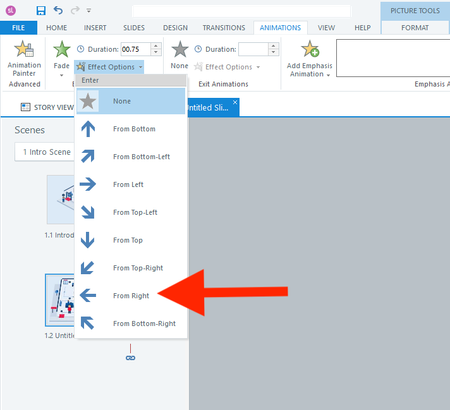
Hi everyone, I actually have two questions. I will start with the easier one first. Question 1 In a fade-in from the right animation, is there a way to adjust how far to the right the object starts? I don't want it to animate from off the right side of the slide. I only want it to start a few pixels to the right. Question 2 How do I animate the red shirt character below across 13 slides? I want it to follow each button from 1 to 13. I realize I should use the Motion Path. But what's the smartest way to use the motion path across slides? I have always found the motion path to be challenging. Thank you all for your help! :)39Views0likes3CommentsVideo on Storyline slide stops playing when viewing in Review 360
Wondering if anyone else has encountered this issue. I have a Storyline course that has an mp4 video inserted on a slide. When I preview the course in Storyline the video plays fine without any issues. When I publish the course to Review 360 and go through the course, the slide loads and the video starts to play and then abruptly stops. I can't rewind and start over, can't fast forward...nothing. Anyone else run into this? Is something going on with Review 360?115Views1like9CommentsIn Storyline, how can I prevent the Player Next button from working until all layers are visited?
I am using Storyline. I have a large course with many slides. One slide has four layers in it. I want the player's next button to remain inactive until all of the layers are viewed. Each layer has several icons to be viewed, as well as a close button to go back to the main layer. How can I prevent the player's next button from being active UNTIL each layer has been viewed? I added a Storyline file to help with this solution.115Views1like6CommentsChanging Status on the Dashboard?
I have a Rise course currently in review and created a PDF copy for an SME. Unfortunately, publishing to PDF changes the status from "In Review" to "Published." I've been trying to figure out how to change it back. Will saving another version to Review change it back? At this point I don't want to play around with it without a clear understanding of how the dashboard status works. I searched for an answer and didn't see anything. Thanks! Penny46Views0likes1CommentCelebrate: AI Image Generator
Hi, I used the AI image generator to create a few images for a process block. The images turned out great!! When I generated an image that needed edits, the iterations were spot-on. Usually, it's hard to correct an existing AI image, but it was effortless! I also uploaded an existing image and asked it to incorporate the character into a new AI image, and I couldn't believe how good it was! Kudos, Articulate Team! Things are progressing fantastically! KandiceDid the accessibility checker cause duplicate closed captions?
Hey, First off, I'm totally new to the accessibility checker before I publish in Articulate Storyline. After I selected almost all the issues (I really should study this accessibility tool before moving forward), I now see duplicate closed captions when I play Storyline as a published file in Review 360. How do I correct this issue? Thank you for your help,82Views1like1CommentReview 360 - Screenshot annotation is not what's displayed on Screen
I'm using Review 360 in Chrome for Mac OS. When I see a section I want to comment on, I create a comment and create a screenshot annotation and its not what I'm seeing. I've tried clicking inside the content to change the focus. Sometimes this works, sometimes this doesn't. Is there a trick to getting the right screenshot annotation that I am missing? BTW waiting a minute or two for the UI to catch up doesn't help.55Views0likes2Comments