review 360
1439 TopicsRemoval of Comments After Publishing to Review In Rise?
I am currently working on a course in Rise and had just gotten feedback from my manager on my course. I decided to publish a new version to Review, but now when I go back to look at the comments that were originally there, it says the course has no comments. Has this happened to anyone else? And is there a way to get them back?(Kind of urgent) How do I make an icon animate across a map in multiple slides?
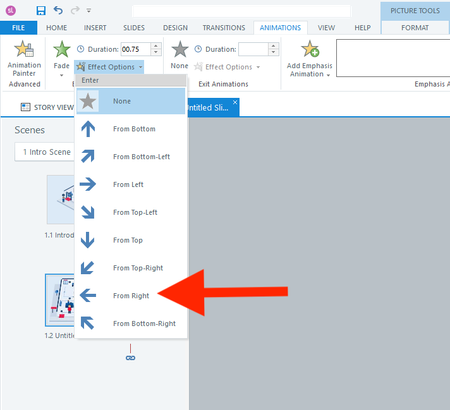
Hi everyone, I actually have two questions. I will start with the easier one first. Question 1 In a fade-in from the right animation, is there a way to adjust how far to the right the object starts? I don't want it to animate from off the right side of the slide. I only want it to start a few pixels to the right. Question 2 How do I animate the red shirt character below across 13 slides? I want it to follow each button from 1 to 13. I realize I should use the Motion Path. But what's the smartest way to use the motion path across slides? I have always found the motion path to be challenging. Thank you all for your help! :)39Views0likes3CommentsAllow publishing access for more than one owner
My team works in a very collaborative environment and the "owner" of the course in Rise360 may not be the only owner or the only person that needs access to publish the course to our LMS. We previously all had access to publish the course as long as we were listed as collaborators (manager or editor). As of today, this access is gone and only the owner has the option to publish the course. I saw in Articulate Community that this question has been asked previously in the context of an employee leaving the organization and it was recommended to just share the link. This does not allow us to publish the course in our LMS to track completion for compliance. I'm not sure what changed for us to previously have access to the publish feature regardless of ownership or why we no longer have the access to do so, but there should at the very least be an option to assign collaborators as "co-owners" so we can have equal publishing/modification rights on team projects. Thank you!660Views19likes8CommentsMajor Storyline Audio Playback Issues
I have recently been receiving a lot of feedback from my course testers that there have been issues with audio not playing, audio only partly playing, incorrect audio playing or layer audio overlapping when they visit the slide initially, however when they return to the slide the audio works as designed. Even weirder, two people may be testing the exact same package and will experience completely different audio glitches and some testers experience no glitches at all. These tests have been done on both Review360 and in SCORM 1.2 and 2004 on our LMS. It has been tested in both Edge and Chrome. There are no issues with the timeline and the audio is not attached to any triggers. I've been using Storyline for around a decade now and have never encountered an issue like this. From looking at the forums here it seems that a number of people are having similar issues, with no solutions provided or any update/explanations as to why this may be occurring. This is incredibly frustrating, as it means nothing can get past quality control and be provided to clients. Has anyone experienced this and found a fix?Solved2.4KViews7likes60CommentsBrowse Review 360 should be searchable
My team has recently began to localize multiple course series into multiple languages. Due to requirements, each language iteration is published separately requiring each language version of a Storyline to be published to Review360 separately. For even further confusion, add that each storyline has the exact same start page (branding) and we are unable to match the correct Storyline piece to where it should go in the language-coordinated Rise course because we cannot read the translated title. Using the current setup for Browse Review 360 when inserting these items into the course, we can't tell which Storyline goes in which slot within the course. This would be so much easier if I could provide a screenshot, but, NDA. May I suggest that when inserting a Storyline block into Rise that the Browse Review 360 function be searchable by name (at the minimum) or allow folder searching versus the current jumble of files it currently displays?17Views0likes1CommentReview 360 Comments Disappearing and Timing Out
Hi! We've been having issues with our reviewers leaving comments and then they disappear. We've also been having issues with frequent Time Out errors with an "Oops" error screen. The comments disappearing has been happening for the past few months and not sure if it's a bug. We had one of our reviewers recently say "When I hit post, they are disappearing." We're testing out using the Review Request feature instead of the general Review 360 links, but wanted to know if anyone else was experiencing this and what the solve was. Thanks!75Views0likes2CommentsImprovements to the Review 360 + Rise 360 Review Process
Real‑Time Review Updates When reviewers access a Review 360 link and leave comments, they should be able to see updates in real time—without waiting for the author to republish or send a new link. Rise already allows real‑time updates when publishing LMS output, so extending this behavior to Review 360 would make collaboration significantly smoother and reduce downtime between revisions. Comment Linking to Specific Lesson Sections Even with screenshots and highlights, it can be difficult to find exactly where a reviewer’s comment applies—especially in larger courses. A feature that lets comments attach directly to a specific block, media item, or text element in Rise 360 (similar to slide‑anchored comments in Storyline or PowerPoint) would reduce time spent searching through lessons. Change Tracking in AI-Assisted Edits When AI makes adjustments—for example, replacing a term like “client” with “customer”—the only way to verify changes is by scrolling through the whole lesson. A “review changes” mode or a searchable list showing where edits occurred would help creators quickly confirm modifications and avoid missing anything. Also, giving the developer the ability to say I want this one changed, but not this other one would be beneficial. Improved Reviewer Navigation Flexibility When a reviewer receives a Review 360 link, they often must follow the course’s navigation rules (knowledge checks, continue buttons, locked progress). Even if restricted navigation is turned off, certain interactive elements still block progress unless completed. Reviewers should be able to freely jump to any lesson or section without needing to complete activities—saving authors from temporarily removing knowledge checks or continue buttons just for the review cycle. Overall Benefit These enhancements would dramatically reduce review time, eliminate duplicate work across multiple reviewers, and streamline development for anyone building courses for employers or clients.27Views0likes1CommentRISE: New launch page w Library
We appreciate all the updates that Articulate has been making with custom blocks, and many, many other features these past 2 years. But today, under rigorous deadlines (our team), we are wishing we could revert back to the "legacy" UI for the opening of RISE (launch page). The new top layer (Library) seems confusing when one is in a dreadful hurry, and although I've clicked through many times today, it's not becoming intuitive, but confusing. In addition, I can no longer readily determine if I am in "Review 360" or "RISE authoring" whereas before, it was obvious, and easy to move around, know where I am. (New icons indicated "in review" or "published" have no meaning to us; but we realize every firm has their own preferred workflow.) (And yes, I do recall about 3 to 4 years ago upon a UI change involving folders, there was much controversy and we all adapted.) With changes so dramatic, I am wishing for a 'revert' to legacy UI button (like I've seen in other portals & dashboard). Nevertheless, totally regard Articulate as a top-notch software that keeps evolving, growing, and keeping up with change, innovation, and technology!133Views1like2Comments