rise 360
20 TopicsI Built a Course on Responsive Custom Blocks. Here's Where It Broke. 💔
Long post ahead, read at your own risk 😅 (in my defense, there's an AI Avatar and a seating chart of coworkers with fake excuses involved, so it's at least a fun kind of long.) Also, quick disclaimer up front: if I'm just missing something about how this feature actually works, feel free to disregard this entire post (I did have Claude fact check for me). 🤣 Genuinely open to being told I'm wrong here. When I saw this week's challenge, I got a little too excited. A new responsive feature in Labs? 🎉 I've been building with Custom Blocks for a while now, so I figured, why not build an entire course just about the feature itself? Enter Fitz: my Pixar-style AI Avatar host. He opens the course with a warning, actually. He tells you straight up that he was expecting a glow up from this feature and got "something" instead and that he's going to show you the whole thing warts and all because that's more useful than pretending it went perfectly. Bold choice for an intro video, but stick with me, because he's not wrong. After that, Fitz introduces you to six coworkers (Marcus, Priya, Dave, Sam, Elena, and Jordan) who are all, without exception, late. Click their flip cards and you get their excuse. Some are believable. Some are not. Dave's is a lot. The plan was simple: use this cast of chronically late coworkers as a seating chart, dropped into a responsive custom block, so learners could watch the whole thing reflow beautifully across devices. Desktop View: I pictured all six of them spread out comfortably, each one with their own space and an armrest to spare, main character energy. Table View: Same group tightening up a little, like everyone just got called in for picture day. Mobile View: I wanted them squeezed into a single-file line, like they're all waiting for the one bathroom on the floor. Drama, humor, a satisfying "ooh, it resized itself" moment. That was the pitch, before Fitz talked me down to reality. Here's where it fell apart 👀 I built the fixed version first, and predictably, it didn't hold up. Here's the thing about a fixed custom block (this is my understanding): it doesn't actually change layout across devices, it just scales the same image down. So tablet portrait, tablet landscape, mobile portrait, mobile landscape, same six coworkers, same arrangement, every single time, just shrinking a little more with each device until it's borderline unreadable on mobile. Not a great learner experience, but exactly the kind of "before" screenshot I wanted for this. Then I rebuilt it as a responsive block, genuinely excited to see six people rearrange themselves gracefully across every screen size. They did not, not really. What I got instead was almost the same view, on every device, every orientation. Tablet portrait: 2 columns. Tablet landscape: 2 columns. Mobile portrait: 1 column. Mobile landscape: 2 columns. And that's when it hit me: the fixed version and the responsive version were both doing the same basic thing, showing me one layout at every size. One was scaling it down. The other was (technically) resizing containers. But side by side, they read almost identically. It responds, technically. It just doesn't behave the way I expected "responsive" to behave. Here's why: Direction only gives you two options, row or column, and it applies to the whole container. There's no wrap, no grid-template-columns, nothing that lets a container say "3 across on desktop, 2 on tablet, 1 on mobile" on its own. If you want that graduated effect, you're manually nesting containers per breakpoint and hand-managing each one. Which is exactly the kind of manual positioning I thought this feature was supposed to get me away from. That's the part that gave me pause. For anything grid-shaped, like my seating chart of six increasingly unreliable coworkers, I was still very much positioning. Just with new vocabulary. So how would I make it better? 💡 To be clear, none of this exists in the tool today. This is my wish list, the stuff I actually pitched to the Articulate team over in Product Ideas, not a preview of anything coming down the pipeline. Wrap support, or something like it, so a container can hold its shape and let items wrap into a new row or column at each breakpoint instead of needing a separate manually-built container per device. Even just a "columns: 1 to 4" style setting per breakpoint would get most of the way there. Right now getting a true grid means rebuilding the layout by hand for every screen size, which is a lot of manual work for a feature whose whole promise is not doing manual work. I'd also love a small library of interactive objects (something like a flip card, an accordion, a simple toggle) that live natively in a block, plus a lightweight trigger system so objects could show, hide, or react to each other without needing a Code Block for it. Storyline already has a version of this with its states and triggers, so there's a real model to borrow from, not a totally new invention. I sketched out a concept mockup of what this could look like across five screens (wrap-enabled containers, a resize preview per breakpoint, an object library panel, and a trigger builder), just to make the idea concrete for the pitch. It's a mockup, not a sneak peek. If you want the full breakdown and the mockup images, that's all in the Product Ideas post. Maybe I'm missing something. If there's a way to get true wrap or grid behavior out of the current tool, genuinely, please tell me, because I would love to be wrong here. But as it stands, I don't think the fixed and responsive versions of my seating chart are different enough to justify calling one of them "responsive." Yes, I'm Finally Done 🙌 All that said, I had a lot of fun building this. Fitz turned out great, Dave's excuse still makes me laugh every time I open the file, and I'd take this feature over not having it. I just don't think it's finished yet. Even Fitz would tell you that, and he's the one who has to stand there being upbeat about it. Course link here, if you want to meet Dave and the gang for yourself: Rise 360 Custom Block386Views2likes3CommentsThink About It!! Quiz, with Quiz Builder
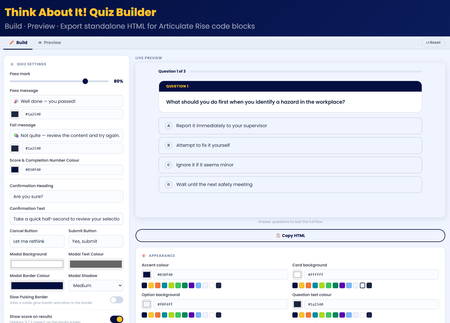
💡My take on the challenge: I looked at this from a slightly different perspective. Building a quiz is easy! so I wanted to create something useful for the entire community. I didn't just create a quiz, I built an app right inside Rise that allows users to craft, preview, and export their own high-impact, standalone quiz right inside Rise for use in their own courses. Everything in the quiz is customisable! Use it along with the native rise style and format block controls to create something amazing! 🖥️ The tech bit! The tool is a dynamic, client-side web application built using HTML, CSS, and Vanilla JavaScript. It allows you to build, configure, and export self-contained, interactive quiz blocks engineered specifically for code block iframe integration within Rise. 🔎LMS/Rise Compatibility & Performance The exported codebase is mathematically pure Vanilla JavaScript (ES5 standard for runtime compatibility). I hope you enjoy it 😊 Think About It!! Quiz With Quiz BuilderBusiness Maths Essentials
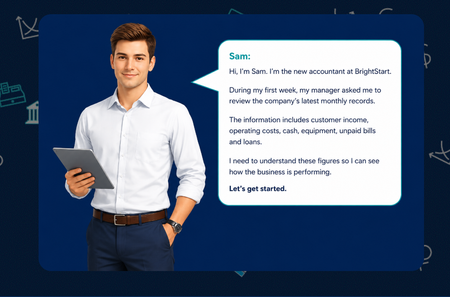
Hello everyone... For this week’s challenge, I decided to experiment with a simple combination of Articulate Rise, ChatGPT and PowerPoint. What started as a small idea quickly developed into a complete, scenario-based learning activity. I created Business Maths Essentials for new starters, using Sam, a newly appointed accountant at BrightStart, to guide learners through key financial terms, classification activities, profit-and-loss calculations and a final decision-making task. The learner supports Sam, a new accountant at BrightStart, as he works through four practical tasks: understanding key financial terms, classifying business figures, calculating profit or loss, and interpreting the wider financial position. The activities were created as responsive HTML, CSS and JavaScript components that can be placed inside Articulate Rise Code Blocks. The design uses clear instructions, immediate feedback, running totals, simple calculations and accessible keyboard controls. Consistent TS4 branding, restrained 44 px emojis and visual status cues help learners navigate the content without distracting from the learning objective. The modular structure also allows each activity to be used separately or combined into a complete learner journey. For the course banner, I adapted a template created by Tom and used PowerPoint’s Morph transition to produce a simple animated GIF, which I placed in different locations. Attached is the Rise Banner Template I used - Source : E-learning Heroes View the course: Business Maths Essentials Enjoy Dr NadiaCybersecurity Awareness - Spot the Phish
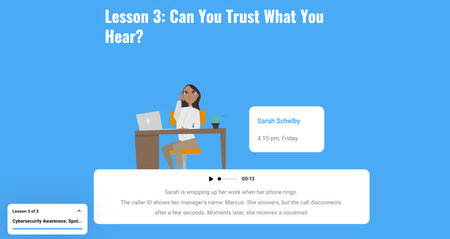
Hola....Here's an interactive cybersecurity awareness course designed to help learners recognise common cyber threats and adopt safer digital behaviours. The course uses a learner-friendly approach to introduce essential cybersecurity concepts, including phishing attacks, password security, social engineering, malware, and safe online practices. CLICK TO VIEWI Asked AI to Help Me Build Team Games. I Didn't Stop at One.
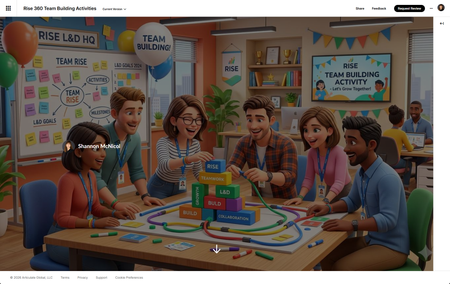
Let me set the scene. I've got a team building meeting coming up. I wanted something engaging — not another "share two truths and a lie" moment that makes everyone stare at the ceiling. I wanted something that actually gets people talking, laughing, maybe even a little competitive. You want a game. 🎮 But I also had approximately zero hours to build one from scratch. Sound familiar? Here's what I did instead: I opened a conversation with AI, described what I was going for, and started building. And somewhere between "let's make it facilitator-led" and "can you add confetti when someone scores a point" I didn't end up with one game. I ended up with five. The Process Was the Whole Point I didn't sit down with a grand master plan to build a game library. I started with a simple goal: create something fun for a L&D team building session that didn't require everyone to download an app, log into a platform, or remember a join code. The constraint? It needed to live in Rise 360 as a Code Block self-contained, no dependencies, ready to run on one shared screen. What I didn't expect was how fast 🏎️ the ideation loop would move. Describe a concept, see it rendered, react to it, refine it. Across a few sessions, that loop produced five fully playable games: L&D Jeopardy: Five categories of industry-specific clues that hit a little too close to home (SME Confessions, anyone?) AI Confessional: A L&D edition where the real answers might surprise you Prompt Lab: A game that actually reinforces AI prompting skills while everyone thinks they're just playing L&D Quest: Virtual Trivia Pursuit: Because our field deserves its own trivia championship The Case of the Vanishing Keynote: A mystery game so relatable it hurts Five games. Multiple sessions. No dev team. No budget line item. What Made It Work A few things I learned along the way that made the process actually fun instead of frustrating: Start with the vibe, not the mechanics. Before I said a word about HTML or JavaScript, I described the energy I wanted: laugh-out-loud, low stakes, facilitator-led, one screen for 20 people. That framing shaped every design decision that followed. React out loud. The fastest iterations happened when I said exactly what I saw — "the modal is off to the left," "the text isn't readable," "this needs more wow factor." Specific feedback beats vague dissatisfaction every time. Let it surprise you. I came in asking for Would You Rather. I left with Jeopardy complete with a starfield background, confetti cannons, animated score bumps, and a facilitator answer key. The AI brought ideas I wouldn't have thought to ask for — and some of them were the best parts. The Real Takeaway for L&D We talk a lot about engagement in learning design. We spend weeks building branching scenarios and interactive modules trying to manufacture the thing that games create naturally: people want to play. What this experiment reminded me is that the barrier to building game-based learning experiences is lower than it's ever been — not because the craft got easier, but because the tools got smarter. You still need to know your audience. You still need to write questions that land. You still need to make judgment calls about what's too complex and what's just right. But the part where you stare at a blank HTML file at 11pm wondering how to center a div? That part you can skip now. Try It Yourself If you've got a team meeting coming up, a training session that needs a warm-up, or just a burning desire to ask your colleagues whether they'd rather deal with a hands-off SME or a micromanaging one — build the game. Describe the vibe. Pick a format. React to what you see. Iterate. You might sit down to build one game and walk away with five. Built in Rise 360 using Code Block. AI-assisted development across multiple sessions. No divs were harmed in the making of these games. 🐵 Rise 360: Team Building Activities234Views5likes2CommentsAre You Sure? Turning a Confirmation Prompt Into a Checkpoint 🛑
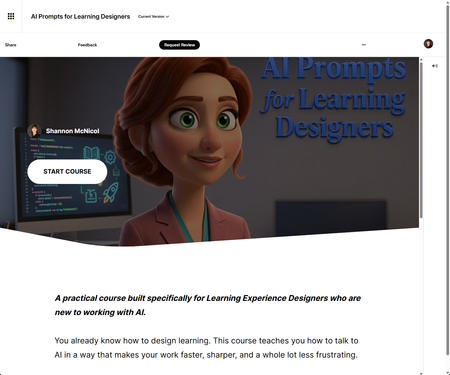
We've all done it. You're halfway through a required course, your inbox is screaming, and you click the first answer that looks right just to keep moving. So when this week's challenge landed on confirmation prompts that little "Are you sure?" pause before you submit I knew exactly the moment I wanted to design for. But I didn't want to bolt a generic pop-up onto a quiz. I wanted the pause to actually do something. The idea id💡 I built this as a Checkpoint inside my course AI Prompts for Learning Experience Designers and here's the part I had a little too much fun with: it's a course about prompting, and the checkpoint itself models the single most important prompting habit there is. Don't fire off the first thing that comes to mind. Pause. Reread. Reconsider. Then commit. The interaction drops the learner into four real-world scenarios, one drawn from each module of the course writing intro copy under a deadline, drafting measurable objectives, iterating on a draft that's almost right, raising the ceiling on generic questions. They pick an answer. And then, before anything locks in, the pause hits. What makes the pause smart ⏸️ This is the bit I'm proudest of. Instead of the same flat "Are you sure?" for every option, the confirmation reacts to the exact answer you picked. Choose the vague prompt and it nudges you: "Three words, zero context — you'll spend the time you saved rewriting the output. Sure?" Choose the strong one and it affirms your thinking instead. It reads like a prompt coach leaning over your shoulder never giving away the answer, just helping you check your own work. Then at the end, a little tally shows what the pause actually did: how many times reconsidering rescued a wrong answer, and how many times it talked you out of a right one. Turns out the value of slowing down is surprisingly easy to measure. 😄 A couple of build notes 🗒️ Placement matters. The Checkpoint sits before the hands-on Practice Lab on purpose recognition first (spot the better prompt), then production (write your own). Nice little scaffolding ramp. All Rise 360 Code Block, and entirely transform-free the gradient hero, the twinkling tokens, the glowing progress bar, the staggered fade-ins, and the count-up score are all pure opacity, shadow, and gradient. Keeps it rock-solid inside Rise's iframe. Matched to my course palette so it feels native, not bolted on. And yes — I built this side by side with Claude as my co-creative partner. The taste and the instructional intent are mine; the AI just helped me get there faster and iterate without losing my mind. Which, fittingly, is exactly what the course is about. 🙂 The real lesson of a good confirmation prompt isn't "gotcha." It's "hey — you've got this, just take half a second to be sure." That's the kind of friction I'm always happy to design in. Would love to hear how you'd use a pause like this in your own work. 👇 AI Prompts for Learning DesignersBack In My Day
Hello! Icebreaker games get a bad rap in corporate training. But I think Articulate's AI Avatar feature can breathe new life into this format. For this Futurama-inspired demo, I created a series of videos using the 'Upload Character' option in the Rise AI Avatar tool. Then I downloaded these videos and placed them in a 'Pick One' freeform question slide in Storyline. Your answer determines how my avatar responds. Try it out here: https://bit.ly/elhc553 190Views1like2Comments
Are you sure?
Hello! Personally, I've always found confirmation prompts like "Are you sure?" to be a little ominous and creepy. This week's demo is inspired by the hit horror movie, #Backrooms. This was another chance for me to practice with branching video scenarios, modal screens, and pairing footage created using Rise's new AI avatar feature with environments built in Google Flow. There are seven individual videos, which are shown/hidden depending on your choices. I found the AI text-to-speech in Storyline to be very versatile - the more you go round in circles, the more desperate the protagonist of the story sounds. There are four different routes through the demo. Be warned, two of the routes end in jump scares. You only have a 66% chance of making it through to the 'good' ending on one of the routes. Fancy your chances in the Backrooms? CLICK HERE
Rise notes utility
I added a global utility bar to my Rise course to add a simple 'notes' piece, data is kept in the browser's local storage and it will not write to SCORM. Because of the global nature of this addon, it can be a handy way to make the functionality, and even some branding, always available to users across your entire course. 1.3KViews14likes14Comments
Meet Your Instructor - Which One Is the Lie?
I built this quick “Meet Your Instructor” interaction for the latest eLearning Heroes challenge. The interaction is a simple truth-or-lie icebreaker where learners review three statements about the instructor and decide which one is false. I designed it with a heavy equipment/construction theme and included custom visuals, themed buttons, correct/incorrect feedback screens, and a short video introduction and conclusion featuring me as the instructor. What I like about this concept is that it could work both virtually and in person. In an eLearning course, learners can click through and make their own choice. In a live class, a facilitator could use the same interaction as a quick group icebreaker before moving into the session. It’s a small activity, but it adds some personality, gives learners a reason to engage right away, and helps make the instructor feel a little more human before the course begins.134Views3likes3Comments