safety training
5 TopicsRISKY RICK
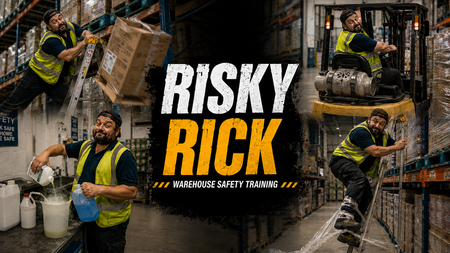
Click here to check it out. For this OSHA eLearning Challenge, I wanted to move away from a traditional “click-next” compliance experience and explore a more cinematic, behaviour-driven approach to warehouse safety training. Rather than focusing purely on rules and hazard identification, I built the concept around a character called “Risky Rick”, an experienced warehouse operative whose confidence and familiarity with the environment lead to unsafe decisions and shortcuts. The experience begins with a fast-paced montage sequence showing Rick carrying out increasingly risky behaviours across a warehouse setting, including: overreaching from a ladder dropping boxes using a forklift without checking the environment properly creating trip hazards with pallet wrap mixing chemicals carelessly The intention was to make the learner feel like an observer watching unsafe behaviour escalate in real time, rather than simply being told what not to do. After the montage, the experience rewinds and breaks each scenario down using freeze-frame analysis interactions. Instead of using standard multiple-choice questions, I focused on three reflective lenses: OBSERVE: the behaviour or warning sign INTERVENE: the point where action should happen CULTURE SIGNAL: what the behaviour suggests about wider workplace norms and accepted risk Visually, I leaned heavily into a gritty, cinematic warehouse style using bold typography, industrial textures, high-contrast colour palettes, and dynamic OSHA-inspired graphics. The “Risky Rick” branding was designed to feel more like a behavioural safety campaign than a standard training course. From an instructional design perspective, the project explores how storytelling, character-driven scenarios, rewind analysis, and progressive reflection can create a more immersive and memorable learning experience around workplace safety and risk awareness. Click here to check it out.866Views22likes12CommentsDon't Stop Me Now: How a 'Quick' Challenge Turned Into 35 Files and a Lab Safety Course
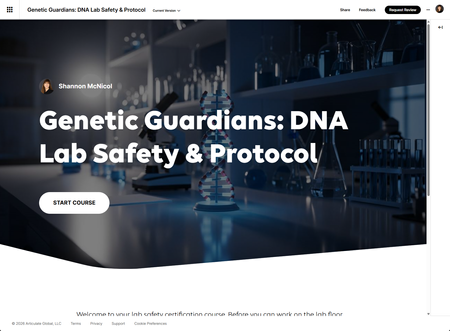
"I'm building a lab safety course and I'm having such a good time / I'm having a ball / I've got thirty-five files, twelve Avatar scripts / Don't stop me, don't stop me now" 🎶 🎹 I saw this week's challenge, I thought "sure, I'll do something quick," and then approximately one million hours later (I may be exaggerating just a little 🤣) I emerged from my computer with a fully built six-module DNA lab safety course, a design system, twelve AI Avatar scripts, and a deeply personal relationship with a single line of JavaScript code that broke my heart, rebuilt my confidence, and appeared in approximately 300 places across 28 files. Don't stop me now — I was having such a good time. Let me explain. The concept I built a complete lab safety onboarding course for a DNA diagnostics company — based on my experience designing training for a DNA lab — targeting new hires who need to be cleared for the lab before they can touch anything. Six modules, approximately 60 minutes, highly interactive throughout. The twist? I committed early to doing the whole thing as custom Code Project Blocks instead of native Rise interactions. No Rise flashcards, no Rise knowledge checks, no Rise accordion. All custom HTML, all dark-themed, all consistent design system. Every. Single. Screen. Was this the easy path? Reader, it was not. Meet Alex The course has a recurring AI Avatar character named Alex — a friendly lab colleague who started six months ago and still remembers what day one felt like. Alex appears at the top of every module as a short video clip wrapped in a custom Mac-style video frame (yes, with the red amber green dots, yes it looks incredible, yes I was unreasonably proud of it). Alex's tone shifts across the course, warm and welcoming in Module 1, increasingly serious through Modules 3 and 4, quietly grounded by Module 5, and genuinely emotional in the Module 6 sign-off (just kidding, he is just an Avatar he does not emotional, yet... 😋). Writing all twelve scripts was honestly one of my favorite parts of this project. The final line of the course is "Welcome to the lab." and if you do not get at least a little bit of a feeling from that after sixty minutes of safety training then I do not know what to tell you. 🤨 What I actually built Module 1 — Lab orientation Interactive floor map with clickable hotspots, signage flashcards (with a 3D flip that I had to completely rebuild when Rise decided CSS rotateY was not going to happen in an iframe), and a knowledge check. Module 2 — PPE PPE reference cards, a scenario-based selection activity where learners pick the right gear for three different lab tasks, and separate donning and doffing sequencers. Yes I had to explain what donning and doffing meant. Yes that became a design feature — each activity has a definition pill right at the top. Module 3 — Chemical and biological hazards All 9 GHS pictograms with DNA-lab-specific examples, a chemical spotlight on the six reagents actually used in a genetics lab (ethidium bromide, formaldehyde, chloroform, hydrochloric acid, ethanol, and bleach), a fully written 16-section Safety Data Sheet explorer for EtBr that learners can browse freely, and a separate task activity where they apply what they read. This is the module that made the course feel like a real DNA lab course instead of a generic safety template. Module 4 — Emergency procedures The big one. Emergency response reference cards, a three-decision branching scenario about a chemical spill with six consequence screens showing what actually goes wrong when you make the wrong call, and a fire evacuation sequencer. The branching scenario has a named bystander — Jordan — because "Jordan could have been exposed" lands harder than "a nearby colleague could have been exposed." Module 5 — Specimen handling Chain of custody interactive flow, labeling and verification cards with CLIA implications, a specimen routing activity where learners route six different specimens to the correct destination, and cold chain reference cards. Every wrong routing decision shows the clinical consequence — what it means for an actual patient. Module 6 — Final assessment Ten scored questions, 80% to pass, two attempts, per-module results breakdown so learners know exactly where to go back and review. The sign-off video is gated to pass only. "Welcome to the lab" only plays if you earned it. The technical truth Everything runs in Rise as Code Project Blocks — single HTML files, zipped, uploaded. The design system is consistent across all 28 activities: dark background (#0d0f14), DM Sans font at 16px minimum, green accent (#4ade80), and a set of reusable component patterns for cards, progress bars, feedback boxes, and tip callouts. Now. About the Alex video wrappers. The plan was to upload each Mac-frame video wrapper alongside its MP4 as a Code Project Block — HTML and video bundled together, clean and self-contained. Except Rise had other ideas. The upload kept failing and I could not figure out why. I stared at it. I troubleshot it. I may have said some words that are not appropriate for a lab safety course. 😖 And then I pivoted. I dropped each wrapper into Storyline as a Web Object, published to Review 360, and embedded the Storyline slides into Rise as Storyline blocks. Did it add a couple of extra steps? Yes. Did it work perfectly? Also yes. Did I feel like a problem-solving genius? Absolutely. Don't stop me now — when the Code Block door closes, a Storyline window opens. The big coding lesson I learned — and I learned it the hard way on the flashcards — is that Rise iframes block inline event handlers. No onclick. No onchange. Everything has to be wired through addEventListener inside a DOMContentLoaded IIFE. Once I locked that pattern in across all the activities, everything worked. Before I locked it in, everything worked in the browser and absolutely nothing worked in Rise, which is a specific kind of suffering I would not wish on anyone. Also: no CSS 3D transforms. Rise will render them but they will behave in deeply confusing ways. Show/hide with display: none and display: flex is your friend. Boring is reliable. What I am genuinely proud of The SDS explorer is the thing I keep showing people. It is a fully written, realistic Safety Data Sheet for ethidium bromide — all 16 sections — that learners can browse freely with no time pressure, followed by a separate activity where they answer three scenario questions using the document as reference. It makes SDS navigation feel like a real skill rather than a compliance checkbox. The branching scenario is the other one. Three decisions, six consequence screens, fail-forward design so wrong choices show exactly what goes wrong before resetting to that decision point. No penalty, just consequences. The clinical stakes in Module 5 are the quiet version of the same thing — specimen routing errors do not set off alarms, they just mean a patient somewhere gets their result late, or gets the wrong one. That line is in Alex's Module 5 intro and it does more instructional work than any quiz question I could write. The stats, because I cannot help myself 6 modules 60 minutes total 35 files delivered 28 interactive Code Blocks 12 Alex scripts written and wrapped 18 formative knowledge check questions 10 scored final assessment questions 1 design system document that I am unreasonably attached to 0 times I regretted going custom (okay maybe once, during the flashcard iframe incident 😜) Try it! The design system is documented and every pattern is reusable. If you are building compliance training that needs to feel like something other than a legal obligation, the dark lab aesthetic is surprisingly versatile — it works for any technical or high-stakes content where you want the visual language to say "this matters" without screaming. Drop your questions in the comments. I am always here to talk about iframes, event listeners, and the specific emotional journey of debugging a CSS transform at 11pm. Built with Rise 360 Code Blocks, AI Avatars, DM Sans, and an inadvisable amount of enthusiasm. Genetic Guardians: DNA Lab Safety & Protocol397Views6likes6CommentsELH #552 Control the Energy: Lockout/Tagout Safety Essentials
Sharing a pretty basic example for this week’s eLearning Heroes Challenge. This one is a simple OSHA-related Lockout/Tagout course starter template built in Storyline. It includes a landing page, learning objectives slide, knowledge check template, and a flashcard activity. Nothing too wild or groundbreaking this time. I did not have much time this week, but I wanted to jump back into the challenges and start building the habit again. Sorry for being a little boring on this one. I promise I’ll try to get more creative going forward. For now, I’m just glad to be getting back into the rhythm. Check it out here!159Views4likes0CommentsOSHA Course Starter Template
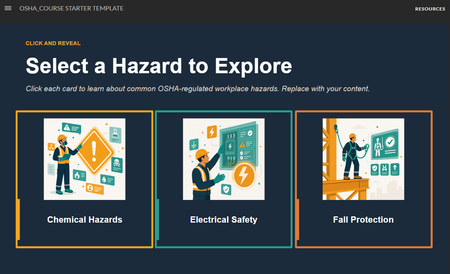
The safety slides got a glow-up: OSHA Course Starter Template Safety training doesn't have to be a snooze-fest. This is a simple starter pack built around a character-driven illustration theme. The source file is available for download on the Resources tab. Grab it, riff on it, make it yours. OSHA turning 55 felt like the right moment to sit this one out. #ELHChallengeThe Cost of Ignoring Safety Signs
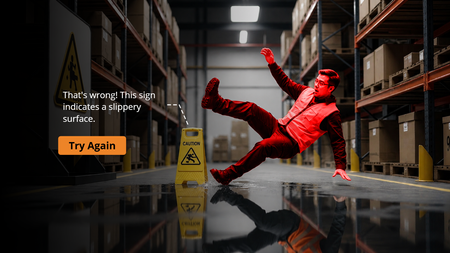
Created an interactive scenario-based quiz: “The Cost of Ignoring Safety Signs” ⚠️ The course uses AI-generated visuals to build realistic workplace scenarios that help learners understand the real consequences of ignoring safety warnings. A quick, engaging, and impactful learning experience focused on improving workplace safety awareness. Demo: https://www.sarkgcreation.com/elc552/story.html