variables
12 TopicsCMY Mix Lab
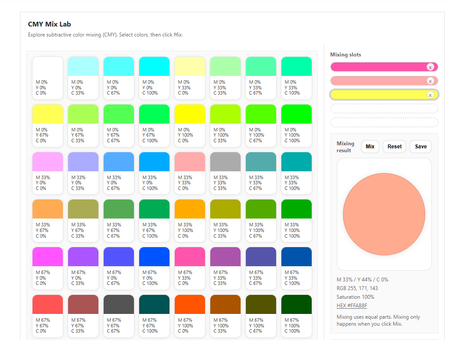
An experiment in pushing Articulate Rise beyond fixed variables and linear flows. What this is The CMY Mix Lab is an interactive experiment built in Articulate Rise to explore what happens when you are no longer limited to a fixed set of variables. Unlike standard Rise blocks, and even compared to Storyline, this approach allows for a virtually unlimited number of variables and states within a single interaction. For this challenge, I wanted to build something that cannot be created in Rise in any other way. The mixer relies on continuously changing values, combinations, and outcomes rather than predefined slides, layers, or triggers. Everything happens inside one custom block, driven by logic. How it was made Full transparency: I’m not a programmer. This project was very much vibe coded. I built it by experimenting, tweaking values, breaking things, and fixing them again with the help of AI and a lot of curiosity. Working this way felt very different from building in Storyline or standard Rise blocks. Instead of defining all states upfront, the interaction reacts to whatever values the learner creates in the moment. That shift in thinking was a big part of the experiment. The challenge One of the biggest challenges has been (and still is) accessibility. Mouse interaction works well, but I do not have a stable, fully keyboard-accessible version to show you yet. Improving this is something I am actively working on and continuing to refine. This challenge is also part of what makes the project interesting to me. It clearly shows both what Rise can already do and where its current limits are, especially when you start working with many dynamic variables. Why this build This build is not about delivering a perfect or finished solution. It is about exploring possibilities, learning by doing, and testing how far you can push Rise without relying on Storyline or predefined interaction patterns. If this experiment inspires other Rise users to think differently about variables, logic, or custom code, then it has done exactly what I hoped it would do. Vote If you like this experiment or find the idea behind it interesting, I’d really appreciate your vote. https://share.articulate.com/aWvCo417oehOA2FTwbHLA Oh... one last thing! Try mixing with "white". You'll be surprised. :D136Views3likes0CommentsCapturing Text from a Shape or TextBox
I have a game with 40 questions, subdivided into 4 categories. I've created an object for each category and used states for each question within the category. My current plan is to enter the questions in the WYSIWYG environment for easier proof reading than if I tried to enter them into the Variables editor. It's a team based game and if nobody can get the answer right, I want it to save the question to a variable, then at the end of the game, I want it to email the questions to the SMEs. My problem is that unless I switch to using 40 variables, I haven't figured out a way to pull the question from the object before moving on to the next question. I had thought it would be something simple like this: const jsObject = object('6N5bhivlzyV'); set jsText = jsObject.value; setVar('theText',jsText); But, that's not working. Is my javascript bad or is there a way to do this with standard triggers?Solved714Views0likes3CommentsGet learnername, coursename and coursedate from Cornerstone LMS
I have been tinkering to get the learername, coursename and coursedate from cornerstone lMS ( Cornerstone on demand) but am unable to make it work. i have made it work in Scormcloud but am unable to find the correct way. can someone be of help. thnx700Views0likes3CommentsChars control
Hi! I´m working on a SL activity about Chars max a min control when user typing in Entrytextfield var, but I don´t know why it does not working!! Please, could you, checking o adding an example about characters control max and min? I need to solve a javaScript issue. I´m traying to follow a programming code but it does not work! Any help it is gonna be appreciate!303Views0likes3CommentsButton Listener to move a character
Hello everyone I've dealing with a problem, I started a project, it is supposed to be an Escape Room, and most of the things I need for it are already available on Storyline. But I've been stuck on the movement of the character, it is a simple 2D movement, right and left, inside the room. The problem is: I already got it to move on a click, but it is just on that click, I want it to move as long as I keep the button pressed. This is the last JavaScript I tried to make it move: const button = object('5yfHufFxicy'); function moveWhilePressed() { button[i].addEventListener("mousedown",() =>{ const player = GetPlayer(); player.GetVar("MousePressed"); const currentX = player.GetVar("MoveX"); player.SetVar("MoveX", currentX +1); setTimeout(moveWhilePressed, 100); const objects = [ object('6EPGwyDzEfX'), ]; const positions = objects.map(obj => ({ x: obj.x})); objects.forEach((obj, i) => { obj.x = positions[i].x+currentX; }); }); } moveWhilePressed(); Not sure if I'm wrong on the EventListener, before I added it, the character moved, but the moment I clicked, it kept moving without the button pressed. I tried using Variables, but the result was the same, the character kept moving.Solved882Views1like4CommentsVariable not changing button state
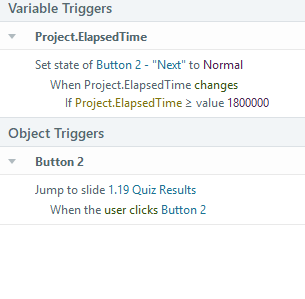
I've got a pretty complicated situation. I am creating a compliance course that a user must be in each module for 30 minutes. There are 9 modules. When the course begins, they can't leave the course, open another browser tab, click on a different monitor screen, etc. Also, if they do any of these, their time stops and resumes when they return to the course and a popup layer tells them that they need to resume and that their time has stopped. Everything works great except that I've got a variable, %correctedElapsedTime%, that shows the actual time that they've been in the course. Essentially, it subtracts the time away from the built in %Project.ElapsedTime% and shows a running timer in the corner of the slide the whole time. I want a button to change states to normal when %correctedElapsedTime% has been met. Right now, I can only get the button to change when it is triggered by %Project.ElapsedTime%. %correctedElapsedTime% is a text variable with a value of MM:SS and %Project.ElapsedTime% is a number variable with a value of 0. I think this is where the problem may be. It also may be that my timer is somehow skipping over the 18000000 ms to meet the 30 min time constraint. Any thoughts? Slide triggers Master slide javascript and triggers Javascript var player = GetPlayer(); var elapsedTime = 0; var timer = null; var isTabActive = true; var isFocused = true; var inactivityTime = 0; var inactivityLimit = 120; var inactivityTimer = null; // Load saved elapsed time if (player.GetVar("correctedElapsedTime")) { var savedTime = player.GetVar("correctedElapsedTime").split(":"); elapsedTime = parseInt(savedTime[0]) * 60 + parseInt(savedTime[1]); } // Update elapsed time function updateElapsedTime() { if (isTabActive && isFocused) { elapsedTime++; var minutes = Math.floor(elapsedTime / 60); var seconds = elapsedTime % 60; var formattedTime = minutes + ":" + (seconds < 10 ? "0" : "") + seconds; player.SetVar("correctedElapsedTime", formattedTime); } } // Start elapsed time counter function startTimer() { if (timer === null) { timer = setInterval(updateElapsedTime, 1000); } } // Stop elapsed time counter function stopTimer() { if (timer !== null) { clearInterval(timer); timer = null; } } // **Inactivity Timer Functions** function resetInactivityTimer() { inactivityTime = 0; // Reset inactivity timer player.SetVar("showPopUpLayer", false); // Hide pop-up if user is active } function trackInactivity() { inactivityTime++; if (inactivityTime >= inactivityLimit) { player.SetVar("showPopUpLayer", true); stopTimer(); } } // **Event Listeners to Reset Inactivity Timer** document.addEventListener("mousemove", resetInactivityTimer); document.addEventListener("keydown", resetInactivityTimer); document.addEventListener("touchstart", resetInactivityTimer); // **Start inactivity tracker** function startInactivityTimer() { if (inactivityTimer === null) { inactivityTimer = setInterval(trackInactivity, 1000); } } // **Detect window focus loss** window.addEventListener("blur", function() { isFocused = false; player.SetVar("isFocused", false); player.SetVar("showPopUpLayer", true); // Show pop-up when window is blurred stopTimer(); }); // **Detect window focus gain** window.addEventListener("focus", function() { isFocused = true; player.SetVar("isFocused", true); player.SetVar("showPopUpLayer", false); startTimer(); }); // **Detect when tab visibility changes** document.addEventListener("visibilitychange", function() { if (document.hidden) { isTabActive = false; player.SetVar("isTabActive", false); setTimeout(function() { player.SetVar("showPopUpLayer", true); // Ensure pop-up layer appears }, 500); // Delay helps trigger the layer reliably stopTimer(); } else { isTabActive = true; player.SetVar("isTabActive", true); player.SetVar("showPopUpLayer", false); startTimer(); } }); // **Start timers** startTimer(); startInactivityTimer();613Views0likes5CommentsAdjust text variables Storyline 360
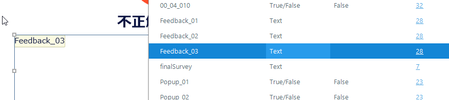
Hi everyone, I have a project that required translation (into Japanese in this particular case), and I couldn't come across a solution to edit the text for the variable's text itself. This is the variable: This is the text displaying in the Review, and as an example, I would need to move up the dot, or move down some characters (as per legibility purposes). Is there a way to add some line breaks to this feedback text? It is not possible to edit it from the Usage for variable ... windows. I'm using the latest update available for Windows 10, x64 Thank you!454Views0likes8CommentsDealing with the naming of variables
Hello Storyline developers, I wonder how you deal with the following situation: I have made an e-learning with +/- 80 slides and to prevent errors I have created new variables for every slide (because Storyline doesn't have the concept of slide variables: variables attached to one slide). My variables have now the following naming convention: slide[scene and slide number]_[description of variabele]. For example: slide414_moveSidebarUp. The problem with this naming convention is that if I want to add a new slide before slide 4.14, I have the change the names of all the variables on slide 4.14 (now slide 4.15) and all the slides thereafter (in that scene). The solution would be to create a short hash for every slide, but I'm too late for that now. Does anybody have another kind of solution? Thanks in advance!Solved791Views0likes9Comments