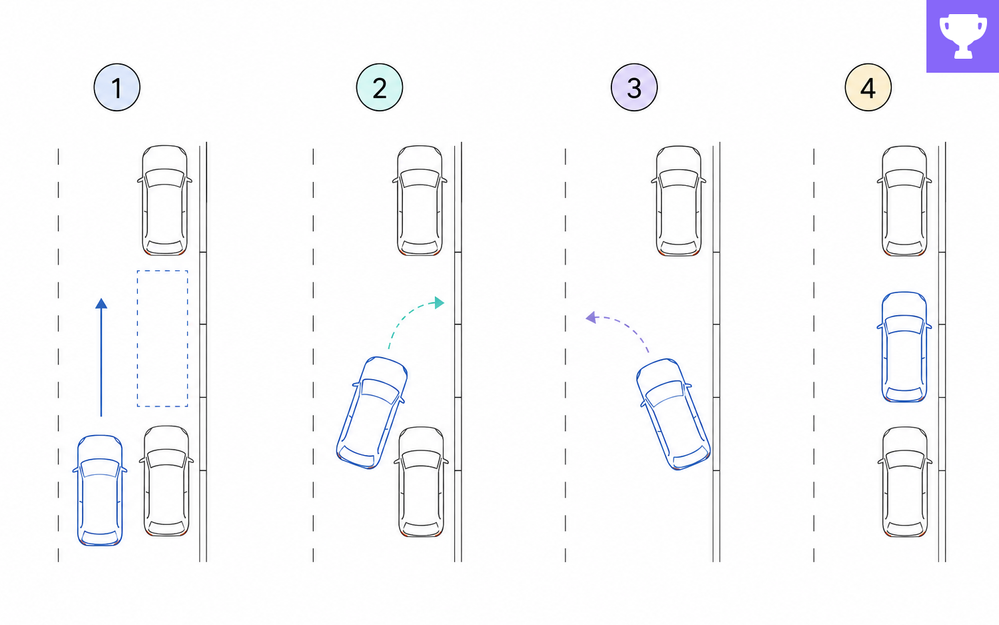

You finally found a spot. It’s tight. The car behind you is waiting. You know the steps: Pull alongside the car. Reverse at an angle. Turn the wheel. Straighten out. Easy, right?
Well, not exactly.
The real challenge is spatial reasoning. Drivers have to judge angles, distances, timing, and clearance while the car is moving. That’s why someone can memorize every step and still have no idea what to do once they’re sitting behind the wheel.
This is where e-learning can really help.
Instead of simply listing the steps, you can show learners what’s happening around the vehicle.
- Animated explainers can demonstrate the turning radius.
- Visual markers can show where to position the mirrors or rear bumper.
- Interactive step graphics can let learners practice the sequence before trying it with an actual car.
Consider the different steps that cause drivers the most trouble:
- Knowing when to begin turning
- Positioning the car before reversing
- Recognizing when to straighten the wheel
- Judging the distance from the curb
- Checking the clearance in front and behind
Each one is a teachable moment and a design opportunity. And that's what this week's e-learning challenge is all about!
🏆 Challenge of the Week
This week, your challenge is to create a how-to example or short interaction that teaches a learner how to parallel park.
Maybe you walk through the basic procedure. Maybe you help learners spot the visual reference points, give them room to practice steering decisions, or show how a small mistake throws off the final position. Your call.

🚀 Tips for Getting Started
Here’s how you can approach this week’s challenge at the level that works best for you:
- Start simple: Build an interactive diagram with labeled graphics. Show the car's position at the critical moment and point out what the driver should be watching for.
- Level up: Create a short branching interaction that lets learners choose when to turn and see how each choice changes the car's position.
- Challenge mode: Design a mini-course that covers the essentials and the spatial concepts, walks learners through the procedure, and gives them a chance to practice decisions with feedback—before they ever get behind the wheel.
🙌 Share Your E-Learning Work
You put in the effort. Now make sure your work gets seen:
- Personal blog: If you have a blog, please write about your example from this week’s challenge and share the link with your submission.
- Social media: Please share your examples on LinkedIn and mention both David & Articulate using the #ElearningChallenge tags so we can help promote your work.
- Support your peers: Try leaving helpful feedback on at least three projects this week.
- Community forums: Feel free to cross-post in the forums to give your work even more visibility.
🙌 Last Week’s Challenge:
Before you pull into this week’s challenge, make a quick stop to check out the restaurant server training examples from last week's challenge:

Training for Restaurant Servers & Waiters #561: Challenge | Recap
👋 New to the E-Learning Challenges?
The weekly e-learning challenges are ongoing opportunities to learn, share, and build your e-learning portfolios. You can jump into any or all of the previous challenges anytime you want. I’ll update the recap posts to include your demos.
Learn more about the challenges in this Q&A post and why and how to participate in this helpful article.
