Blog Post

Storyline Templates
2 MIN READ

Storyline: Printable Free-Response Slide Template

JohnPinkster-19's avatar
JohnPinkster-19
Community Member
4 years ago

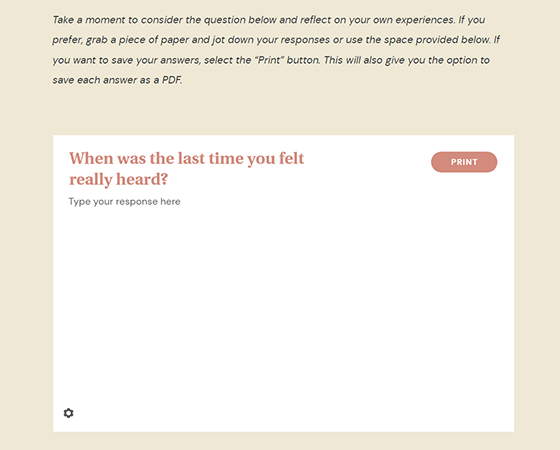
Written reflections or responses can encourage learners to think deeply about a topic and consider how it applies to them. And they’re easy to include in a Storyline 360 course by simply adding a data entry input field. But what if you want to add a free-response question to a Rise 360 course? And what if you want to give learners a simple way to save or print their responses?

Not to worry! This Storyline 360 download has you covered. With a little help from two text variables and the included JavaScript, learners can print their response or save it as a PDF with just the click of a button.

Explore how this project looks as a Storyline slide.


And if you want to add a reflection activity to your Rise 360 course, just update the template with your own content in Storyline 360. Then use the Storyline Block to seamlessly bring it into your own Rise 360 courses.


Explore how this project looks when included in a Rise 360 course.


Just remember these two things when using this template in your projects:

  • New question text: Update the default value of the Q1TextEntry variable with your new question text so it’s updated in both the PDF and the printed copy.
  • Multiple copies of the template in a single course: For the print/PDF option to work properly, each slide needs its own unique question and response variables. So if you want to include several printable responses in one Storyline course, you need to make a few quick adjustments to each new one you add. Rename the two text entry variables on the free-response slide. Then apply those variable name changes in the slide JavaScript as well.


This template will work for folks using Storyline 360, the continuously updated version of Storyline included in Articulate 360. Want to try it out? Get a free trial of Articulate 360 right here.


Published 4 years ago
Version 1.0

33 Comments

  • This template is very useful! I'm so glad to have a better option for learners to reflect rather than telling them to write something down on a piece of paper! One question though, we found that it did not function well unless you were using a computer to take the RISE course. Formatting was lost when using a smartphone. Any thoughts or recommendations?
    • JohnPinkster-19's avatar
      JohnPinkster-19
      Community Member
      Wow, I thought we had tested it on all devices...so if nothing has changed on Articulate's side, this got overlooked. Thanks for bringing it to our attention! I pulled my coding expert back in to help out and we have updated Javascript for the Storyline element:

      var questionTitleVar = 'Q1TextEntry';
      var styles = `
      #printHelper, #printHelperTitle {
      display: none;
      }
      @media print {
      body {
      width: 100% !important;
      height: auto !important;
      position: relative !important;
      }
      html {
      height: auto !important;
      }
      body * {
      display: none;
      }
      #printHelper, #printHelperTitle {
      display: block;
      overflow: visible;
      white-space: pre;
      white-space: pre-wrap;
      }
      #printHelperTitle {
      font-size: 18px;
      }
      }
      `;
      if (!document.head.querySelector('#printHelperStyles')) {
      var stylesheet = document.createElement('style');
      stylesheet.nodeType = 'text/css';
      stylesheet.id = 'printHelperStyles';
      stylesheet.innerText = styles;
      document.head.appendChild(stylesheet);
      }

      var player = GetPlayer();
      var questionTitle = player.GetVar(questionTitleVar);
      var questionTitleEl = document.createElement('h1');
      questionTitleEl.id = 'printHelperTitle';
      questionTitleEl.innerText = questionTitle;

      var printHelperEl = document.createElement('div');
      var textarea = document.querySelector('textarea');
      printHelperEl.id = 'printHelper';
      printHelperEl.style.fontFamily = textarea.style.fontFamily;
      printHelperEl.innerHTML = textarea.value;

      const mql = window.matchMedia('print');
      mql.addEventListener('change', (media) => {
      if (media.matches) {
      document.querySelectorAll(['#printHelperTitle', '#printHelper']).forEach(el => el.remove());
      document.body.appendChild(questionTitleEl);
      document.body.appendChild(printHelperEl);
      }
      else {
      printHelperEl.remove();
      questionTitleEl.remove();
      }
      });

      window.print();
  • StephenMorey's avatar
    StephenMorey
    Community Member
    Perfect just what I was thinking about building. Now I can re-brand and pretend I did all the work. You're making me look good. ;)
  • Quick question is there a way to record responses into a LMS using this as a block with Rise?

    As a former coding teacher this code makes me so happy. Thank you for this sample! I haven't used Storyline since 2015 so I am catching up to this newest version and love 360 and Rise (I left off at Storyline 2). I already know how I can start using this with my work builds!
    • JohnPinkster-19's avatar
      JohnPinkster-19
      Community Member
      I'm glad this is useful for you. I can't take credit for the code portion, but I can tell you that our need was to have learners reflect without concern that their responses would be monitored. The code was designed not to record the responses in an LMS. If, with your coding background, you come up with an adjustment to the code to do so, I'm sure many people would love to have you share your solution.
  • I love this! I'm having trouble having the freeform text appear in the print window. Other than updating the question text in the Q1 variable does anything else need to be updated? I feel like I'm missing something.
  • UEBSTEL's avatar
    UEBSTEL
    Community Member
    This is great, thank you! Is there a way to make the reflective text persist if a learner moves to a different part of a course? I'm adding this data entry input field as a SL block to a Rise 460 course. Thanks
  • AnneShiell's avatar
    AnneShiell
    Community Member
    Also no java expert here. I'd like to do something similar, but where multiple responses/text entries (that are located throughout the course) can all be printed together in one PDF at the end. Is that possible?
  • Hi Nia,
    I am attempting to do something similar to what you are doing and asking 4 free response before using the print. Did you have any luck when positing to the Building Better Courses discussion?
    I am far from a java expert.
  • NiaMartinez's avatar
    NiaMartinez
    Community Member
    Hi Julia! Thank you for sharing. I am trying to add print responses of 6 different slides, and attempted to change the Q1...Q2..Q3TextEntry variable on each slide as well as copy your Javascript code and add my variables. I definitely am missing something because when I published it, I only got my response to the last question and also did not see each question and then response.

    Would you mind taking a look at my file and let me know what I need to do to get it to show each question and response and have it be printable?

    I'm not sure how to attach the file here but it is in my profile on a discussion question I just asked.

    Thank you so much!

    Best,
    Nia
    • BWoods's avatar
      BWoods
      Former Staff
      Hi Nia,

      I was able to check out the original Reviewlink you shared. It's tough to say without looking at the Storyline file and the exact updates to the JavaScript you made, but I wonder if some of the issue here may be in shifting to use a single print button collecting the answers to all six questions instead of one print button per screen?

      In the original template, the print button was included on each slide and the JavaScript associated with it was designed to print the title and content of the slide the button was on. So if you wanted to include multiple copies of this slide in a course and use the JavaScript as is, you'd need to have a print button on each slide that would then print each response separately. Consolidating all the questions and responses together on a single print screen would likely require edits to multiple places in the JavaScript.

      Julie's original discussion post about this project may be able to give you some additional ideas for how to customize the JavaScript further: https://community.articulate.com/discussions/building-better-courses/storyline-free-response-component-in-rise-javascript

      Alternately, in the BuildIng Better Courses discussion board we do have a number of JavaScript experts. You can post your Storyline file there and see if they can help troubleshoot the JavaScript tweaks you'll need to consolidate all the questions and responses into a single printable sheet. https://community.articulate.com/forums/building-better-courses
      • NiaMartinez's avatar
        NiaMartinez
        Community Member
        Thank you so much Bianca. I will reach out to the Building Better Courses discussion board group to see if the JavaScript experts can help troubleshoot.

        Have a wonderful day.

        Best,
        Nia
  • Can this be embeded into Rise as a storyline block and learners can submit their answers to an LMS?
    • JohnPinkster-19's avatar
      JohnPinkster-19
      Community Member
      Hello Trisha,

      Our goal when developing this print/PDF options was to allow learners to reflect honestly to themselves, and specifically NOT to record the reflection in an LMS. To achieve this, I worked with a developer to come up with the Javascript included in the downloadable SL file.

      I'm thinking that the Javascript may be able to be adjusted to submit an answer to an LMS, but not being a developer myself, I can't provide you with the proper direction. If you do find a solution, I'm sure many in the community would love to see a post from you sharing that solution.