Forum Discussion

AI Assistant Model Changing
Hello! Is anybody else having an issue with the Text-to-Speech model changing mid-slide? For a project I'm working on, I'm specifically using Multilingial v2 but any time I generate a new clip inside this project, it's defaulting to v3, which sounds very different and causes the narration to be uneven if I don't make the necessary adjustment. I mean, if I have to start using v3, I'll start using it. In the meantime, for projects where I'm already using v2, manually adjusting each time, even when regenerating audio for an existing clip, is becoming a bit of a pain point.
6 Replies
Hi BryanRice,
Thanks for sharing what you’re seeing here. I can understand how that would be frustrating, especially when it affects narration consistency.
I did some testing on my end using Multilingual v2, and I wasn’t able to reproduce the behavior. After changing the model to v2 on an existing clip, I inserted a new AI text-to-speech clip and it remained set to v2.
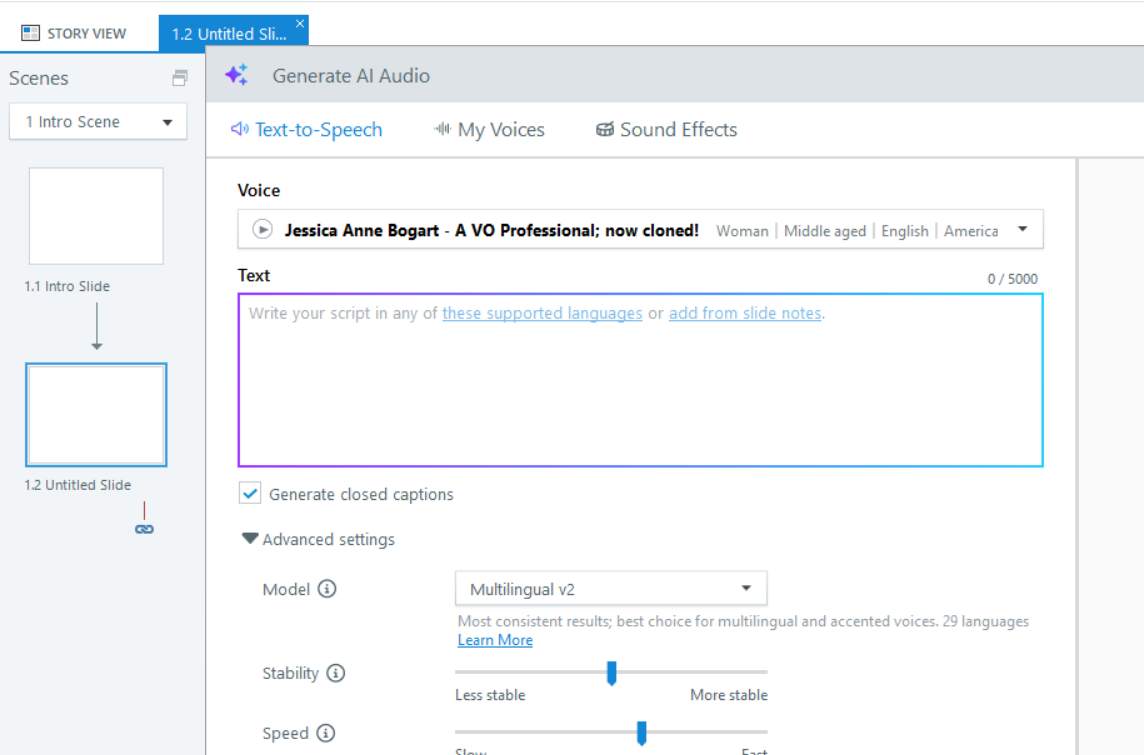
It would be helpful to narrow down what might be causing the difference. Does this happen in all project files or just a specific one? Also, when generating a new clip, are you changing the AI voice at any point?
One thing you can also try is repairing your Storyline installation to see if that resolves the behavior.
If you’re open to it, feel free to reach out to our support team and share your Storyline file so they can take a closer look at your setup and see what might be causing this.
- BryanRiceCommunity Member
Thank you for reaching out. I've been testing it more and notice that it's happening whenever I select a text box to add a text-to-speech audio file. Any time I do that, it defaults to V3, regardless of which model I'm using.
- JasonDalrympleCommunity Member
I'm getting the same behavior - any time I add a new AI Text-to-speech, it defaults to v3, even if I have one that's v2. Editing the existing AI TTS does retain the v2 setting.
On a somewhat related note, I'm hearing SIGNIFICANT differences in speech between v2 and v3 for the same voice. I'm using Jessica and if I use v3, not only is the expressiveness gone, it sounds like a completely different voice.
Hello JasonDalrymple,
Appreciate you sharing your experience with us. I've shared your insight with our product team so they are aware of the changes from v2 to v3 when using Jessica's voice. We'll share any future updates in this thread, so all are in the loop!
Are you currently authoring in Rise or Storyline 360? We'd be happy to take a closer look at your project and a screen recording to better understand the version setting experience on your end. You can share a copy of your file in a support case.
Looking forward to hearing from you!
- JasonDalrympleCommunity Member
Hi LucianaPiazza - I've opened support case 01350628 which has both a screen recording and the .story file - I'm using Storyline in this case, but can test in Rise if that would be helpful. I'm in the middle of a Rise project at the moment and could do that quickly if it uses the same process and options (I'm a Rise newbie!). Thanks for the reply!
Hi, BryanRice!
Thank you for testing this further and clarifying that it occurs when inserting audio into a text box. This is expected behavior at the moment. Since v3 is now the default text-to-speech model, new or edited text-to-speech content will default to v3 in a new text box.
If you’d like to continue using v2 for consistency, you’ll need to manually switch the model back to v2 in the advanced settings when generating audio for new text boxes. To avoid that extra step, I suggest using the v3 model if the voice meets your needs. I’ve shared your feedback with our product team, so we’ll update you here if there are any changes!