Forum Discussion

AI Audio Consistency
There's a lot to love about the AI Audio, however, the frustration with consistency is a major problem. I don't just mean the consistency of how the voices change their pronunciation between each generation or within the same generation itself.
I'm talking about the QUALITY of the generation.
I can have text, click generate with my chosen voice and I can get WILDLY different results each time.
By different results, I mean the audio may be loud in one generation and quiet in the next. It can sound great and studio quality one time and then sounds like it's on a speaker phone the next. The voice can sound like the example one time and sound like a completely different voice another time. It can sound excited at first and then sound more and more disinterested as the voice gets to the end of the generation. I use the default settings.
I've attached a video to show you one of these examples. The only way to fix this, I've found, is to copy the script to another slide and generate the audio there, insert it, then copy and paste it on the slide it needs to go on.
For something that is supposed to save time, I spend an awful amount of time re-generating trying to get a useable file.
8 Replies
Hello AdamPeterson-5b,
Thanks for sharing the video and the details of what you are experiencing. I understand you are seeing inconsistencies in the quality of the generated audio.
For comparison, I ran a test on my end using the settings shown in the screenshot below (Stability—1.00, Similarity—1.00, Style exaggeration—0.50). I did not see the issue with those settings. Each generation produced the same text-to-speech audio.
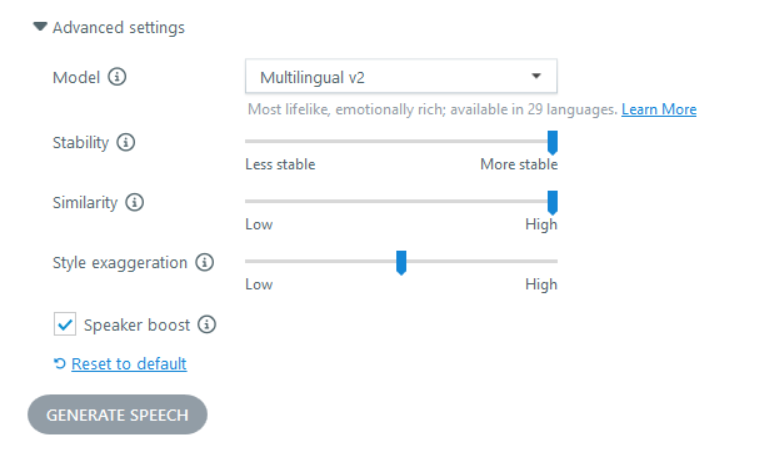
As outlined in this article: Create Content with AI Assistant
- Stability: Controls how stable the voice is and how much randomness appears between each generation. Lower values can sound more emotional, while higher values sound more professional and formal.
- Similarity: Controls how closely the AI should match the original voice when replicating it.
- Style exaggeration: Adjusts how much the style of the original voice is amplified. Higher values can increase generation time.
I’m curious if you can try using the same settings I used in the screenshot and let us know if that makes a difference for you.
- EpicEdwardCommunity Member
I have a similar issue to OP. Doesn't seem like any settings I use work properly and it is tough when SMEs ask for edits after review and tell us the audio isn't as good.
Hi EpicEdward!
Sorry to hear you're also having issues with the consistency of AI Text-to-Speech in Storyline!
I used the same settings Eric applied in his test. During playback, I did not notice any major differences when generating the same script/voice across multiple different Slides.
We'd be happy to take a closer look at your affected .story file, and offer suggestions. Do you mind uploading a copy here in the discussion or privately through a support case?
Looking forward to hearing from you!
- RahnTabron-5904Community Member
I have yet to see anyone encountering this within Rise, so I guess I'll be the first. Same issue: What can we do about inconsistent/incorrect speech? I've been battling with the word "wind", like to rotate (on its own as well as the word "backwind"). I'd love to just change the wording, but these are industry-related, technical terms. I've tried the following- 1. Regenerating the speech. I'm up to probably my 20th time or more maybe; 2. Phonetic spelling. That came out horribly; and 3. I even tried changing the order of the words from "Wind and unwind" to "Unwind and wind" with the hope it would somehow catch on from the preceding word. It did NOT! HELP! Thanks, all. 😁
Hi RahnTabron-5904!
Sorry to hear you're having trouble with AI Text-to-Speech in Rise 360!
Currently, Rise does not support full Speech Synthesis Markup Language. Because of that, controlling description, pronunciation, or inserting phonetic hints is more limited. I've shared your feedback, and pain points directly with our product team!
I understand you're limited to certain industry terms. However, if you can slightly tweak the wording (without losing meaning) to a term that’s unambiguous for TTS, you may reduce errors. Eg: instead of “wind” to mean “rotate”, perhaps “rotate”, “turn clockwise”, “wind up/down”. Whichever fits your use case best. Sometimes adding a short hint around the term can nudge the engine. Eg: “To wind (that is, to rotate) the mechanism…” or “When you backwind (rotate backwards) the spool. This may help disambiguate the pronunciation.
Also, different voices will pronounce ambiguous words differently (especially if the voice has a different regional accent or emphasis). If possible, I suggest trying a few voices and comparing the results.
- AdamPeterson-5bCommunity Member
This is what's so frustrating and why I didn't respond to the earlier comment on mine. "I did the test and didn't get your error." We know. We mention how it happens seemingly randomly. We can't always reproduce it. Maybe it's the time of day. Maybe it's the words we're using. Maybe it's the capacity of the server. Some days are fine and some days are not. I don't know if there is a fix you can give us today, but at least acknowledge that this happens and identify some workarounds. Apologies if this comes across rude. It's just frustrating to feel like the can getting kicked down the road.
Hi AdamPeterson-5b! I completely understand this behavior is inconsistent which, as you said, can become quite frustrating when it comes to troubleshooting. I've connected with a member on our Engineering team who brought up modifying the Stability slider again. They recommended using Most Stable to produce the most consistent results. If I hear any additional tips, I'll be sure to update this discussion.
- SilverfireCommunity Member
You could always just record the audio yourself and avoid this problem completely.






Related Content
- 10 months ago
- 2 months ago