Forum Discussion

AI Avatar GUI needs work
The AI Avatar generator needs some tweaks. First when opening the program, my screen is locked onto that GUI. I can't switch back and forth between storyline and the GUI. Need to fix this.
Second, when exiting I am told that I have unsaved changes with the option to 'cancel' and continue working or 'discard unsaved changes'. Will someone please tell me how to 'save'. I have scoured the GUI and can find no way to save. I would like to, I keep having to reset Avatar and voice each time I launch it.
George
6 Replies
- GeorgeMoureauCommunity Member
Here's a question or two, when using AI Avatars, I mostly just create voiceovers. I noticed I've used over 24,000 credits on my latest program which is only 26 minutes long and primarily voiceovers, with about 6 slides that use an avatar. What is the credit cost for voiceovers? Second, more that a few times the AI generator will fail. When I click try again is regenerates successfully. Is there a credit cost when it fails the first time?
Hey GeorgeMoureau,
Great to see that Kelly has been helping you. Happy to jump in here.
In Storyline, generating a standalone voiceover does not consume any credits. In Articulate 360 AI, you can identify actions that use credits by looking for the Nova icon, a four-pointed star. Compared to the Generate voiceover button with our AI logo, indicating that no credits will be consumed when clicked.
Credits are only consumed when the action is completed successfully. Users will not be charged if AI Avatar generation fails to complete. Currently, AI Avatars cost 1,000 credits per minute of generated video. Checking your usage history, it looks like you've successfully generated 1,783 seconds (29.71 minutes) of AI Avatar video.
Also, our development team is currently exploring ways to improve how AI Avatar videos end. To give authors more control and flexibility over those final moments.
Please let me know if I can help with anything else!
- GeorgeMoureauCommunity Member
Thanks Kelly, That is helpful. I have gone all in on the AI Avatars. It is very powerful and useful. That being said, you'll probably be hearing from me again. I mentioned in an earlier post about adding a pause or "at rest" at the end of a voiceover when generating an Avatar. At the moment the characters stop in some odd states at the end of a voiceover, either quite abruptly, with odd expressions, or an intake of breath as if something else was going to be said. I've tried adding an elipsis (...) at the end of the script with mixed results. It would be nice to clean up the end of a voiceover.
- KellyAunerStaff
Hi GeorgeMoureau,
Thanks for sharing this feedback!
I can see how being unable to move back and forth between Storyline and the AI Avatar window while you’re working can interrupt your workflow. I’ve shared your feedback about allowing more flexibility there with our team.
You can create or customize a character and save it for reuse. Here's where the Save button is located.Once you start adding a voiceover, the current workflow requires you to generate the video to save that work. I can see how the “unsaved changes” message would be confusing when there isn’t an obvious Save option at that stage, and I’ve logged this internally as well.
Please let me know if you have any questions!
- GeorgeMoureauCommunity Member
Hi Kelly, thanks for responding. When I create or customize a character I do have a save option. I would like to also be able to select and save the voice for that character. Right now for each voiceover I have to re-select the voice I want. The default voice for these characters are not necessarily what I want to use.
The nature of our programs don't require a talking head for every slide. I create or generate a voiceover and save just it (the save for this is a little buggy, sometimes i get an empty file and have to try several things to get it to save). I don't need the .png image so I save the mp3 and cancel the .png save. Once I have the voiceover I want, I exit the AI generator. That's when I get the message about Unsaved Changes/Discard or Cancel.
Right now I'd be happy with being able to select a voice for a character and have it remain attached to the character.
George
- KellyAunerStaff
Hi GeorgeMoureau,
Thank you so much for the clarification!
I can definitely understand how having to reattach a voice to a specific character each time can feel repetitive. The additional context you've shared will be really helpful in illustrating this workflow to our product team.
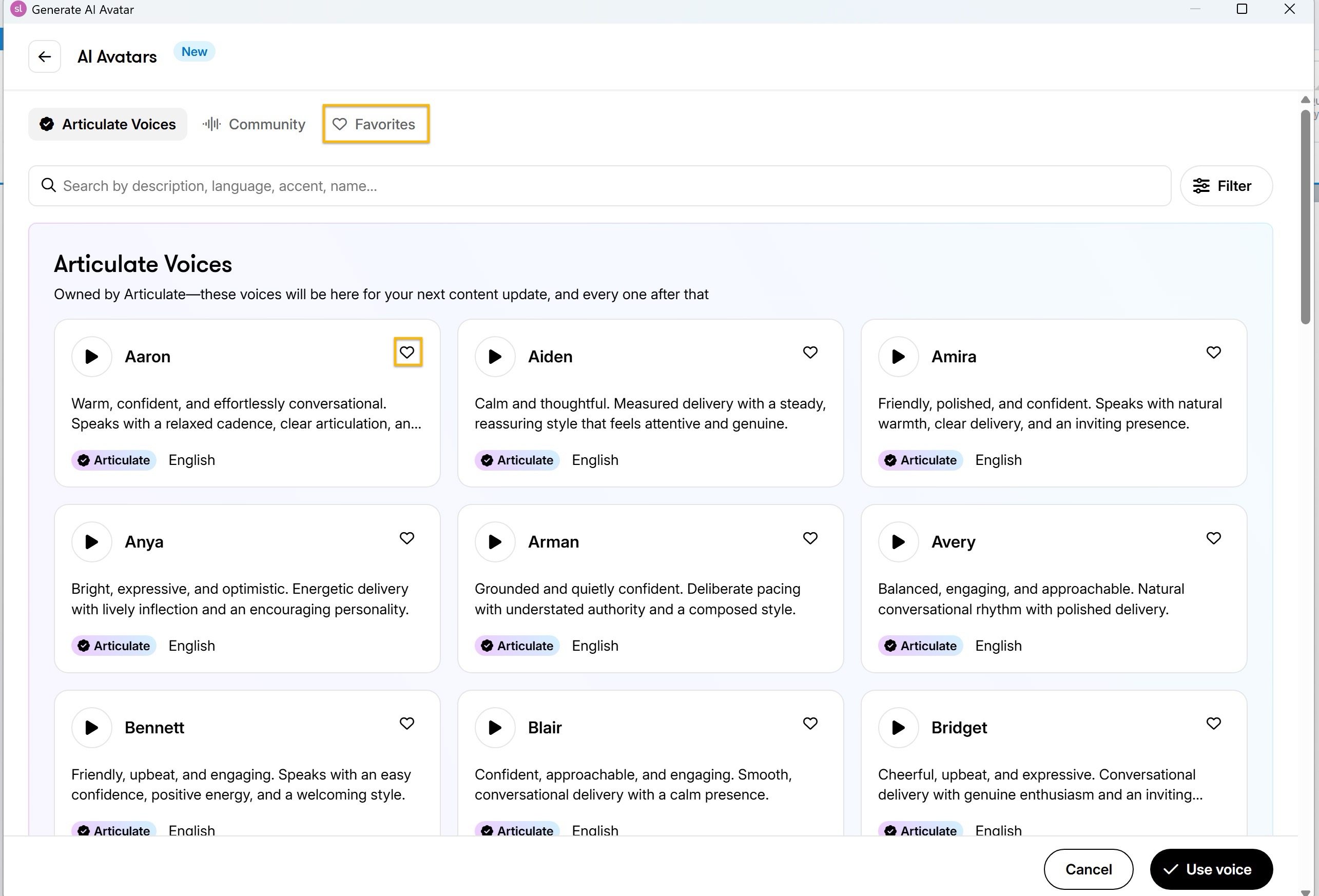
While it isn't a solution to the specific request you've described, I did want to share one tip that may help save a little time. You can Favorite your frequently used voices. When creating a voiceover, select View all, then click the heart icon next to any voice you'd like to save. From then on, you can quickly access those voices from the Favorites tab at the top of the AI Avatars window.
Thanks again for taking the time to share these details!


Related Content
- 1 month ago
- 4 months ago
- 9 days ago
- 3 months ago