Forum Discussion

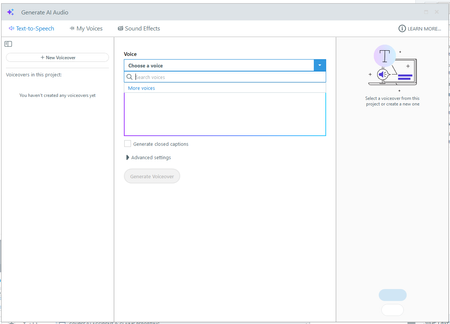
AI Text-to-speech no voices today
- 4 months ago
Hi Everyone,
I can confirm that this incident has been resolved.
AI Audio in Storyline 360 and Rise 360, along with other AI Assistant features, are operating normally. We’ve continued to monitor performance and have confirmed stable service. If you're still experiencing issues, please connect with our support team through a support case.Again, we apologize for this disruption and thank you for your patience!


Ugh yes! I have a major deadline today and need to do audio updates. I thought it was on my end, did the update this morning, restarted my computer and still nothing. You have to manually look up your voice to find it and redo all the settings. Then you can do your TTS, BUT then when you right-click the "Voice over" in the timeline to see the text, it's EMPTY! This is unacceptable, and I hope there is a fix today. I was really happy about the last update before this happened.
How can we do TTS updates if the text is gone. This is what I get when I right-click the new audio file in the timeline to edit the text-to-speech. ARTICULATE, PLEASE FIX THIS ASAP!

I'm in the same situation. This is a major issue. It's taking about 60 seconds for it to appear.
Related Content
- 1 month ago