Forum Discussion

Animation Issues
| Test 1 | Test 2 | Test 3 | Test 4 | Test 5 | |
| Action 1 | unplugged | plugged | circuit | circuit | plugged |
| Action 2 | circuit | circuit | plugged | unplugged | circuit off |
| Action 3 | unplugged | unplugged | circuit | circuit | unplugged |
| unplugged | unplugged | ||||
| Result | lock and circuit disappear | lock disappears | works as expected | works as expected | lock disappears |
Slide 2 of this project, titled "Using States and Triggers," is my attempt to remove some of the objects involved and simplify the animation through the use of states. The issue here is that the "Visited" and "Selected" states fade when one of the layers is displayed.
I do not know which, if either, attempt aligns with standard recommended practices for achieving my desired results. If you have another recommendation as to how to achieve this, please let me know.
Note: the third slide is my stop-gap solution as I cannot get either other option to work. Thank you!

Hi DillonDesigns,
Thanks for sharing additional information. Since you designed your layers not to overlap, you can try turning off the "Hide other slide layers" option to prevent objects you want shown from being accidentally hidden. 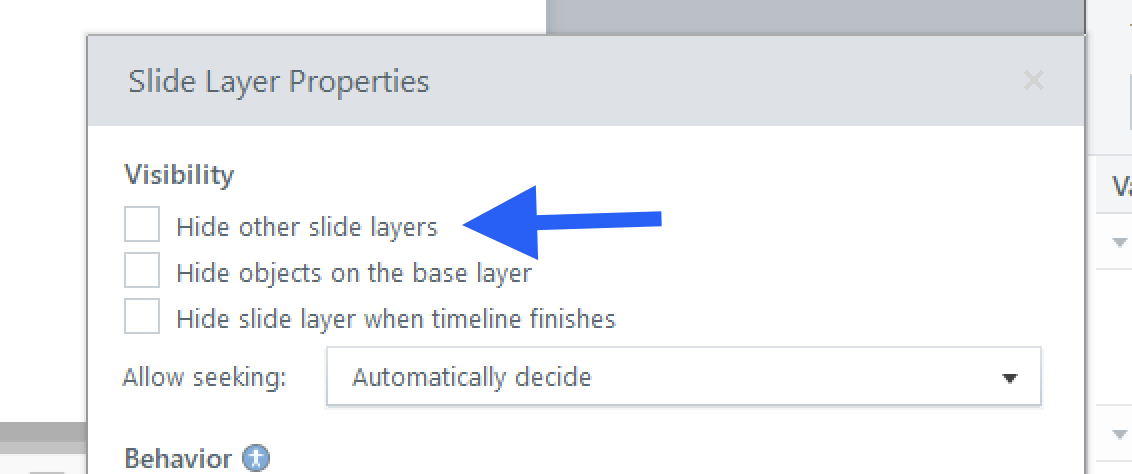
Here's a sample recording that shows what happens when you allow the slides to appear together. I also noticed that the same object, like the lock icon, is displayed in the exact location on multiple layers. By altering your design and possibly using variables, you can place this object in the base layer without making copies of it. However, this is something to revisit later to avoid complicating the solution. Would you mind disabling the option to hide other layers to see how this improves the interaction for you?