Forum Discussion

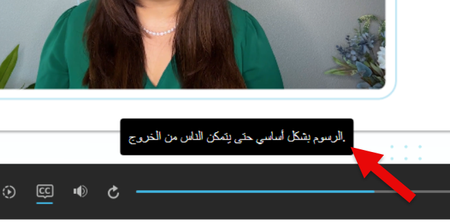
Arabic Closed Captions do not Display properly (Storyline 360)

Hello lorraineS
I encountered the same problem (and many others) with the Arabic language a few months ago. I posted a feedback post about it on my LinkedIn profile (in French, but you’ll no doubt be able to translate it). An Egyptian member of the community helped me sort out this (your) subtitle issue with four lines of JavaScript code. “This issue is actually built into Articulate — it doesn't properly support RTL (right to left) in captions (subtitles). I tried to fix it using JavaScript, and luckily, it worked!” he said. I’ll explain step by step how to do it in the fourth point, but it’s not complicated at all. You can copy and paste the lines of JavaScript code too. I’m pretty sure this will help you.
LinkedIn post about arabic close caption issue and other problems in SL
- lorraineS5 months agoCommunity Member
Thank you for the linkedin article. I'm going to work on it now. But reading your article raised a question for me.
If I change the player to read right to left when Arabic displays, how do I get it to automatically switch back to ltr for other languages in a multilanguage file? - lorraineS5 months agoCommunity Member
I tried your solution and now I have really weird behavior. If I publish just one scene, it works great. But if I publish the entire project, it's all back to having the punctuation wrong. Any ideas/thought about this and what might be going on?
Related Content
- 10 years ago