Forum Discussion

Articulate 360 Login Loop – Requesting Immediate Assistance
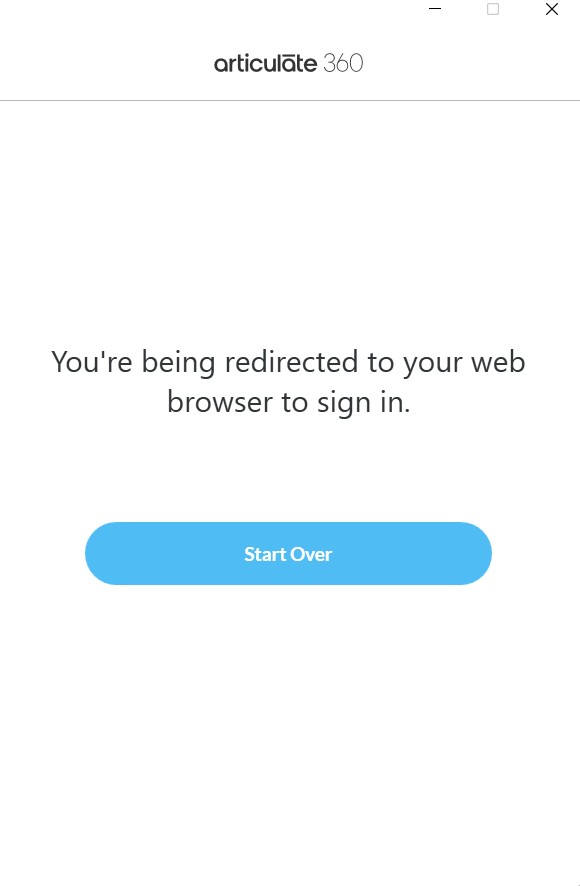
I'm currently unable to log in to Articulate 360. When I attempt to sign in, I get the message: "You're being redirected to your web browser to sign in." The browser opens, I successfully sign in, but then the desktop app shows a "Start over" button. Clicking it simply repeats the process, returning me to the same "Start over" screen.
I’ve already tried uninstalling and reinstalling the app, but the issue persists.
I opened a support case and received a response from an agent directing me to a help page that outlines common troubleshooting steps:
- Outdated Desktop App: Ensure that your Articulate 360 desktop app is up to date. Older versions may not function correctly. You can download the latest version from Articulate 360 Downloads.
- Browser-Based Sign-In: Since the app uses your default web browser to sign in, make sure your browser is up to date and set as the default. You can also try clearing your browser cache and cookies.
- Incorrect System Time: Double-check that your system clock is set to the correct time and date. This can affect the sign-in process.
I’ve checked all of these, and everything appears to be in order. My colleagues can log into their Articulate apps with no issues.
I responded to the agent’s email explaining this, but I haven’t had a reply — it's been over four hours now. I also tried using the support chat, expecting to speak to a live agent, but was only met with an AI bot repeating the same steps listed above.
This is incredibly frustrating, especially as I can't access any of my Storyline projects and I’m working to a tight deadline. I’d really appreciate direct help from a human support agent as soon as possible.
Hi JohnnyBriggs,
Sorry to hear that you ran into this issue.
Good call on opening a case with our team. I can see that my colleague Lejan is already working with you on resolving the problem. While waiting for his response, here's a troubleshooting step you can try to reinstall Articulate 360 from scratch on your machine so we can start completely fresh. Then, please let me know if the issue has been fixed. I want to ensure we get you up and running as quickly as possible.
If the issue persists, please let us know through the support case so we can continue checking what's preventing you from signing in.

17 Replies
- JohnCurranCommunity Member
All seems to be normal again. Thanks KellyAuner for ensuring it was fixed speedily. Just to say that I have noticed this 'bounce' behavior before where the browser and the launcher app are battling each other. Usually one won out but this time it was deadlock.
- MattCherryCommunity Member
I am also having the same problem and have tried all of the suggested fixes noted in this thread. Still no luck. Really hoping this gets solved quickly as I'm at a work standstill until it's resolved.
- MattCherryCommunity Member
I see now that this is a known issue on the Status Page - https://www.articulatestatus.com/
Noting that I submitted a support ticket already - Case # 01352189
- KenFliegerCommunity Member
Who marked this as Solved? IT'S STILL BROKEN ! endless loop and WHY oh WHY is this not on the top of Announcements !!!!!!!!!
- BenjaminWalsh-7Community Member
This is an older thread, and was marked solved a year ago.
The issue we're experiencing now is new.
I signed up for text alerts so I'll be notified when this status changes:https://www.articulatestatus.com/
- JohnCurranCommunity Member
I've set-up a support case by the way. Case number 01351983
- KellyAunerStaff
Hi, everyone!
We’ve resolved the issue that was preventing Creators from signing in to the Articulate 360 desktop app. Everything should now be functioning normally, though we’re continuing to monitor performance to ensure stability.
We appreciate your patience while we worked through this!
- JohnCurranCommunity Member
I'm getting the same problem. There's some sort of death loop between my web browser (Chrome) and the Articulate 360 launcher app. Please fix this catastrophic error!
- KellyAunerStaff
Hi everyone,
We’re currently investigating an issue where Creators can't sign in to the Articulate 360 desktop app. You may encounter sign-in failures, get stuck during login, or see a “No Subscription” error despite having an active subscription. This can impact launching and updating apps from the desktop app.
Our team is actively working to identify the cause, and we appreciate your patience and understanding. We’ll provide an update as soon as more information becomes available!
Please visit the Articulate status page, and click the Subscribe in the top right corner to receive notifications about future status changes.
- JenniferFran740Community Member
I'm able to get back in now. Thank you.
- JenniferFran740Community Member
I'm having the same issue. I opened a casd as well. I've got deadlines and this is a really big problem.
- BenjaminWalsh-7Community Member
I am experiencing the same issue. Tried on Microsoft Edge (I know. Barf.) and also on Firefox. Nothing. I'm caught int he same death loop.
Please fix this as soon as you can. Thanks guy!
Hi JohnnyBriggs,
Sorry to hear that you ran into this issue.
Good call on opening a case with our team. I can see that my colleague Lejan is already working with you on resolving the problem. While waiting for his response, here's a troubleshooting step you can try to reinstall Articulate 360 from scratch on your machine so we can start completely fresh. Then, please let me know if the issue has been fixed. I want to ensure we get you up and running as quickly as possible.
If the issue persists, please let us know through the support case so we can continue checking what's preventing you from signing in.
- Nicole_OchsCommunity Member
I am having this exact same issue. None of the troubleshooting steps resolve.
Uninstalling and reinstalling Storyline using the steps above does work. BUT, this is the third day of this. I can't be uninstalling and reinstalling the software every day. Any updates on this issue?Hi Nicole_Ochs! I’m so sorry you’re dealing with this! Reinstalling Storyline once is disruptive enough. Having to do it three days in a row is beyond frustrating. That’s not a real fix, and you shouldn’t have to keep doing it.
I’ve opened a case with our Support Engineers so they can dig into why this keeps coming back. They’ll follow up with you directly in that case and work with you on next steps toward a permanent solution.
Thanks for sticking with us while we get this sorted out!
- JohnnyBriggsCommunity Member
Thanks Jose, after wasting almost a full day messing about trying to get signed in, you're suggestion worked and I'm finally back in!
Great news, JohnnyBriggs! Thanks for letting us know. I'm glad that Jose's suggestion was helpful.
Feel free to reach out in the community with any future questions or discoveries!
Hope that you have a great day and happy authoring!