Forum Discussion

Articulate storyline 360 sign in error ( recurring)
Hi team,
I am facing a multiple sign in error in middle of using articulate storyline and sometime my password is also not accepted while re-signin.
It asks for sign-in any time, sometimes more than 5 times in a day. Seems its log back and throws a message of "You need a subscription to articulate 360 to sign in."
At our end, i have also re-installed the software, but this option didn't work out.
Need help as this is frustrating. Thank you!
86 Replies
- JacobStone-e7deCommunity Member
Hello all! Here's my solution for issues with logging in to Articulate in Parallels if this helps:
- Make sure ALL sharing between windows and mac are off
- Allocate at least 16GB of RAM in Parallels for Windows
- I switched from Apple Hypervisor back to Parallels Hypervisor, but then a coworker said that Apple Hypervisor runs smoother so I switched back and don't have any issues.
I was able to log in and continue working.
Hi Shawn,
I see that you were able to work directly with Ronaziel on our support team as well and that you're now back up and running :)
- ShawnDinnocentiCommunity Member
Yes - she was awesome and got me back on track quickly. Thanks for checking in.
- DakotaBrown-e7bCommunity Member
Hi Dakota,
Thanks for contacting us and sharing that you're running into a similar issue.
It looks like you're opening Storyline 360 directly and getting an error.
- Are you able to login to the Articulate 360 Desktop App?
Here are some common sign-in issues you may experience and how to resolve them.
- DakotaBrown-e7bCommunity Member
I had my administrator uninstall and reinstall and it fixed it!
ThanksDakota L. Brown, PSS (Pronouns: She, Them)
MHSA Tech Innovation, Desert
Desk 760-770-2227 | Cell 951-470-8125
47-825 Oasis St, Indio, CA 92201
Mail Stop: 4038
DaBrown@ruhealth.org
#deaffriendly[cid:image001.png@01D4DD92.A1687C10]
CONFIDENTIALITY STATEMENT -- See California Welfare and Institutions Code Section 5328. This email message, including attachments, is intended for the sole use of the person(s) to whom it is addressed, and may contain information that is privileged, confidential and exempt from disclosure under applicable law. If you are not the intended addressee, you are hereby notified that you may not use, copy, disclose or distribute this email or information contained in the email. If you have received this email in error, please immediately advise the sender by reply mail, delete this message and destroy all copies of the original message. Thank you.
RUHS Confidentiality Disclaimer
The information contained in this electronic message is intended only for the personal and confidential use of the designated recipients named above. This e-mail transmission and any documents, files or previous e-mail messages attached to it may contain confidential information that is legally privileged, covered by the Electronic Communications Privacy Act 18 U.S.C. ? 2510-2522. If you are not the intended recipient, or a person responsible for delivering it to the intended recipient, YOU ARE HEREBY NOTIFIED that any retention, dissemination, distribution, disclosure, copying or further use of any of the information contained in or attached to this transmission is STRICTLY PROHIBITED.
Glad to hear it's working for you now, Dakota. Thanks for the update.
It looks like your email signature came through when you replied via email. You can remove that if needed by clicking ‘Edit’ beneath your response. Here’s a quick Peek video if you need help.
- NoraCloonanCommunity Member
I just started having this issue today! I click on the sign in button and nothing happens. I'll try rebooting my computer but as of now, I can no longer work!
Hi Nora,
Thank you for reaching out and letting us know that you're having difficulty signing in.
First, can I have you close the Articulate 360 desktop app (click on the red X and then head over to the system tray. There, right-click on the Articulate logo and select Quit).
Here's a quick video
After that, please restart the machine and then try signing in again.
In addition, this article describes the reasons why signing in could fail and how to solve them.
Let me know if you see any improvements from there!- NoraCloonanCommunity Member
My storyline ap now tells me it is corrupt. I uninstalled Articulate and
am trying to reinstall but it seems to be hung up.I don't know what else to do. Please help this is making me really
frustrated.Nora
[image: image.png]
Thanks for the additional information, Nora.
I cannot see the image that you've shared here, but I've opened up a support case on your behalf since you are still having difficulty after the troubleshooting.
You should be hearing from someone soon.
- ZuzanaUrbanekCommunity Member
- RenGomezStaff
Hi Zuzana,
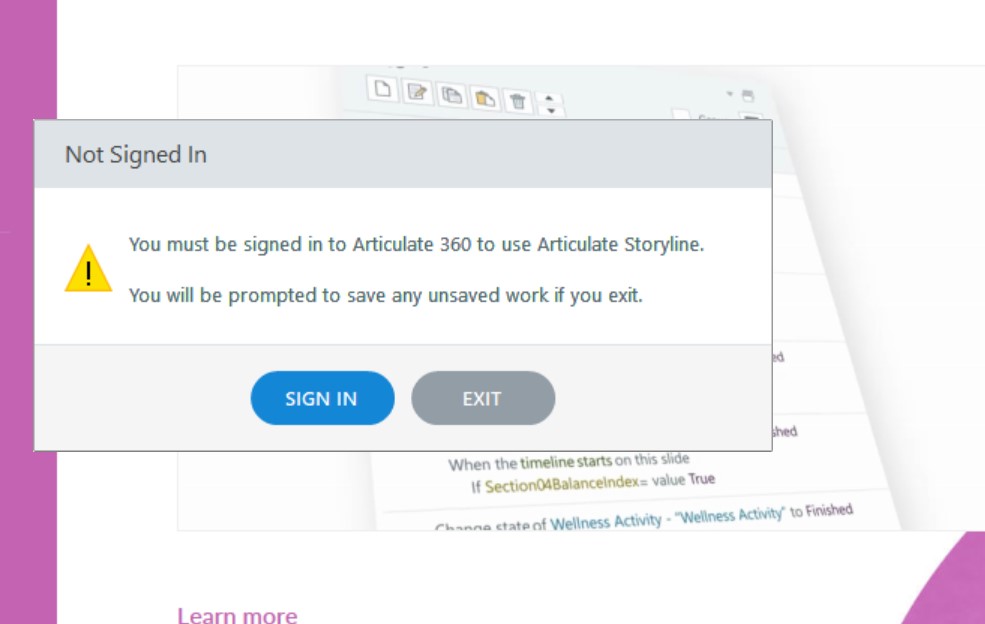
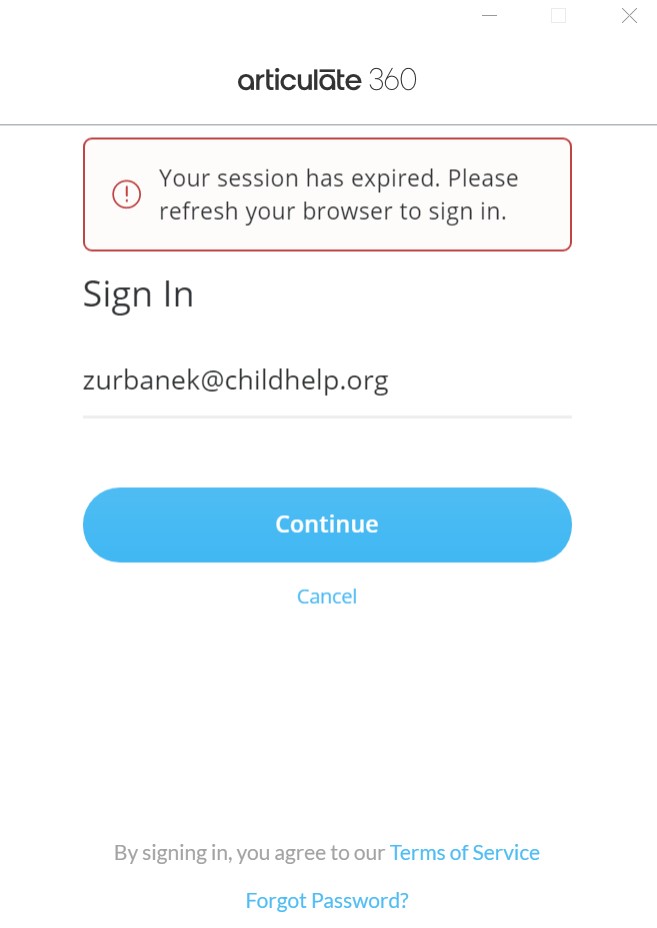
Thanks for sharing that image of what you're experiencing! I've opened a case on your behalf to connect you with a support engineer who can help.
Be on the lookout for a reply soon!
- ZuzanaUrbanekCommunity Member
Thank you, Ren,
I rebooted my computer and then it allowed me to sign in.







Related Content
- 11 months ago