Forum Discussion

Can I stop storyline reporting a score to the LMS?
Hi,
I have several courses developed in Storyline running on our LMS. They are all set to track using a quiz result, but because it seems to slow the assessments down a lot if we track using the result of an actual quiz, there is a final results page that does not track particular answers.
I have set the course to record as Complete/Incomplete.
But something odd happens when the course is live - most of the time, no score is recorded, and the LMS just says 'complete'. But about 10% of the time, the score is recorded as 0%, which is annoying people....
How can I stop this happening?
Heres what our LMS provider had to say:
it looks as though it IS the course that is reporting a 0% score at times. We're not sure why - the course developer would need to investigate their source files - but the course is at times sending "cmi.core.score.raw" = 0 and other times it is not.
So the LMS is functioning fine. Looks like the course provider will need to review the source files again to be sure,
71 Replies
Hi Rebecca,
Thanks for continuing to keep us updated. I'm unable to offer a timeframe in regards to when we'll hear back from our QA team in regards to a fix - but once we have additional information to share we'll post here and so if you're subscribed to the thread you'll receive an email notifications with our replies.
If there is anything else we can assist you with please let us know.
- KevinCollins-38Community Member
We just launched our LMS yesterday and some users have already noticed that even though the course is marked complete a score of 0 is being reported. The course was published to report back as Complete/Incomplete based on the number of slides viewed, which in this case was 19/21 slides. Any updates as they become available would be greatly appreciated.
Thanks Kevin and we'll keep you posted here with any updates.
- DominiqueWheeleCommunity Member
Hi,
I am having a similar issue. I have two courses I published in Articulate Storyline 2. They have a pre-test and post-test included. The initial passing score was 80% for each. However, since Articulate is reporting both the pre-test and post-test results, I reduced the passing score for each to 40% based on whether the student takes the pre-test and pass and/or take the post-test. Additionally, the pre-test is being pulled from the question bank. While the post-test has unique variables for the quiz questions as the client requested a gamification technique for that portion.
The course is working fine in LMS and I set the reporting and tracking to LMS as Pass/Fail but the score is also being reported on the student’s Learning Plan upon completion. I want to prevent the score from being reported on the student side. I also tested the other three reporting statuses in SCORM Cloud and the score still shows.
My question is there a way to bypass sending the score to LMS and only reporting the completion and/or incompletion of a course upon meeting the minimal passing score? Or, at least not report on the student's Learning Plan course completions?
Any help is welcomed!
- JeffreyHurtCommunity Member
Hi Dominique,
There are two ways to indicate a completion to your LMS: 1) a results slide and 2) number of slides.
You can determine which results slide to use that will indicate completion of a course to the LMS. Say you didn't want the pre-test to be sent and that was Results slide 1 and the post-test is Results slide 2. You would select Results slide 2 to be the reporting factor when you publish.
In your current scenario (where you don't want the score passed to the LMS), you could cause the action of passing the post -test take them to an additional slide that said "Congrats!" or something similar where there was an additional slide for the Pass route. You could have the "fail" slide information just be on that layer. So lets say the final results slide is slide 30, your congrats slide would make it 31. Using number of slides to determine completion of the course, you would set the completion based on viewing 31 of 31 slides. The user would only see a "Completed/Passed" or "Incomplete/Failed" status.
- DominiqueWheeleCommunity Member
Hi Jeffrey,
Thank you for this feedback! My current dilemma is if I use number of slides viewed for the Pre-Test and Post-Test, the user will fail the Pre-Test and must proceed to Post-Test. The number of slides viewed to reach the Pre-Test is only three slides and then you take the assessment which is 15 questions. If you pass, you can exit the course. The Post-Test needs 14 slides viewed before you take the exam which is 20 questions.
Hi Dominique,
The reporting/tracking status you set is dependent on the LMS, and some report completion and success as detailed here. If you're using a results slide, the score is going to be visible and passed to the LMS - but in regards to not showing it to your students, perhaps there is a setting within your LMS set up that would allow for you to hide that information? I know you mentioned testing on SCORM Cloud, but you may want to share what your LMS is so that folks who use that same set up could chime in here.
- DominiqueWheeleCommunity Member
Hi Ashley,
Thanks for your recommendation. We are currently using Oracle LMS powered by Taleo. I asked the LMS team if there was a way to hide the score and they said no.
- rebeccaevensCommunity Member
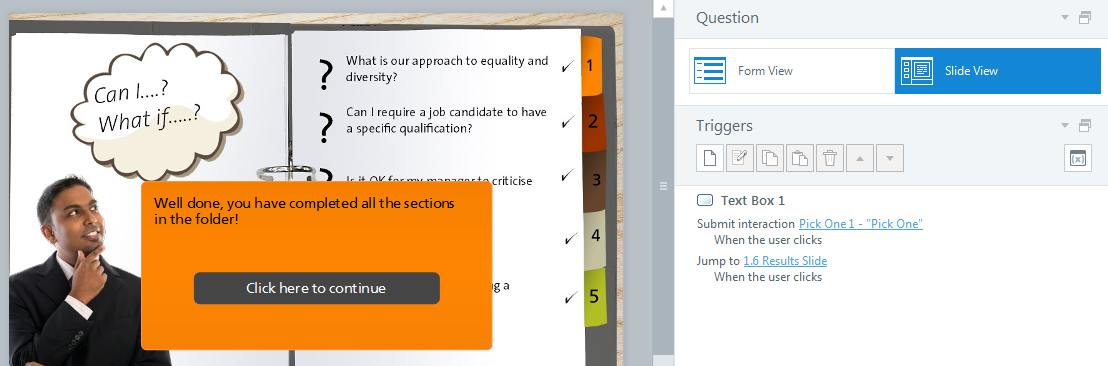
Hi Dominique, we use Taleo as well, and we have not found any way to hide the score. I have come up with an alternative, which is to add a final question, which doesnt look like a question (as in the attachement) - so there is no way for the user to continue without clicking on 'continue', which is the 'correct' answer. Then the user jumps to an additional results slide, which draws the result from that single question. The course is set to report a score, then the user always completes with 100%.
- JoKaptijn-d4ba7Community Member
Hi Rebecca,
Your original issue seems very close to the one I'm just investigating: testing new course in new LMS - the course runs fine, but users say the assessment (a quiz bank) itself runs VERY slowly, and I wonder reading this thread if it is because I am reporting completion based on the results slide to this quiz.
This sounds like your original problem I think?
From your testing, if I change the tracking to number of slides completed + Complete/Incomplete - and add an extra slide for 'passed' (instead of a layer) that sounds like it might help. The quizzes are very little and I don't think the client cares about the score, just completed=passed.
But - do I understand you (and other members of this thread) correctly that using this approach, a score will still be generated? Your 100% button solution sounds good, but if learners actually get 80% in the assessment, then see 100% on the LMS, this will appear incorrect.
Just hoping you don't mind clarifying, in case I've misunderstood anything :)
thanks
jo
- DominiqueWheeleCommunity Member
Hi Rebecca,
Great idea! I'll try that and let you all know what happens. Thank you Heroes! :)
- DominiqueWheeleCommunity Member
Hi Rebecca, Ashley, and Jeffrey!
You all are my heroes!! You've all been a tremendous help in providing me assistance with my LMS reporting dilemma. I followed Rebbecca's recommendation as an alternative to provide a passing score to students and it worked perfectly! I'm so happy there is a community like this to support IDs. Thank you once again and thank you to the eLearning Heros community! :)





Related Content
- 1 year ago
- 1 year ago
- 1 year ago
- 2 years ago