Forum Discussion

Can not change automatic slide advancement
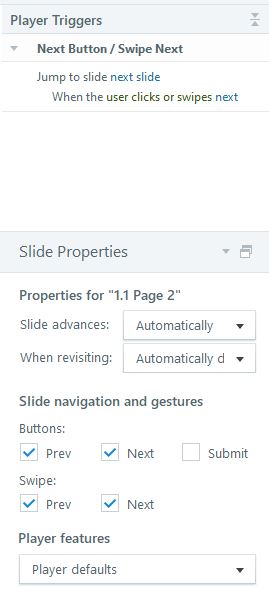
Good morning helpful people! Odd thing is happening - when I am in Story View, I go to Slide Properties to change advancement from "Automatically" to "By User." The dropdown does not allow me to change it. The "Slide Advances" and "When Revising" dropdowns are set to "Automatically." I always change it to "by User" but it won't allow me to do that, even with a trigger (Jump tp slide next slide when the user clicks or swipes next.) Help? Thanks much!
3 Replies
Hi Lori,
Sorry to hear that you ran into this issue. I did a quick test on my end to see if I could replicate the behavior, but I can confirm that changing the slide advancement setting worked for me.
I'd like to ask a few questions to help clarify your experience:
- Are you working locally when making changes to your project? Working directly out of a network drive has been known to cause issues with retaining changes.
- Have you tried importing your slides to a new project? In some cases, importing slides to a new project file fixes configuration settings that have otherwise become corrupted.
- Are you able to replicate the behavior on all project files? If so, try doing a repair of Storyline 360 to see if this fixes the issue.
If the issue persists, reach out to our support team here so we can take a closer look at what's happening.
- LoriMossCommunity Member
Ah thank you! Yes something must have been corrupted. I copied and pasted the slides into another Storyline file and the option returned. Many thanks for your help! Have a great week.
Lori Moss
Sr. Manager
Learning & Development
Global Human Resources
1 Astellas Way | Northbrook, IL | 60062
Cell/Mobile: 847-274-3414
[https://appsstage.astellas.us/esignature/images/AstellasLogo.jpg]
astellas.com
- AnnRothpletz-ceCommunity Member
I had the same thing happen. The drop down menu for slide advancement was not working after I imported some slides from PowerPoint into Storyline. I exited Storyline, and then re-opened the program and I was then able to switch the drop-down from "automatic" to "by user".


Related Content
- 2 months ago
- 8 months ago