Forum Discussion

Prakash_IQMD
1 year agoCommunity Member
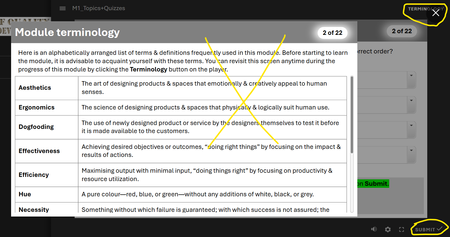
Can turn off only default glossary button, not customized glossary button, in quizzes...
Hi people,
In an SL project that contains a lightboxed glossary (terminology) slide, topics, and quizzes, I am unable to turn off the customized glossary in the quiz section. While the def...

MichaelGallaghe
1 year agoCommunity Member
You can't turn off custom tabs. I would use the "'Glossary" tab and rename it "Terminology" in the Player. You can change the title using the "Text Labels" button in the Player. Then, just enter all the text you currently have on the lightbox slide into the Glossary.
Prakash_IQMD
1 year agoCommunity Member
Well, yes, that's an efficient solution, Michael. But the problem with the built-in glossary is that it progressively keeps reducing the font size of the content as I keep adding more terms, and eventually this affects accessibility. That's why I was "compelled" to create a custom glossary (along with its associated issues). I am new to SL, and I would not have risked this "lightbox" thingie if not for the font reduction in the built-in glossary (sigh!). 😇
Related Content
- 9 months ago
- 3 months ago
- 2 years ago