Forum Discussion

Customizing the Process Block in Rise
- 1 year ago
Hi everyone, 🎉
I'm happy to let you know we released a new update for Rise 360. This update adds the following feature:
- Enjoy more flexibility with process blocks. Turn off the step label to present non-sequential interactions.
There's nothing to install for web apps. New features and fixes are immediately available, though you might need to publish your Rise 360 course again.
Let me know if you have any questions about this update or the new feature!


Hi, Patrick!
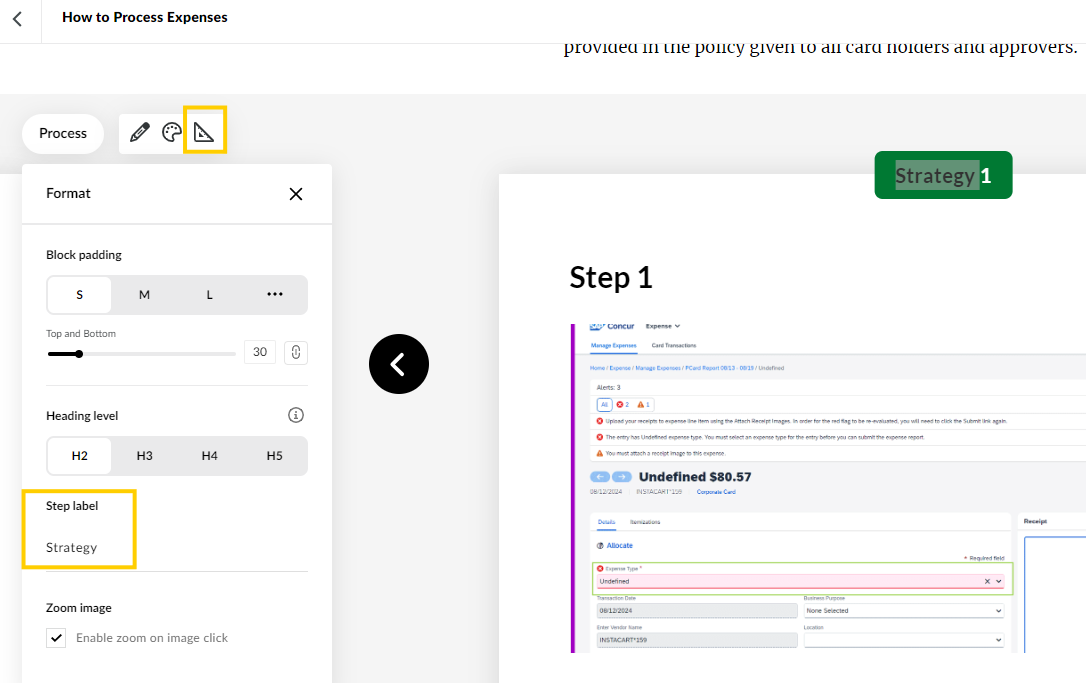
When using a Process Block, you can remove or replace the word "Step" in the block settings. Here's how:
Keep in mind the numbers will remain even if you remove the word "Step". I'll let our team know you'd like to have the ability to remove the numbers, too!
- PaulaOBrien-73b1 year agoCommunity Member
This gif is out of date. Go to the set square icon (triangle ruler) and look down for the label. Example attached where it is currently labeled "Strategy" as the default.
- KristinaRodier-1 year agoCommunity Member
Really helpful - thanks Paula! I hit the spacebar to remove the word 'Step', so the banner just displays the number for each card.
- MichelleHenry-71 year agoCommunity Member
yes, please. we need to be able to remove the numbers.



Related Content
- 10 months ago
- 10 months ago
- 10 months ago
- 10 months ago