Forum Discussion

Drag and Drop Interaction
- 1 month ago
If you attempted to recreate the Rise sorting activity discussed in this thread, then quite a few steps may have been missed in order to get the interaction working correctly. I would suggest reviewing my Storyline file again and then recreating the interaction one element at a time.
There are several variables involved that help reset drag objects back to their Normal state when they are returned to their original position via motion paths after being dropped on an incorrect target. Additional triggers tied to the motion path completion then set certain drag objects to a Hidden state when dropped on a correct target.
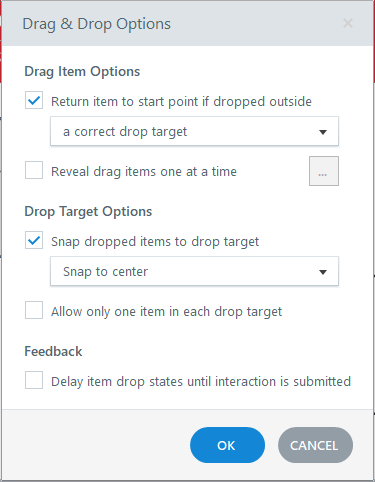
The reason the drag objects are not returning to their starting position after an incorrect response even though "Return item to start point if dropped outside a correct drop target" is selected, is that the built-in drag-and-drop behavior has already been overridden by your custom triggers and animations.
As a quick test, try disabling the Emphasis Animation triggers for the drag objects and then preview the slide again. If the objects start returning correctly, you'll know that one of the custom triggers or animations is interfering with Storyline's default drag-and-drop functionality. Or simply disable or remove all triggers to test it out.
My recommendation would be to compare your setup against the sample file step by step, paying particular attention to the variables, motion path triggers, and state changes, as these elements all work together to achieve the desired behavior.

If you attempted to recreate the Rise sorting activity discussed in this thread, then quite a few steps may have been missed in order to get the interaction working correctly. I would suggest reviewing my Storyline file again and then recreating the interaction one element at a time.
There are several variables involved that help reset drag objects back to their Normal state when they are returned to their original position via motion paths after being dropped on an incorrect target. Additional triggers tied to the motion path completion then set certain drag objects to a Hidden state when dropped on a correct target.
The reason the drag objects are not returning to their starting position after an incorrect response even though "Return item to start point if dropped outside a correct drop target" is selected, is that the built-in drag-and-drop behavior has already been overridden by your custom triggers and animations.
As a quick test, try disabling the Emphasis Animation triggers for the drag objects and then preview the slide again. If the objects start returning correctly, you'll know that one of the custom triggers or animations is interfering with Storyline's default drag-and-drop functionality. Or simply disable or remove all triggers to test it out.
My recommendation would be to compare your setup against the sample file step by step, paying particular attention to the variables, motion path triggers, and state changes, as these elements all work together to achieve the desired behavior.