Forum Discussion

Drag and Drop

CaitlinGregory- : There's no file attached to your message that says you added it.
I suggest you make a copy of your slide (just in case). Then just follow the instructions in my previous reply step by step. I think it'll make more sense when you see what happens with each step.
And here's more info from User Guide:
Storyline 360: Choosing Feedback and Branching Options | Articulate - Community
Storyline 360: Working with Feedback Layers | Articulate - Community
- CaitlinGregory-5 months agoCommunity Member
So strange that the file didn't attach, but here it is. The activity I'm having issue with is 4.6 - the layers I want to pop up to give answer feedback don't show.
- JudyNollet5 months agoSuper Hero
A Submit [question] trigger includes a lot of built-in functionality.
- If the question is set to provide feedback, and it has the standard Correct and Incorrect layers (and the Try Again layer, if >1 attempt is allowed), the Submit trigger scores the question and shows the appropriate layer.
- If the question isn't set to provide feedback or if the feedback layers have other names, the Submit trigger scores the question and jumps to the next slide.
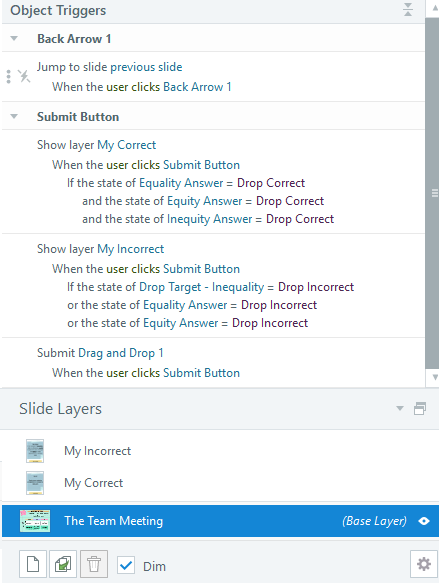
Thus, you're not seeing your custom feedback layers because they aren't named Correct and Incorrect. Change the names, and the layers will appear—without any triggers except the Submit trigger.
Your slide has other non-standard programming. The question is set to allow only 1 attempt. Yet the "MyIncorrect" layer doesn't jump to another slide, like a standard Incorrect layer would. Instead, the button just hides the layer, like a standard Try Again layer would. This, in essence, gives the user unlimited attempts. However, as I wrote in a previous reply, it's typically easier and more reliable to let the built-in functions do what they're programmed to do.
The attached file has the question set for Unlimited attempts. The feedback layers use the standard names. The only trigger on the Submit button is to submit the question.
FYI: This post explains how to set up multiple attempts. It also explains how to reset the question--for example, to move draggable items back to their starting positions: PRIMER: Graded Questions that Allow Multiple Attempts | Articulate - Community
Final note: Drag-and-drop interactions aren't accessible. Also, the file includes images with a lot of text, which means the text isn't accessible. That seems especially egregious in a course about equity.
Related Content
- 7 days ago