Forum Discussion

feedback master button states not being inherited by feedback layers
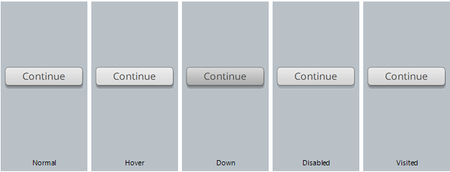

Hi Dom!
Sorry, you're still seeing this error. As mentioned in this discussion, we have released the fix for this bug in a previous update. Which update are you on?
If you're not on the newest update (Update 33, Build 3.33.20625.0), then I would recommend updating Storyline 360. If you're on the newest update and still seeing this snag, I'd like our Support Engineers to dig further. You can share your file with them by using this link.
Thank you for bringing this to our attention! I hope we can find the culprit!

I first contributed to this discussion well over a year ago - probably closer to 2 years.
From my perspective, there has been no 'fix for this bug' as you mention here Lauren. As John also says, I am vigilant in keeping Storyline 360 updated with the latest version, but still experience so much trouble with feedback master buttons that I can't use them - I create my own, but this means more work and unnecessary time spent - which I really shouldn't have to charge clients for.
In my latest troubleshooting, I went right back to basics to make sure I hadn't missed anything.
- I left the originally generated feedback master and inserted a new feedback master which I hoped to customise and use. This highlighted even basic issues with changes to the formatting of the text colour on the feedback master slide not carrying over to the correct feedback layer.
- Then when I used the button tools and applied a button style to the button on the master slide, it didn't pick up on the correct text colour of the button style (leaving the text grey instead of changing it to white) - for any of the button styles. So immediately, I was forced to spend time working with text colour in text boxes and on buttons in the feedback master. Even when I changed this text colour to white, the disabled button state text remained grey.
- The hover state button colour didn't carry over to the slide layers in the feedback master.
- On leaving the feedback master and generating a new graded question slide, then applying the feedback layers I'd customised, the buttons on the layers had actually taken on the feedback master slide button formatting, including the hover state, which was not what the feedback layers showed me would happen.
- There seems to be a real issue with the correct layer of the feedback master. At one point I changed the button style to a different style on my customised feedback master slide, then changed it back, but the correct layer did not initially take on this change - it seemed to have a delay in doing this.
- When I tried to change the size and position of the button on the feedback master slide, the change was not reflected in the normal state on any feedback master layer, plus the states hover and down states of the button that I had removed the outline formatting from now had this formatting reapplied. On going back into my slide and resetting the slide, or applying the layout again for the correct and incorrect layers resulted in what I would term 'confusion' on the part of the Storyline master gods - the button size adjustment was reflected, but the hover and disabled states now didn't reflect what the master layers showed.
- When I ditched the built-in feedback master button altogether and added my own using the insert button menu, as has previously been suggested in this thread, when I added it to the feedback master slide, there were no triggers set, like there are with the default button. I had to cut the button from the feedback master slide and paste it onto each of the feedback master slide layers. The formatting of the button then changed from the default with white text to have grey text - on all layers...this became a whole new set of issues with the feedback master as it applies to a slide - there are also no pre-set triggers on a button that you insert into a feedback master slide layer, and this doesn't appear in the timeline of a slide layer like the default buttons do. The only thing that seems to work is the hover state. So, I went back and added triggers to each of the buttons in the layers of the feedback master slide set - but this didn't work either.
So, where does all this troubleshooting leave me? Back to where I was 2 years ago - adding my own customised buttons to each layer of each question slide, and not being able to rely on using the feedback master at all for buttons if I want to customise the look of them, or being able to just add a new question slide and using the default feedback master buttons.
I'm really hoping to see a fix for this - and note in a previous comment in this thread that this issue had been prioritised.
Of note, as John has pointed out, it doesn't take long when you're trying to customise the feedback master for all of this to fall apart - it just takes us all a long time to describe what's happening and revisiting this troubleshooting has highlighted that there hasn't actually been any progress since I discovered this 2 years ago.
I've attached my working file for this troubleshooting.
Can we please get an update on where the troubleshooting with this issue is at?
- LaurenDuvall6 years agoStaff
Hello Dianne!
I really appreciate you sharing your troubleshooting steps with us! I can see that this bug is still impacting both your workflow and the courses you've built. I'd like our Support Engineers to investigate further since we've already released a fix for this bug, which hasn't solved the issues on your end. I've submitted a case on your behalf and emailed you sharing the next steps. We'll continue the conversation in your case!
Related Content
- 2 years ago
- 6 months ago
- 6 months ago
- 8 months ago