Forum Discussion

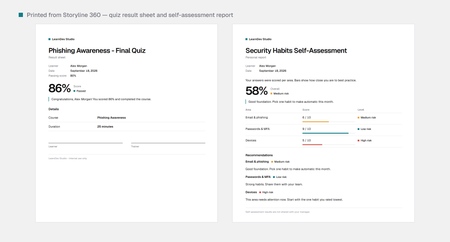
Free: let learners print their quiz results or action plan from Storyline (no web objects)

Love seeing more JS-in-Storyline shares. Including the Example.story with the triggers visible is the most valuable part — in my experience, most people get stuck passing course variables into the print view, not on the print call itself. One question: how does it behave when the print window opens from inside an LMS iframe? Pop-up blockers are the one gotcha I'd warn folks about. Thanks for sharing this.
- LearnDevStudio5 hours agoCommunity Member
Thanks, and agreed: getting the variables into the printout is where people get stuck, not the print call itself.
On LMS iframes: by default the pack doesn't open a new window at all. It builds the report as HTML, loads it into a hidden iframe inside the course's own frame and calls print() on that. No window.open, so pop-up blockers don't come into play, and it never needs access to the LMS's parent frame. Variables are read with GetPlayer().GetVar() at the moment of the click, so nothing is passed between windows either.
The one gotcha I know of: if an LMS loads content in a sandboxed iframe without allow-modals, the browser silently blocks the print dialog, and the course can't work around that.
So far I've tested it in Chrome and Firefox. I haven't run it through many LMSs yet, so if anyone tries it in theirs, I'd really like to hear how it behaves.
- ronald-hicks5 hours agoCommunity Member
That's a smart design choice — keeping the report inside the course frame sidesteps the popup-blocker headache entirely. The allow-modals gotcha is worth flagging in your docs, since sandboxed iframes are increasingly common. If I get a chance to run it through my LMS, I'll report back on how it behaves.

Related Content
- 10 years ago