Forum Discussion

ReneeKowalchik-
1 month agoCommunity Member
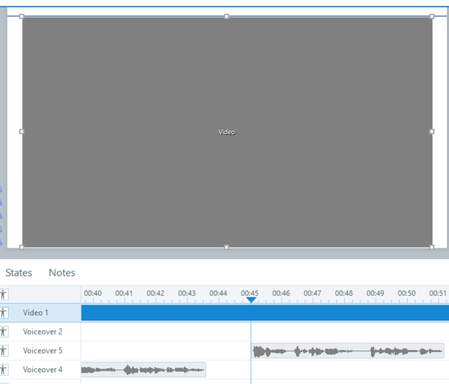
Gray "Video" box when editing SL
Help! Something has changed in a recent update that is making my video appear as a gray box within the editing stage in Storyline. The video plays fine, but as soon as I pause the timeline to add aud...

JMManalili
1 month agoStaff
Hi ReneeKowalchik-,
I understand how difficult this makes editing, especially when you need to see the paused video frame to position shapes and line up audio.
I tested this on my end, but I wasn’t able to reproduce the video turning into a gray box after pausing the timeline. A few details could help us narrow down what’s happening.
- Which version of Storyline 360 are you using? You can find the full build number under Help > About Storyline.
- Does this happen with multiple videos and projects, or only this one?
- If you insert the same video into a new blank project, does the video still turn into a gray box when you pause the timeline?
Could you share a sample .story file that includes an affected slide? A short screen recording showing playback, pausing, and then positioning a shape would also help us test the same steps.
If you’d prefer to share your project privately, feel free to open a support case. Our team can take a closer look at the behavior.
Related Content
- 10 years ago